SSmit.13
Senior
August 2, 2023
Question

Logic analyser shows difference between genuine (not communicating) and cheap (communicating)ST-Link

  • August 2, 2023
  • 9 replies
  • 3967 views

Hi

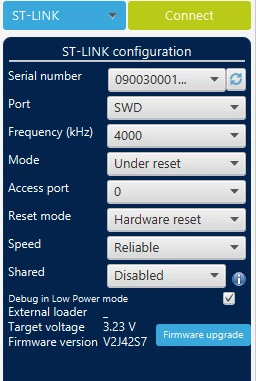
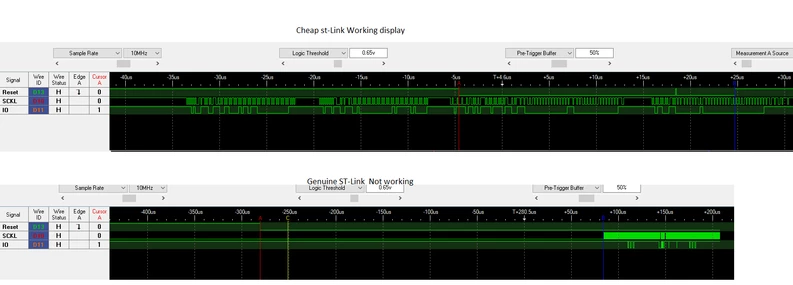
  I am having issues with programming a target board with a genuine ST-Link board (got from Farnell) . I have been using a cheap programmer that works, and as I have upgraded to the new IDE (from atollic) it fails to work , but still works on the STM32CubeProgrammer. The genuine ST-Link communicates with the PC, but cant connect to the Cube Programmer, while the cheap one works perfect. I have set the ST-Link Configuration to the below.I also have the images from the logic analyser during a connect sequence. As this is on the same target board and the cheap one work, I think this points to an issue with the genuine programmer. I managed to get a loan of another genuine one, and that too has the same effect. A noticeable difference the serial clock starts before the Reset line goes low , unlike the genuine no clock  till a good while after the reset line , and I assume it times out before this. Anyone any idea, I am totally baffled. I checked all the voltages on the board and are correct. The cheap one works on software reset as well as hardware.

Any help would be great

Scott
STLink.png

SSmit13_0-1690969335122.png


This topic has been closed for replies.

9 replies

Pavel A.
Super User
August 2, 2023

What is your target MCU? (genuine or not?)  Version of CubeProgrammer?

"new IDE (from atollic)" - seriously?

SSmit.13
SSmit.13Author
Senior
August 2, 2023

Our target MCU is a STM32L433 , and is genuine from a distributor.  CubeProgrammer is version 2.14.

Regarding  the IDE, I meant I upgraded to the latest CubeIDE from atollic because the new cubeMX  doesnt export the project correctly in atollic. The IDE doesnt work with either the new and cheap programmer. I got as far as the CubeProgrammer working with the cheap programmer, and stuck at this.  I dont understand why there is so much of a difference in the analyser output with both of them (as above).

TDK
Super User
August 2, 2023

How exactly is it connected to the board? Appropriate header or long jumper wires? Picture would be nice. Try a lower speed.

"If you feel a post has answered your question, please click ""Accept as Solution""."
SSmit.13
SSmit.13Author
Senior
August 2, 2023

We have an appropriate header, and long jumper wires. Actually, the cheap programmer lead is longer than the genuine. I have tried the lower speed too.  Anyone know why the difference in the analyser output? Looks like we get a not found due to the time the programmer sends out a clock pulse compared to the cheap one

I even tried it all on a computer that hadnt got any st-link drivers, programmer etc, and is still the same. So think that rules out the drivers

Pavel A.
Super User
August 2, 2023

Do the "genuine" st-links have virtual USB disks?  (I guess that the "cheap" does not?)

Are all your computers managed by your company IT, with same set of mandatory junk-ware?

SSmit.13
SSmit.13Author
Senior
August 2, 2023

None of the ST-Links came with USB disks. The cheap one came with nothing, the genuine with a leaflet pointing to stm.com  .  We set up the computers ourselves (Windows 10 and 11), they are not managed by IT

Tesla DeLorean
Guru
August 2, 2023

I think Pavel means do they come up like a USB MSC device (Flash Drive), where you can drag-n-drop .BIN files? ie USB composite device, MSC, VCP, etc.

Also understand that the data pin is bidirectional, so you're not just looking at the signal sent by the ST-LINK, but the response of the MCU. Now obviously if the MCU doesn't respond in the manner anticipated the link is going to fail.

Drop the speed. Perhaps look at what pull-up / down you have going on with your board vs SWCLK / SWDIO

Tips, Buy me a coffee, or three.. PayPal VenmoUp vote any posts that you find helpful, it shows what's working..
SSmit.13
SSmit.13Author
Senior
August 2, 2023

Hi

  I found a Nucleoboard and set it up to be used as a ST-Link to my own board. And the it worked with the STM32CubeProgrammer, on the same board as above. Strange how the 2 genuine ST-Links dont work, and the Nucleo board, and cheap one works. I can erase the board etc..

I then tried the STM32CubeIDE V 1.13 , and all the programmers couldnt be found when I tried to program the board. This is getting so strange.

Pavel A.
Super User
August 2, 2023

Get a new USB cable. Very best quality you can find.


SSmit.13
SSmit.13Author
Senior
August 2, 2023

I tried a few cables, and as it is a new programmer, I also used the cable that comes with it. I assume this is good enough

Tesla DeLorean
Guru
August 2, 2023

Detect the board or the MCU? Obviously I hope this would all work, but perhaps start looking at different computers, cables, drivers, OS, etc. Avoid hubs and docking stations. DELL's have historically been a bit quirky, but they may skew the statistics due to the volume of the products in the market place.

Likely to find 4 MHz is TOO FAST for the CM0(+) cores to hack. ST's defaults can be too aggressive at times, and their fall-back and recovery game is also poor.

Might I suggest providing the analyzer plots at the same scale? Perhaps review the signal in the context of what's generated by the ST-LINK, and the expected/anticipated responses from the core, and square the circle from that perspective.

Tips, Buy me a coffee, or three.. PayPal VenmoUp vote any posts that you find helpful, it shows what's working..
SSmit.13
SSmit.13Author
Senior
August 2, 2023

The STM32CubeProgrammer detects the programmer on the genuine, but not the MCU. As mentioned it works with the cheap and the Nucleo Board I have (used the ST-LINK only to my board).

I have tried another computer, a new one we have with no ST software on it, and still the same. I tried all the speeds .

I couldnt display the genuine analyser output as it takes too long for the sck to start. Both are sampled at 10MHz , and noticed the genuine skl line is low , compared to high in the cheap model

Pavel A.
Super User
August 3, 2023

@Amel NASRI @Peter BENSCH  ?

TDK
Super User
August 3, 2023
"If you feel a post has answered your question, please click ""Accept as Solution""."