Ehsan
Associate
July 26, 2022
Solved

Programming STM32H750B-DK discovery board failed

  • July 26, 2022
  • 2 replies
  • 1562 views

Trying the program STM32H750B-DK discovery board using STM32CubeProgrammer, but it fails. Here is the log:

 08:47:43 : STM32CubeProgrammer API v2.11.0 | Linux-64Bits 

 08:47:45 : ST-LINK SN : 0036004A3137511133333639

 08:47:45 : ST-LINK FW : V3J10M3

 08:47:45 : Board    : STM32H750B-DK

 08:47:45 : Voltage   : 3,28V

 08:47:45 : SWD freq  : 24000 KHz

 08:47:45 : Connect mode: Normal

 08:47:45 : Reset mode : Software reset

 08:47:45 : Device ID  : 0x450

 08:47:45 : Revision ID : Rev V

 08:47:45 : Debug in Low Power mode is not supported for this device.

 08:47:46 : UPLOADING OPTION BYTES DATA ...

 08:47:46 :  Bank     : 0x00

 08:47:46 :  Address    : 0x5200201c

 08:47:46 :  Size     : 308 Bytes

 08:47:46 : UPLOADING ...

 08:47:46 :  Size     : 1024 Bytes

 08:47:46 :  Address    : 0x8000000

 08:47:46 : Read progress:

 08:47:46 : Data read successfully

 08:47:46 : Time elapsed during the read operation is: 00:00:00.002

 08:47:53 : Memory Programming ...

 08:47:53 : Opening and parsing file: GPIO_IOToggle.hex

 08:47:53 :  File     : GPIO_IOToggle.hex

 08:47:53 :  Size     : 4,56 KB 

 08:47:53 :  Address    : 0x90000000 

 08:47:53 : Erasing memory corresponding to segment 0:

 08:47:53 : Download in Progress:

 08:47:53 : Error: failed to download Segment[0]

 08:47:53 : Error: failed to download the File

 08:53:41 : Disconnected from device.
This topic has been closed for replies.
Best answer by N. SANTINI

Hi,

For a reason I ignore I cannot answer on the other thread so let me answer you here:

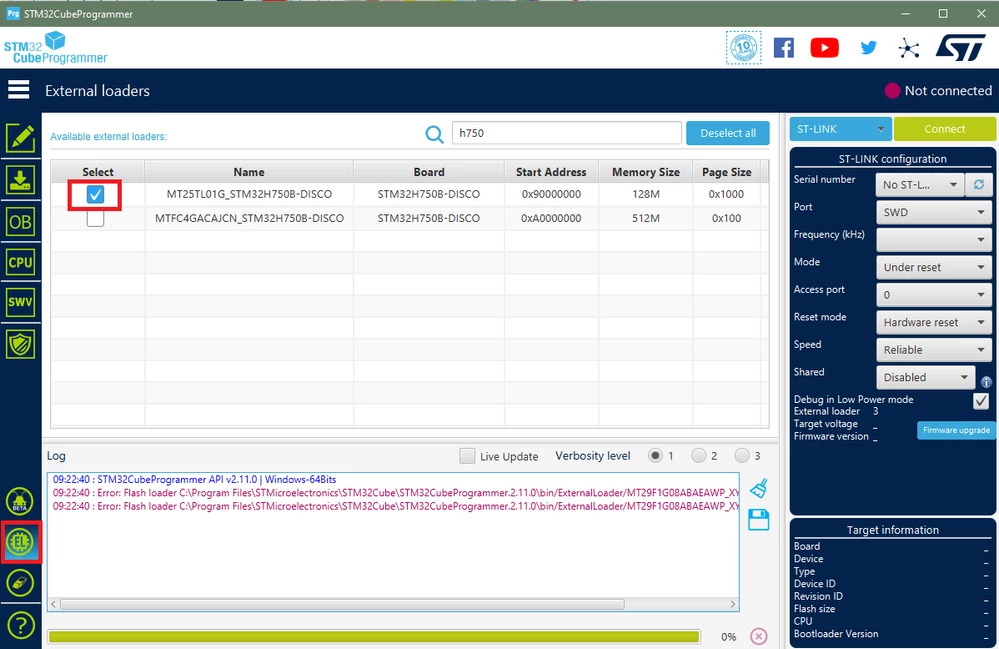
As mentioned in the other thread, the workaround mentioned by @Community member​ is only relevant for custom external loaders. When using an ST development kit such as the STM32H750B-DK you just need to select the proper external loader in the "EL" tab of the CubeProgrammer :

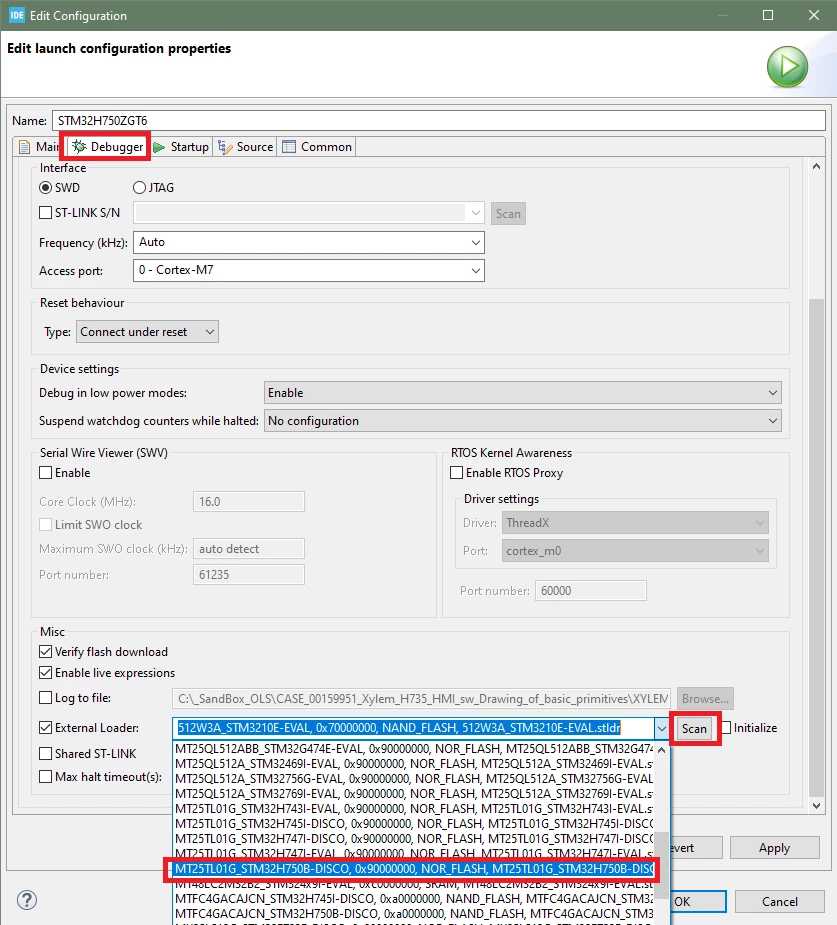
0693W00000QMFp2QAH.png STM32CubeIDE include its own version of CubeProgrammer so the same applies, open the Debug Configuration, go the the "Debugger" tab, then :

  • scroll down to the "External Loader" and enable it
  • click on the "scan" button to populate the menu list
  • select the external loader for the STM32H750B-DK board

0693W00000QMFn6QAH.png 

See details in section 3.4.1 (Revision 6) of the STM32CubeIDE user manual

Best regards,

Nicolas

2 replies

Tesla DeLorean
Guru
July 26, 2022
Tips, Buy me a coffee, or three.. PayPal VenmoUp vote any posts that you find helpful, it shows what's working..
N. SANTINI
N. SANTINIBest answer
ST Employee
July 27, 2022

Hi,

For a reason I ignore I cannot answer on the other thread so let me answer you here:

As mentioned in the other thread, the workaround mentioned by @Community member​ is only relevant for custom external loaders. When using an ST development kit such as the STM32H750B-DK you just need to select the proper external loader in the "EL" tab of the CubeProgrammer :

0693W00000QMFp2QAH.png STM32CubeIDE include its own version of CubeProgrammer so the same applies, open the Debug Configuration, go the the "Debugger" tab, then :

  • scroll down to the "External Loader" and enable it
  • click on the "scan" button to populate the menu list
  • select the external loader for the STM32H750B-DK board

0693W00000QMFn6QAH.png 

See details in section 3.4.1 (Revision 6) of the STM32CubeIDE user manual

Best regards,

Nicolas

Ehsan
EhsanAuthor
Associate
July 27, 2022

Thanks, it helped!