Associate II
October 23, 2024
Solved

STM32 programmer failed PCB not working afterwards

  • October 23, 2024
  • 3 replies
  • 1656 views


I'm trying to flash my custom STM32L152RET6 board using the command-line version of CubeProgrammer. Initially, everything seemed fine, but I wanted to ensure the firmware couldn't be read out. So, I set the option bytes with -ob RDP=1 to enable read protection. However, after doing this, the flashing process failed, and now my program no longer runs.

I was able to flash it again using a Segger debugger, but when I try to run the program, it crashes at startup. The voltages all seem normal, so I don't suspect a hardware issue. Could this be due to some incorrectly set registers or option bytes in the CPU?

Here’s the command I used:

STM32_Programmer_CLI.exe -c port=usb1 -ob RDP=1 -d firmware.hex -v


Any advice would be greatly appreciated!


Best answer by mt1

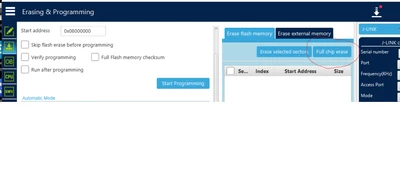
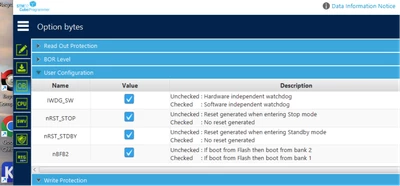
I fixed the broken PCB, when I looked in the Cube programmer GUI the option byte  nBFB2 was not set so it would boot from bank2. When enable this option and also did a full chip erase everything was working just fine !

Why I could still flash it with the segger debugger (in bank 1 ?) and the program would still go to the main , but then  only crashed when it wanted to init the HAL is still a mystery to me.

mt1_0-1730357049656.pngmt1_1-1730357073868.png


3 replies

Tesla DeLorean
Guru
October 23, 2024

Your app running on the STM32 should be able to print out content/state of FLASH and/or OB

Check it it write protects the base sectors.

Usually you can clear these with a Mass Erase, or walked in via the UART connection to the System Boot Loader.

As you say Segger also has an un-brick app.

Can you use ST-LINK via SWDIO/SWCLK ? To connect/inspect?

Tips, Buy me a coffee, or three.. PayPal VenmoUp vote any posts that you find helpful, it shows what's working..
mt1Author
Associate II
October 24, 2024

Yes I can just debug no problem. But when it inits the HAL driver it gives an exception and crashes

Visitor II
October 24, 2024

Try reverting the RDP level back to RDP=0 (no read protection) and see if your program starts running properly. You can do this by issuing the following command:


STM32_Programmer_CLI.exe -c port=usb1 -ob RDP=0


Look for any unexpected settings, particularly those related to:

  • Boot configuration (nBOOT0, nBOOT1)
  • Write protection (WRP)
  • Watchdog settings (IWDG_SW, WWDG_SW)
  • Flash memory configuration
  • If you want to redesign the board, you can see this for reference:

https://www.pcbway.com/project/shareproject/Getting_Started_with_STM32_Arduino_code_Programming_and_PCB_Design_b4b9891e.html

mt1Author
Associate II
October 24, 2024

That is a good one I will try indeed the -ob RDP=0  option !

But what I do not understand is that the Segger SWD can just write new flash code. So its not write protected anymore. Or the Segger ignores the protection bits ?

mt1AuthorBest answer
Associate II
October 31, 2024

I fixed the broken PCB, when I looked in the Cube programmer GUI the option byte  nBFB2 was not set so it would boot from bank2. When enable this option and also did a full chip erase everything was working just fine !

Why I could still flash it with the segger debugger (in bank 1 ?) and the program would still go to the main , but then  only crashed when it wanted to init the HAL is still a mystery to me.

mt1_0-1730357049656.pngmt1_1-1730357073868.png