
Associate III
August 28, 2025
Solved

STM32H7S78-DK flashing issue: "Failed to execute MI command"

  • August 28, 2025
  • 5 replies
  • 1067 views

Hello,

I am working with the STM32H7S78-DK board and I want to toggle the LEDs LD1 (PO1) and LD2 (PO5).
I followed the instructions from this GitHub resource:

https://github.com/ST-TOMAS-Workshop/stm32h7s_workshop/blob/main/1_external_memory/handson/1_extmem_intro.md 

and this YouTube video:

https://www.youtube.com/watch?v=sPiFBzvCWfI&t=945s 

However, when I try to flash my program into the development board, I get this error:
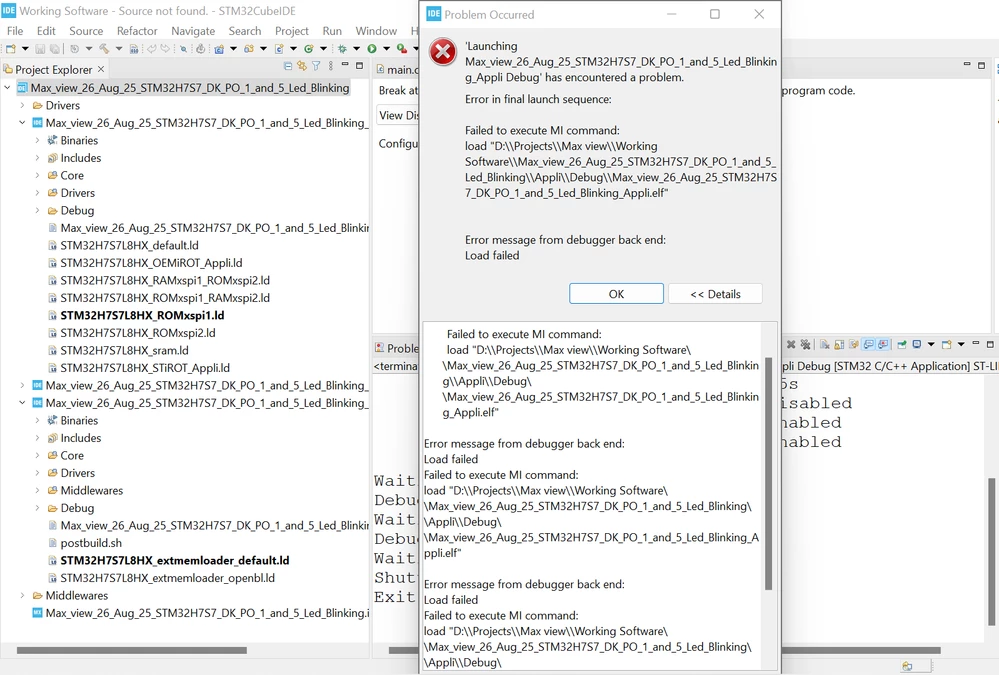
Screenshot 2025-08-26 154249.png


I am not able to program the board because of this.

:right_arrow: Can anyone guide me on how to solve this flashing issue?
:right_arrow: Do I need to configure something specific in STM32CubeIDE or CubeProgrammer for STM32H7S78-DK?


Best answer by KDJEM.1

Hello @Berlin-raj123 ;

You can find the Boot_XIP.hex file under the STM32CubeH7RS path "STM32Cube\Repository\STM32Cube_FW_H7RS_V1.2.0\Projects\STM32H7S78-DK\Templates\Template_XIP\Binary" 


Thank you.

Kaouthar

5 replies

KDJEM.1
Technical Moderator
August 28, 2025

Hello @Berlin-raj123 ;


Which STM32CubeIDE version are you using? Could you please with the latest toolchain version.

I recommend you referring STM32CubeIDE: How to debug an STM32H7Rx/Sx project without flashing boot every time. - STMicroelectronics Community  article and follow the steps indicated.

Are you experiencing the same issue with STM32CubeH7RS cube firmware Examples?


I hope this help you.

Thank you.

Kaouthar

To give better visibility on the answered topics, please click on Accept as Solution on the reply which solved your issue or answered your question.
Associate III
August 28, 2025

version : STM32CubeIDE 1.17.0

Are you experiencing the same issue with STM32CubeH7RS cube firmware Examples?

No, actually I used the GPIO Toggle example. It loaded properly, but the LED is not blinking on my STM32H7S78-DK.

KDJEM.1
Technical Moderator
September 5, 2025

Hello @Berlin-raj123 ;


First of all, I aoplogize for my reply and thank you for sharing the project, I will check the issue and I will come back to you as soon as possible?

For the GPIO_IOToggle example issue, I recommend you to refer to the readme file and check the hardware and software environment and also how to use it? sections

KDJEM1_0-1757059870484.png

KDJEM1_1-1757059943322.png

Please let me if the example issue solved or not?

Also try to update your toolchain STM32CubeIDE | Software - STMicroelectronics.

Thank you.

Kaouthar


To give better visibility on the answered topics, please click on Accept as Solution on the reply which solved your issue or answered your question.
Associate III
September 5, 2025

@KDJEM.1  Thank you for your reply.. i was using your above instruction, but still i am facing that same issue.

and i tried below versions

cube ide version 1.17.0 & 1.19.0

cube mx version 6.15.0

cube programmer 2.18.0

KDJEM.1
Technical Moderator
September 10, 2025

Hello @Berlin-raj123 ;


I tested GPIO_IOToggle example with STM32CubeIDE1.19.0 version and it works correctly without issue, I can see LEDs blinking.


KDJEM1_2-1757493029999.png


Thank you.

Kaouthar


To give better visibility on the answered topics, please click on Accept as Solution on the reply which solved your issue or answered your question.
Associate III
September 10, 2025

@KDJEM.1 

Screenshot 2025-09-10 173428.png


 where can i get the Boot HEX file? can you tell me the Location of the hex file? 

KDJEM.1
KDJEM.1Best answer
Technical Moderator
September 11, 2025

Hello @Berlin-raj123 ;

You can find the Boot_XIP.hex file under the STM32CubeH7RS path "STM32Cube\Repository\STM32Cube_FW_H7RS_V1.2.0\Projects\STM32H7S78-DK\Templates\Template_XIP\Binary" 


Thank you.

Kaouthar

To give better visibility on the answered topics, please click on Accept as Solution on the reply which solved your issue or answered your question.
Associate III
September 13, 2025

Hello @KDJEM.1 


Thanks for your help! Everything is working well based on your example. I also tried the GPIO toggle with my own program, and it’s working fine. However, I have not enabled the Boot Project and ExtMemLoader Project.

Can you explain why we don’t need these two projects in this case? When should we use the Boot Project and ExtMemLoader Project?

Also, why did the tutorial suggest enabling the Boot Project and ExtMemLoader Project?

Here is the tutorial link I am referring to:
https://github.com/ST-TOMAS-Workshop/stm32h7s_workshop/blob/main/1_external_memory/handson/1_extmem_intro.md

KDJEM.1
Technical Moderator
September 15, 2025

Hello @Berlin-raj123 ,


Glad to know that the initial issue is solved. To give better visibility on the answered topics, please click on Accept as Solution on the reply which solved your issue.

The project structure of a BootFlash application is divided into three different contexts:

  • Boot: boot code to run from the internal flash memory.
  • Appli: application code to run from the external flash memory.
  • ExtMemLoader: code dedicated to generating the External Loader.

For more information about the ST32CubeH7RS project structure, I recommend you to look at Getting started with External memory Manager and External memory loader - stm32mcu and Getting started with STM32CubeH7RS for STM32H7Sx/7Rx MCUs - User manual 

If you have more question, I advise you to create a new post.


Thank you.

Kaouthar

To give better visibility on the answered topics, please click on Accept as Solution on the reply which solved your issue or answered your question.