

PJose.3
Associate
September 1, 2022
Solved

STM32L4Q5CGT - not detecting in STM cube programmer

  • September 1, 2022
  • 2 replies
  • 2148 views

Hi All,

We had purchased STM32L4Q5CGT6 controller for our work and after assembling and testing programming using STLINK V3 using SWD we found that none of the controllers are being detected in the programmer software. when connected the following screen appears

"Failed to connect to STM32 target".

we tested for 10 numbers of controllers and found the same issue in each. Is it due to the RDP feature or controller fail. If it is RDP then how can we remove the read out protection and program them. Any detailed step by step procedure is available, please suggest.

Thanks in advance.

Note - tried to add the images in screenshot but not able to add due to some error messages.
This topic has been closed for replies.
Best answer by Tesla DeLorean

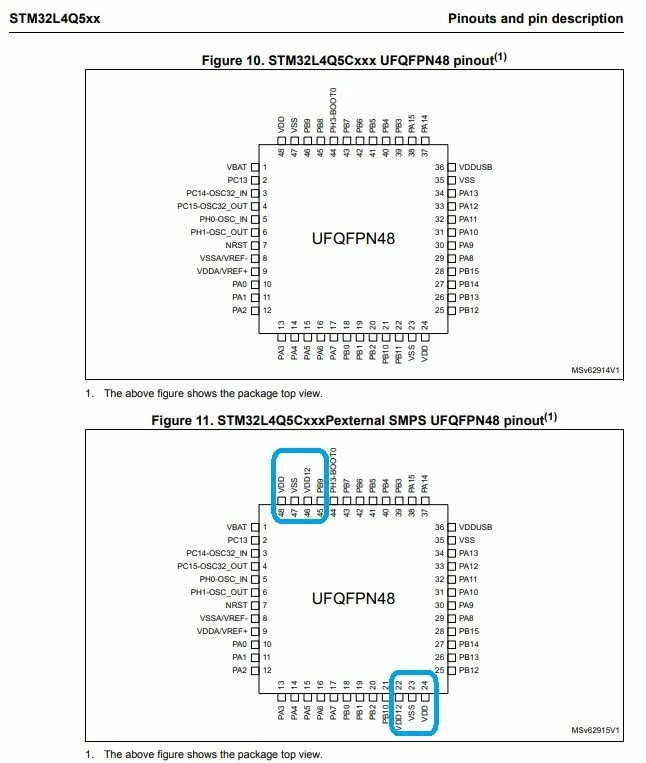
STM32L4Q5CGT6 Expected/Wanted

STM32L4Q5CGT6P Purchased (Less Popular, More Available)

0693W00000SueCVQAZ.jpg 

https://www.st.com/resource/en/datasheet/stm32l4q5ag.pdf

I personally would have chosen a different Marking/SKU strategy, but..

2 replies

Amel NASRI
Technical Moderator
September 5, 2022

Hi @Community member​ ,

Most probably you need to perform an ST-Link Firmware Upgrade.

For more hints, please refer to How to solve debugger connection issues?

-Amel

To give better visibility on the answered topics, please click on Accept as Solution on the reply which solved your issue or answered your question.
PJose.3
PJose.3Author
Associate
September 6, 2022

Hi Amel

thanks for your reply

When connecting the controller then the ST Link V3 is not able to detect the controller. I updated the firmware using another controller and STM V3Link. When I connect the STM32L4Q5CGT controller there is a fail message that appears. That's why I am not able to use stm cube programmer or cube ide for programming or full erase none of the options are working.

Thanks

0693W00000SubCwQAJ.png

Tesla DeLorean
Guru
September 6, 2022

The failure message says what?

If it can't find the STM32L4 it is likely not connected ​or powered properly.

Check orientation of part.

Check VDDA/VSSA.

Check level of NRST pin.

P​rovide relevant subset of schematic built, and wiring to the pod.

Tips, Buy me a coffee, or three.. PayPal VenmoUp vote any posts that you find helpful, it shows what's working..
PJose.3
PJose.3Author
Associate
September 6, 2022

Hi

The relevant part is shown in the image. we have the same copy with different l4q5 controller working perfectly. The problem is only with this latest set of 10 numbers that we purchased recently.

Schematic wise all connections are right and tested

Thanks for your support

0693W00000SubzeQAB.png