

bm2
Associate III
June 12, 2024
Solved

STM32Programmer V2.16.0 Missing BOOT bits in Option Bytes

  • June 12, 2024
  • 2 replies
  • 1274 views

Hello,

I will configure the boot mode in the option bytes of the STM32G030F6. Now I see only the nBOOT1. I missing the nBOOT_SEL and nBOOT0.
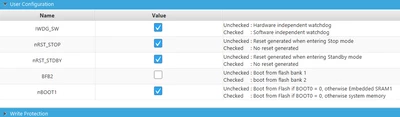
bm2_0-1718176354405.png

In the refernce manual are describe all:
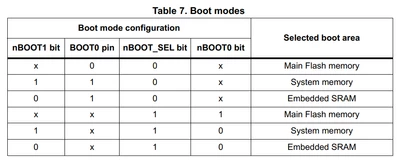
bm2_1-1718176427320.png

How can I cinfigure it?

And after the programming I will reload the option bytes with setting of the OP_LAUNCH flag. Can I do it with the STM32Programmer and how?

Thanks for our help,

Bernd

Best answer by bm2

Oh, I've vorgot my function in the application. I must remove it, it overwrite this.

Not it works fine :)

2 replies

bm2
bm2Author
Associate III
June 12, 2024

sorry @ all

I've found out that the programmer use the false device:

bm2_0-1718177722329.png

I've use a NUCLEO--L073RZ and connect the ST-Link to my hardware with a STM32G030. Can I change the device configuration?

Peter BENSCH
Technical Moderator
June 12, 2024

STM32CubeProg recognises which target is connected to it via the ST-LINK.

Are you sure you have removed the two jumpers on CN2 so that the STM32L073 is no longer connected to the ST-LINK?

Regards
/Peter

bm2
bm2Author
Associate III
June 12, 2024

Thanks Peter Bensch,

that was the problem. I have removed the SB12..15 but this two line not. So now I have the correct device and see the correct boot mode flags.

I've set this in my software to nBOOT_SEL=0, nBOOT0=1 and nBOOT1=1. Now I see this in the programmer.

Now I will change the nBOOT_SEL to 1. After press "Applay" I become a error message:

bm2_0-1718181632435.pngbm2_1-1718181686481.png

And it is not changed. After press "Read" it show for me correct but after a POR it is not changed.

What must I do that work this correct?

Best regards,

Bernd

bm2
bm2AuthorBest answer
Associate III
June 12, 2024

Oh, I've vorgot my function in the application. I must remove it, it overwrite this.

Not it works fine :)