

RHaag.1
Associate II
February 10, 2021
Solved

SWD connection no longer working

  • February 10, 2021
  • 13 replies
  • 2946 views

Hello,

On a STM32L4 design, we no longer have an SWD connection to the processor: using STM32CubeProgrammer reports

ST-LINK SN : 39FF6A064243383912381057

ST-LINK FW : V2J36S7

Voltage : 3.26V

SWD freq : 4000 KHz

Connect mode: Normal

Reset mode : Software reset

Device ID : 0x461

UPLOADING OPTION BYTES DATA ...

Bank : 0x00

Address : 0x40022020

Size : 20 Bytes

Bank : 0x01

Address : 0x40022044

Size : 16 Bytes

UPLOADING ...

Size : 1024 Bytes

Address : 0x8000000

Read progress:

Error: Data read failed

SWD works fine in the design in general, also also ran on this particular device. An idea what is missing?

Or to put it the other way round: what do we need for a running SWD? Supply, connection to the SWD pins of course, but what further? IMHO we don't need running CPU core or clocking on it for example....

Thank you

Ralph
This topic has been closed for replies.
Best answer by Houda GHABRI

Hi @RHaag.1​ ,

Writing OB needs a specific procedure describes in MCU reference manual : "FLASH option bytes" section.

It is different from writing to flash.

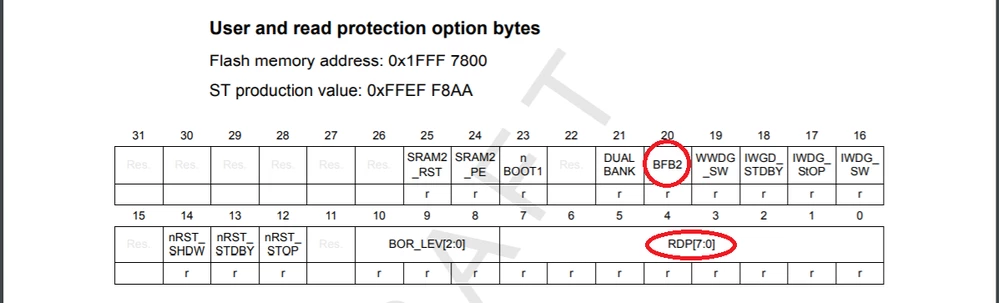
The two OB BFB2 and RDP are configured in the same register , may be your are modifying the RDP when BFB2 is modified by your application.

0693W000007Z6ZPQA0.pngHope this helps you, when your question is answered, please close this topic by choosing Select as Best. This will help other users find that answer faster.

Houda

13 replies

Houda GHABRI
ST Employee
February 14, 2021

Hi @RHaag.1​ ,

I see in your log file that you are connecting in normal mode, can you please try to connect in "under reset" mode?

Houda

Tesla DeLorean
Guru
February 14, 2021

Is hardware reset pin connected?

Select connect under reset.

Otherwise pull BOOT0 high and check if you recover connectivity.

Then check if you power down the hardware in your code, or interfere with the PA13/PA14 pins.

Tips, Buy me a coffee, or three.. PayPal VenmoUp vote any posts that you find helpful, it shows what's working..
RHaag.1
RHaag.1Author
Associate II
February 15, 2021

Thank you for your suggestions guys.

Connecting under reset didn' change the behaviour.

BOOT0 is no accessible in the desgin.

Meanwhile I learned I misinterpreted the tool output: I was indeed successfully connected via SWD, but the tools "auto flash read" function caused the error message! For whatever reason, the RDP byte in the option bytes was set to 0xFF which means level 1 and no access to user flash via SWD...strange thing

Regards

Ralph

Houda GHABRI
ST Employee
February 20, 2021

Hi @RHaag.1​ ,

If I well understand , when you set RDP to level 0 you are able to connect successfully?

Concerning the 0xFF value , your application is modifying any option bytes?

Houda

RHaag.1
RHaag.1Author
Associate II
February 22, 2021

Hi Houda,

I'm always connected via SWD (see my update below...) and yes, user flash can be read again after setting RDP to level 0.

My app can write a small part of OBs user byte: the bit BFB2 to switch between flash banks.

By the way: how are options bytes written in detail? Is it a "read erase write" like normal flash?

Regards

Ralph

Houda GHABRI
Houda GHABRIBest answer
ST Employee
February 22, 2021

Hi @RHaag.1​ ,

Writing OB needs a specific procedure describes in MCU reference manual : "FLASH option bytes" section.

It is different from writing to flash.

The two OB BFB2 and RDP are configured in the same register , may be your are modifying the RDP when BFB2 is modified by your application.

0693W000007Z6ZPQA0.pngHope this helps you, when your question is answered, please close this topic by choosing Select as Best. This will help other users find that answer faster.

Houda

RHaag.1
RHaag.1Author
Associate II
February 23, 2021

Hi Houda,

I know about the writing of option bytes and this is a very rare case in our application. But thanks for pointing out that both BfB2 and RDP are located in the same register, had not really realized that!

Also read the option bytes chapter in the manual again! Unfortunatelly, I didn't check the OPTVERR bit before overwritting RDP, but how about RDPs default level in case of "inversion data mismatch" in OBs: level 1 is used as default level, but what is the acutal register content in that case? Could it be the 0xFF I was reading?

Regards

Ralph

Houda GHABRI
ST Employee
February 23, 2021

Hi @RHaag.1​ ,

For RDP default value is 0xAA (as you can see in the snapshot I sent you the ST production value is 0FFEF F8AA).

Can you please tell me what do you mean by the "inversion data mismatch" in OBs? it is not a known notion for me.

Houda

RHaag.1
RHaag.1Author
Associate II
February 24, 2021

Hi Houda,

RM0351 3.4.2 Option bytes programming says:

If the comparison between the word and its complement fails, a status bit OPTVERR is set.

Mismatch values are forced into the option registers:

...

For RDP option, the value of mismatch is the default value “Level 1�?

The 0xAA you mention is the RDP reset value leading to "level 0", but which value in is forced to the RDP regs in the described mismatch case leading to "level 1"? Can't find it in the ref manual.

Regards

Ralph

Houda GHABRI
ST Employee
February 24, 2021

Hi @RHaag.1​ ,

In this case the value of RDP OB can be any value other than 0xAA and 0xCC (so it can be 0xFF).

Houda