
Unable to uninstall STM32CubeProgrammer v2.16 (Windows 11, 64-bit)
I cannot uninstall STM32CubeProgrammer v2.16 (64-bit) from my Windows 11 64-bit system.
- If I try to uninstall it from the Windows Apps->Installed Apps list, a terminal window briefly flashes on the screen and then nothing else happens.
- If I go to C:\Program Files\STMicroelectronics\STM32Cube\STM32CubeProgrammer\Uninstaller and run "unscript.bat" as Administrator, I get this window:
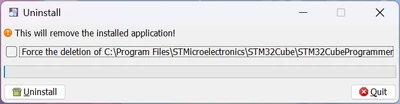
Whether or not I select "Force the deletion of ...", when I click "Uninstall," I get an unhandled exception pop-up (I can't find a way to copy the text out of it, sorry), which appears to indicate Access Denied when trying to modify registry keys:
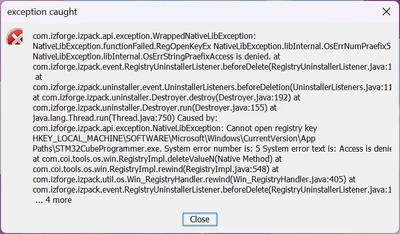
My company uses a credentials manager to provide admin privileges as needed when installing and uninstalling apps, and it asked if I wanted to escalate my privileges in both cases (running the uninstaller and running the script directly), but it said the software publisher was "Unknown" as if it didn't install correctly or wasn't signed.
I'm at a loss on what to do here; I want to try a previous version as my USB DFU device isn't identifying properly on USB when plugged in (which I see may be a common issue with 2.16), but I'm concerned about having multiple versions and drivers making this problem worse. Any suggestions to remove Programmer 2.16?