
Uninstaller does not work as expected STM32CubeProgrammer V2.16 (64-bit) on Windows 10
During the installation of the STM32CubeProgrammer creates some registry keys under:
HKLM\SOFTWARE\Microsoft\Windows\CurrentVersion\Uninstall\STM32CubeProgrammer 2.16.0\One of them is "UninstallString" with the value:
cmd /c start /min cmd /c "C:\Program Files\STMicroelectronics\STM32Cube\STM32CubeProgrammer\Uninstaller\unscript.bat" & "C:\Users\elkadmin\AppData\Local\Temp\7zS852D4102\jre\bin\javaw.exe" -jar "C:\Program Files\STMicroelectronics\STM32Cube\STM32CubeProgrammer\Uninstaller\uninstaller.jar" -f -xIf I run this command on in a cmd.exe with the same elevated credentials as the installer was started I get the initial uninstall screen as expected
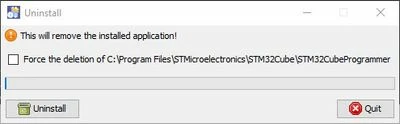
After clicking on the "Uninstall" button I get the unhandled exception message:
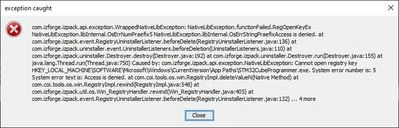
Here is a text version:
exception caught
com.izforge.izpack.api.exception.WrappedNativeLibException: NativeLibException.functionFailed.RegOpenKeyEx
NativeLibException.libInternal.OsErrNumPraefix5 NativeLibException.libInternal.OsErrStringPraefixAccess is denied, at
com. izforge. izpack. event. Registr yUninstallerListener. beforeDelete (Registr yUninstallerListener .java : 136) at
com.izforge.izpack.uninstaller.event.UninstallerListeners.beforeDeletion(UninstallerListeners.java: 110) at
com. izforge. izpack. uninstaller. Destroyer, destroy (Destroyer .java: 192) at com.izforge.izpack.uninstaller.Destroyer.run (Destroyer .java: 155) at
java. lang.Thread, run (Thread .java: 750) Caused by: com.izforge.izpack.api.exception.NativeLibException: Cannot open registry key
HKEY_LOCAL_MACHINE\SOFTWAREV4icrosoft\Windows\CurrentVersion\App Paths\STM32CubeProgrammer.exe. System error number is: 5
System error text is: Access is denied, at com.coi.tools.os.win.Registrylmpl.deleteValueN(Native Method) at
com. coi. tools. os. win. Registr ylmpl. rewind (Registr ylmpl .java : 548) at
com.izforge.izpack.util.os.Win_RegistryHandler.rewind(Win_RegistryHandler.java:405) at
com. izforge. izpack. event. Registr yUninstallerListener. beforeDelete (Registr yUninstallerListener. java: 132)... 4 more
Close
I do not start anything that could cause the "Access is denied" situation in the registry.
I beleieve this behavior is related to https://community.st.com/t5/stm32cubeprogrammer-mcus/unable-to-uninstall-stm32cubeprogrammer-v2-16-windows-11-64-bit/td-p/670714
Interestingly, the uninstallation works without any problems if it is executed from the Windows Add/Remove Programs dialog.
Unfortunately, this does not help because the uninstallation is to be called by a dependent uninstaller.