

cgnd_chris
Associate II
November 15, 2025
Solved

Zephyr images signed with STM32CubeProgrammer 2.21.0 do not run

  • November 15, 2025
  • 2 replies
  • 355 views

Following the directions in https://docs.zephyrproject.org/latest/boards/st/stm32n6570_dk/doc/index.html images signed using STM32_SigningTool_CLI version 2.20.0 run OK on the board.

However, after upgrading to STM32CubeProgrammer 2.21.0, images no longer run (I believe the signature check is now failing on the device).

Reverting back to 2.20.0 fixes the signing issue on Windows, macOS, and Linux for the STM32N6570-DK board.

However, this is a blocker for developers using the Nucleo N657X0-Q board on Windows & Ubuntu because 2.20.0 has a bug which causes west flash to fail for this board on both Windows & Ubuntu. This west flash bug is fixed for Windows & Ubuntu in 2.21.0, but we can't use that version due to the signing issue in 2.21.0.

Best answer by Aziz BRIGUI

Hello @cgnd_chris,

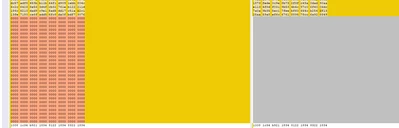
With STM32CubeProgrammer v2.21, there has been a change where the tool doesn't align automatically the payload to 0x400 with padding bytes for N6. Here's a screenshot of where the change is in an example binary:

AzizBRIGUI_0-1763375428880.png

However, this is highlighted in this warning message:

AzizBRIGUI_1-1763375474780.png

And in signing tool help here:

AzizBRIGUI_2-1763375630914.png

To solve this, add the -align or --align to the signing CLI command and it should be fine.

Hope this solves the issue.

Aziz 

2 replies

Aziz BRIGUI
Aziz BRIGUIBest answer
Technical Moderator
November 17, 2025

Hello @cgnd_chris,

With STM32CubeProgrammer v2.21, there has been a change where the tool doesn't align automatically the payload to 0x400 with padding bytes for N6. Here's a screenshot of where the change is in an example binary:

AzizBRIGUI_0-1763375428880.png

However, this is highlighted in this warning message:

AzizBRIGUI_1-1763375474780.png

And in signing tool help here:

AzizBRIGUI_2-1763375630914.png

To solve this, add the -align or --align to the signing CLI command and it should be fine.

Hope this solves the issue.

Aziz 

In order to give better visibility on the answered topics, please click on 'Accept as Solution' on the reply which solved your issue or answered your question.
cgnd_chris
Associate II
November 18, 2025

Thank you @Aziz BRIGUI this fixes the issue for me!

cgnd_chris
Associate II
December 2, 2025

FYI, this issue was recently fixed in Zephyr with this PR: https://github.com/zephyrproject-rtos/zephyr/pull/99721
