
john doe
Senior III
June 25, 2017
Solved

STM32CubeMX feature request - Search for alternate pin functions

  • June 25, 2017
  • 4 replies
  • 3023 views
Posted on June 25, 2017 at 19:25

Currently the search in the pinout view searches the labels. It would be nice if there was some way to search pin functions, too. Eg., all the pins that have I2C2 anything as their alternate function.
    This topic has been closed for replies.
    Best answer by Jeanne Joly
    Posted on January 29, 2018 at 17:30

    Hi,

    Ok for the search, it is only a pin search.

    However, I fully agree with Imen, you have this function on the pin view.

    Here is my example : 

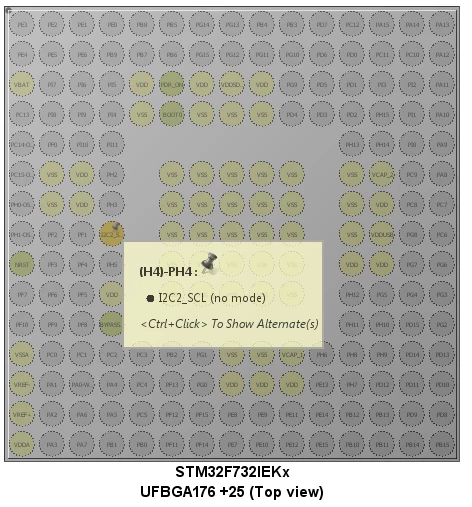
    I2C2_SCL is on H4-PH4 as below : 

    0690X00000609XJQAY.png

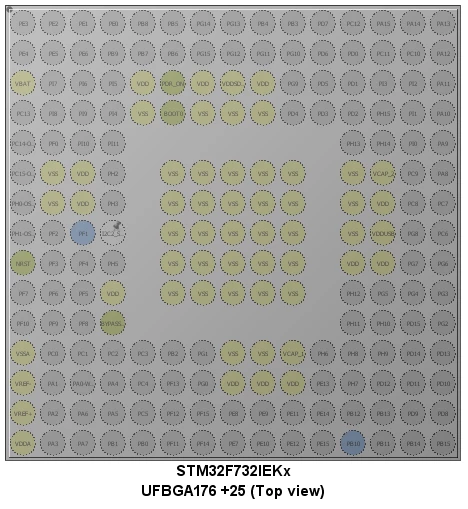
    and if you do a Ctrl Click, you have in blue the alternate functions (H3-PF1 and R12-PB10) : 

    0690X00000609XSQAY.png

    It is the way we decided to show the alternate functions.

    BR. Jeanne

    4 replies

    Zt Liu
    Senior III
    June 26, 2017
    Posted on June 26, 2017 at 03:30

    I also need it too!

    Let me add a pic for Jone, so that everyone can understand better!

    (Following picture is extracted from FSL's(now NXP) KE Pin Tools.)

    0690X00000602TsQAI.bmp
    misagh
    Associate II
    June 26, 2017
    Posted on June 26, 2017 at 10:36

    Hi,

    Actually there is an option: if you press ctrl key on keyboard and click on a pin, all alternates of this pin will change to blue. Also you can change the peripheral's pin by dragging the current pin to blue pin.

    hope it would be helpful.

    Bests,

    Misagh

    Zt Liu
    Senior III
    June 26, 2017
    Posted on June 26, 2017 at 10:52

    COOL!!

    (I should read the following instruction first!)

    0690X00000607TiQAI.png

    Thx, Misagn!

    misagh
    Associate II
    June 26, 2017
    Posted on June 26, 2017 at 11:24

    Your welcome!

    Technical Moderator
    June 27, 2017
    Posted on June 27, 2017 at 16:17

    Hi

    doe.john.016

    ,

    Please refer to the

    http://www.st.com/content/ccc/resource/technical/document/user_manual/10/c5/1a/43/3a/70/43/7d/DM001047pdf/files/DM001047pdf/jcr:content/translations/en.DM001047pdf

    STM32CubeMX User manual to have more insightabout

    Manual Remapping

    features.

    Regards

    Imen

    john doe
    john doeAuthor
    Senior III
    June 28, 2017
    Posted on June 28, 2017 at 01:51

    I'm talking about using the STM32CubeMX application to search for pin functions in stead of using the data sheet, that's all.  'find me all the pins with this alternate function.'

    also it would be helpful if ST used a two digit pin  number because searching for PA01 does not give me pin 1 on port a. Searching for PA1 gives me all pins that being with PA1 including all the pins from pa11-pa19. When the labels are inconsistent, that means I have to click on up to 10 balls in order to find pin PA1. The search needs improvement.

    Technical Moderator
    June 28, 2017
    Posted on June 28, 2017 at 10:27

    Hi

    doe.john.016

    ,

    All your feedback are raised internally for further investigation.

    Regards

    Imen

    Jeanne Joly
    Associate
    January 29, 2018
    Posted on January 29, 2018 at 11:46

    Hi

    doe.john.016

    ,

    I was reading this post and I am trying to reproducethe point you highlighted.

    From the pin search, I am searching for PA1, I found it immediately in the combo box as below :

    0690X00000609XDQAY.png

    Is it what you need?

    BR

    Jeanne

    john doe
    john doeAuthor
    Senior III
    January 29, 2018
    Posted on January 29, 2018 at 14:03

    now can you search for I2C2 and have it reveal all the pins that can do I2C2 as their alternate function?

    Jeanne Joly
    Jeanne JolyBest answer
    Associate
    January 29, 2018
    Posted on January 29, 2018 at 17:30

    Hi,

    Ok for the search, it is only a pin search.

    However, I fully agree with Imen, you have this function on the pin view.

    Here is my example : 

    I2C2_SCL is on H4-PH4 as below : 

    0690X00000609XJQAY.png

    and if you do a Ctrl Click, you have in blue the alternate functions (H3-PF1 and R12-PB10) : 

    0690X00000609XSQAY.png

    It is the way we decided to show the alternate functions.

    BR. Jeanne