ttao.1
Associate III
March 13, 2023
Solved

extlinux.conf can't chose uInitrd boot

  • March 13, 2023
  • 1 reply
  • 1243 views

hi st expert

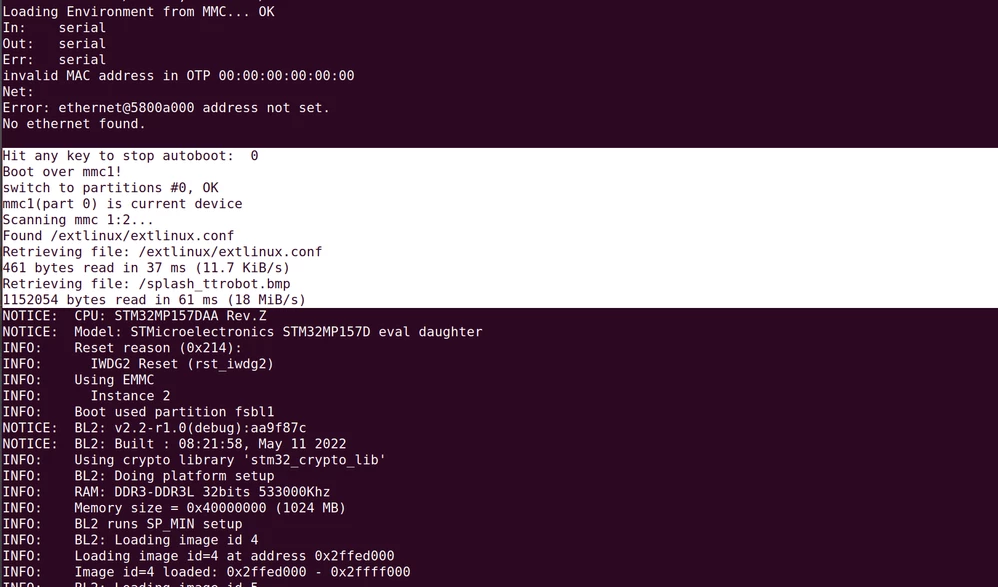
I am porting openstlinux for my robot board, I found that the system froze after uboot selected the extlinux file, and then rebooted after a while,the uart log :

0693W00000aIpSSQA0.pngDo I have any debugging means to analyze where the current problem is? thanks advance!

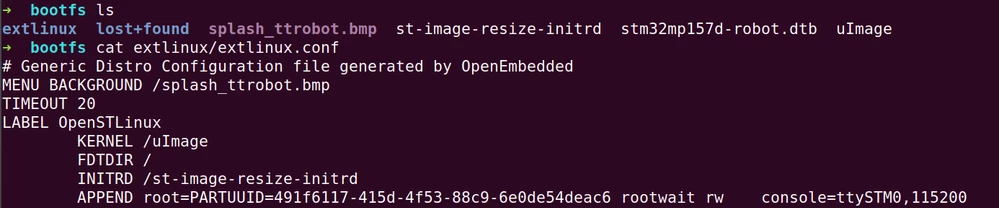
my extlinux.conf context:

0693W00000aIpnJQAS.png

This topic has been closed for replies.
Best answer by PatrickD

Hi,

its seens you are blocking when U-Boot try to display the splash screen

(it the last operation in the trace: extlinux is parsed, the bmp file is loaded and displayed)

and the Watchdog occur after 32s

it is the trace of 'Reset reason' in TF-A log = IWDG2 Reset

1/ to confirm, you can try to skip this splash screen step by removing the line

"MENU BACKGROUND /splash...." in the extlinux.conf file

2/ if it is confirmed, you need to debug the display configuration on your "robot board" in U-Boot

(device tree / Panel driver)

FYI: splash screen is displayed here for DISTRO boot with extlinux.conf

https://github.com/STMicroelectronics/u-boot/blob/v2021.10-stm32mp/cmd/pxe_utils.c#L1454

=> command cls + bmp_display()

you can activate debug trace (define DEBUG and LOG_DEBUG)

in the driver (DSI / LTDC ) and framework (DISPLAY U-Class) used for your panel on your board

https://wiki.st.com/stm32mpu/wiki/U-Boot_-_How_to_debug

for example...

=> https://github.com/STMicroelectronics/u-boot/tree/v2021.10-stm32mp/drivers/video/stm32

=> https://github.com/STMicroelectronics/u-boot/blob/v2021.10-stm32mp/drivers/video/simple_panel.c

=> https://github.com/STMicroelectronics/u-boot/blob/v2021.10-stm32mp/drivers/video/video-uclass.c

regards

Patrick

1 reply

PatrickD
PatrickDBest answer
ST Employee
March 15, 2023

Hi,

its seens you are blocking when U-Boot try to display the splash screen

(it the last operation in the trace: extlinux is parsed, the bmp file is loaded and displayed)

and the Watchdog occur after 32s

it is the trace of 'Reset reason' in TF-A log = IWDG2 Reset

1/ to confirm, you can try to skip this splash screen step by removing the line

"MENU BACKGROUND /splash...." in the extlinux.conf file

2/ if it is confirmed, you need to debug the display configuration on your "robot board" in U-Boot

(device tree / Panel driver)

FYI: splash screen is displayed here for DISTRO boot with extlinux.conf

https://github.com/STMicroelectronics/u-boot/blob/v2021.10-stm32mp/cmd/pxe_utils.c#L1454

=> command cls + bmp_display()

you can activate debug trace (define DEBUG and LOG_DEBUG)

in the driver (DSI / LTDC ) and framework (DISPLAY U-Class) used for your panel on your board

https://wiki.st.com/stm32mpu/wiki/U-Boot_-_How_to_debug

for example...

=> https://github.com/STMicroelectronics/u-boot/tree/v2021.10-stm32mp/drivers/video/stm32

=> https://github.com/STMicroelectronics/u-boot/blob/v2021.10-stm32mp/drivers/video/simple_panel.c

=> https://github.com/STMicroelectronics/u-boot/blob/v2021.10-stm32mp/drivers/video/video-uclass.c

regards

Patrick

ttao.1
ttao.1Author
Associate III
March 16, 2023

hi PatrickD:

After remove "MENU BACKGROUND /splash...." in the extlinux.conf  kernel boot success, i'll try debug the display issue, thanks a lot!

B&R

Tao