

MWoło.2
Senior III
July 10, 2023
Question

stm32mp135 - pcm5102a - sai1a

  • July 10, 2023
  • 3 replies
  • 4928 views

Hello,

I try to connect a popular Arduino board PCM5102a with my board which is base on STM32MP135.
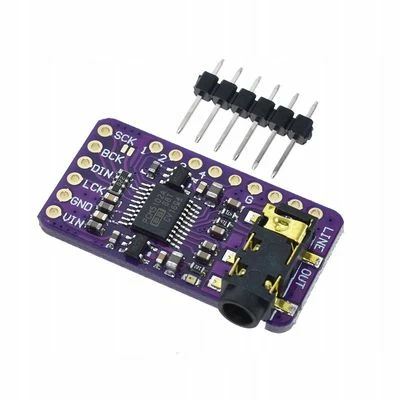
MWoo2_0-1688975337399.jpeg

I read some documentation from the link

but pcm, i2s and sound topics are something I have only a base knowledge of, so please give some advice and hints.

My dts looks like


/ {
 sound {
 compatible = "audio-graph-card";
 label = "STM32MP1-audio-test-card";
		routing =
			"Playback" , "MCLK",
			"Capture" , "MCLK",
			"MICL" , "Mic Bias";
		dais = <&i2s1_port>;
 status = "okay";
 };

 codec: pcm5102a-codec {
 compatible = "ti,pcm5102a";
 #sound-dai-cells = <0>;
 clocks = <&i2s1>; /* The codec is a consumer of I2S2 master clock */
 clock-names = "MCLK"; /* Feed MCLK codec clock with I2S2 master clock provider */

 codec_port: port {
 codec_endpoint: endpoint {
 remote-endpoint = <&i2s1_endpoint>;
				frame-master; /* Set codec as master of SAI1A for FS clock. */
				bitclock-master; /* Set codec as master of SAI1A for SCK clock. */
 };
 };
 };
};

	sai1a_pins_mx: sai1a_mx-0 {
		pins {
			pinmux = <STM32_PINMUX('C', 0, AF2)>, /* SAI1_SCK_A */
					 <STM32_PINMUX('C', 3, AF10)>, /* SAI1_MCLK_A */
					 <STM32_PINMUX('E', 11, AF6)>, /* SAI1_FS_A */
					 <STM32_PINMUX('F', 12, AF6)>; /* SAI1_SD_A */
			bias-disable;
			drive-push-pull;
			slew-rate = <0>;
		};
	};

	sai1a_sleep_pins_mx: sai1a_sleep_mx-0 {
		pins {
			pinmux = <STM32_PINMUX('C', 0, ANALOG)>, /* SAI1_SCK_A */
					 <STM32_PINMUX('C', 3, ANALOG)>, /* SAI1_MCLK_A */
					 <STM32_PINMUX('E', 11, ANALOG)>, /* SAI1_FS_A */
					 <STM32_PINMUX('F', 12, ANALOG)>; /* SAI1_SD_A */
		};
	};

&sai1{
	pinctrl-names = "default", "sleep";
	pinctrl-0 = <&sai1a_pins_mx>;
	pinctrl-1 = <&sai1a_sleep_pins_mx>;
	status = "okay";

	/* USER CODE BEGIN sai1 */
 #clock-cells = <0>;
 clocks = <&rcc SAI1>, <&scmi_clk CK_SCMI_PLL3_Q>, <&scmi_clk CK_SCMI_PLL3_R>;
 clock-names = "pclk", "x8k", "x11k";
 #sound-dai-cells = <1>;
	/* USER CODE END sai1 */

	sai1a:audio-controller@4400a004{
		status = "okay";

		/* USER CODE BEGIN sai1a */
		compatible = "st,stm32-sai-sub-a";
		reg = <0x4 0x1C>;
		clocks = <&rcc SAI1>;
		clock-names = "sai_ck";
		#clock-cells = <0>;
		dma-names = "tx";
		/*dmas = <&dmamux1 1 87 0x400 0x0>;*/
		/*dma-names = "tx";*/
		i2s1_port: port {
			i2s1_endpoint: endpoint {
				remote-endpoint = <&codec_endpoint>;
				format = "i2s";
				mclk-fs = <256>;
			};
		};
		/* USER CODE END sai1a */
	};
};


 I get an error like


root@mp1-sagittarius:~# dmesg | grep audio
[ 0.057703] OF: /pcm5102a-codec: could not get #clock-cells for /soc/audio-controller@44004000
[ 35.535330] platform 4400a004.audio-controller: Fixing up cyclic dependency with pcm5102a-codec
[ 39.684607] OF: /pcm5102a-codec: could not get #clock-cells for /soc/audio-controller@44004000
[ 39.692414] st,stm32-sai-sub 4400a004.audio-controller: Missing dma channel for stream: 0
[ 39.836205] st,stm32-sai-sub 4400a004.audio-controller: ASoC: error at snd_soc_pcm_component_new on 4400a004.audio-controller: -22
[ 39.923241] asoc-audio-graph-card sound: ASoC: can't create pcm 4400a004.audio-controller-pcm5102a-hifi :-22
[ 39.932041] asoc-audio-graph-card sound: parse error -22
[ 40.049044] asoc-audio-graph-card: probe of sound failed with error -22
root@mp1-sagittarius:~# 


in optte dts I use CLK_SAI1_PLL4Q for SAI1a.

BR Michal


This topic has been closed for replies.

3 replies

Erwan SZYMANSKI
Technical Moderator
July 11, 2023

Hello @MWoło.2 ,
Do you want to use SAI interface or I2S interface ? 
For this codec, I2S seems to be the most "natural" to use, and you can find an example of configuration on this thread.

Kind regards,
Erwan.

In order to give better visibility on the answered topics, please click on 'Accept as Solution' on the reply which solved your issue or answered your question.
MWoło.2
MWoło.2Author
Senior III
July 11, 2023

Hi Erwan,

I try and contact via the forum with the author. Unfortunately, I don't know how to connect mentioned Arduino module with I2S. When I use SAI I am able to find compatible signals like FS_A, SKC_A, SD_A. This is the only reason.

Exitst somewhere complete filled example how to use sai? In the link I attached above it's too many places with '...', very significant '...'. So let's try to find out what needs to be filled here.

Currently, I modified my sai in kernel dts to


&sai1{
	pinctrl-names = "default", "sleep";
	pinctrl-0 = <&sai1a_pins_mx>;
	pinctrl-1 = <&sai1a_sleep_pins_mx>;
	status = "okay";

	/* USER CODE BEGIN sai1 */
 #clock-cells = <0>;
 clocks = <&rcc SAI1>, <&scmi_clk CK_SCMI_PLL3_Q>, <&scmi_clk CK_SCMI_PLL3_R>;
 clock-names = "pclk", "x8k", "x11k";
 #sound-dai-cells = <1>;
	/* USER CODE END sai1 */

	sai1a:audio-controller@4400a004{
		status = "okay";
		dma-names = "tx";
		clocks = <&rcc SAI1_K>;
		clock-names = "sai_ck";
		i2s1_port: port {
			i2s1_endpoint: endpoint {
				remote-endpoint = <&codec_endpoint>;
				format = "i2s";
				mclk-fs = <256>;
			};
		};
		/* USER CODE END sai1a */
	};
};


And now it's look 


[ 39.661471] st,stm32-sai-sub 4400a004.audio-controller: Missing dma channel for stream: 0
[ 39.778031] st,stm32-sai-sub 4400a004.audio-controller: ASoC: error at snd_soc_pcm_component_new on 4400a004.audio-controller: -22


So the question is how to configure DMA correctly.

BR

Michal

Erwan SZYMANSKI
Technical Moderator
July 12, 2023

Hello @MWoło.2 ,
I reproduced on my side and here you can find my corrections.

For your device tree:


	sound {
 compatible = "audio-graph-card";
 label = "STM32MP1-audio-test-card";
		routing =
			"Playback" , "MCLK";
		dais = <&sai1a_port>;
 status = "okay";
 };

 codec: pcm5102a-codec {
 compatible = "ti,pcm5102a";
 #sound-dai-cells = <0>;
 clocks = <&sai1a>; /* The codec is a consumer of I2S2 master clock */
 clock-names = "MCLK"; /* Feed MCLK codec clock with I2S2 master clock provider */

 codec_port: port {
 codec_endpoint: endpoint {
 remote-endpoint = <&sai1a_endpoint>;
				frame-master; /* Set codec as master of SAI1A for FS clock. */
				bitclock-master; /* Set codec as master of SAI1A for SCK clock. */
 };
 };
 };
};

&sai1{
	pinctrl-names = "default", "sleep";
	pinctrl-0 = <&sai1_pins_a>;
	pinctrl-1 = <&sai1_sleep_pins_a>;
	status = "okay";

	/* USER CODE BEGIN sai1 */
 clocks = <&rcc SAI1>, <&scmi_clk CK_SCMI_PLL3_Q>, <&scmi_clk CK_SCMI_PLL3_R>;
 clock-names = "pclk", "x8k", "x11k";
 #sound-dai-cells = <1>;
	/* USER CODE END sai1 */

	sai1a:audio-controller@4400a004{
		status = "okay";
		dma-names = "tx";
		#clock-cells = <0>;
		clocks = <&rcc SAI1_K>;
		clock-names = "sai_ck";
		sai1a_port: port {
			sai1a_endpoint: endpoint {
				remote-endpoint = <&codec_endpoint>;
				format = "i2s";
				// mclk-fs = <256>;
			};
		};
		/* USER CODE END sai1a */
	};
};


Note: As you only use the "TX" cell of SAI, I removed the "Capture" route in sound node that is a "RX" functionality. You can modify it as you want.

For PCM5102A:

Find enclosed the patch I applied on the driver. Please consider that this a first step of what you probably need, but it maybe have to be improved regarding the cs41l52.c driver example.

I did not face your DMA issue, so be sure to have OSTL 4.1 without other modifications in other device trees.

I hope it will help you to go forward.
Kind regards,
Erwan.

In order to give better visibility on the answered topics, please click on 'Accept as Solution' on the reply which solved your issue or answered your question.
MWoło.2
MWoło.2Author
Senior III
July 15, 2023

After applying all suggestions and patching my log looks as follows

[ 36.381276] platform 4400a004.audio-controller: Fixing up cyclic dependency with pcm5102a-codec
...
[ 40.341794] stm32-dmamux 48002000.dma-router: Run out of free DMA requests
[ 40.477203] stm32-dmamux 48002000.dma-router: Run out of free DMA requests
[ 40.487823] st,stm32-sai-sub 4400a004.audio-controller: Missing dma channel for stream: 0
[ 40.535104] st,stm32-sai-sub 4400a004.audio-controller: ASoC: error at snd_soc_pcm_component_new on 4400a004.audio-controller: -22
[ 40.638737] asoc-audio-graph-card sound: ASoC: can't create pcm 4400a004.audio-controller-pcm5102a-hifi :-22
[ 40.713549] asoc-audio-graph-card sound: parse error -22
[ 40.717427] asoc-audio-graph-card: probe of sound failed with error -22
Erwan SZYMANSKI
Technical Moderator
July 17, 2023

@MWoło.2 ,
As you have a custom board, I think the issue now is linked to your DMA manipulation. Maybe too many drivers are using DMA and so you have not enough to use it with your audio codec.

To catch this, I point you another thread that deals with the same kind of issue here.

Kind regards,
Erwan.

In order to give better visibility on the answered topics, please click on 'Accept as Solution' on the reply which solved your issue or answered your question.
MWoło.2
MWoło.2Author
Senior III
July 17, 2023

Hi Erwan,

You have right, I set too many interfaces like uart, i2c etc. Now I have no DMA issues.

After issue from command line aplay -l I get

root@mp1-sagittarius:~# aplay -l
**** List of PLAYBACK Hardware Devices ****
card 0: STM32MP1audiote [STM32MP1-audio-test-card], device 0: 4400a004.audio-controller-pcm5102a-hifi pcm5102a-hifi-0 [4400a004.audio-controller-pcm5102a-hifi pcm5102a-hifi-0]
 Subdevices: 1/1

Now I'm curious how to play music using aplay or mpv, vlc etc.

When I issue from the command line alsamixer I get

root@mp1-sagittarius:~# alsamixer
ALSA lib ../../alsa-plugins-1.2.6/pulse/pulse.c:242:(pulse_connect) PulseAudio: Unable to connect: Connection refused

cannot open mixer: Connection refused

the same with 

aplay -c 3 -t wav -r 44100 -f cd default.wav
ALSA lib ../../alsa-plugins-1.2.6/pulse/pulse.c:242:(pulse_connect) PulseAudio: Unable to connect: Connection refused

aplay: main:831: audio open error: Connection refused

Hmmm, what's now?

BR

Michal

MWoło.2
MWoło.2Author
Senior III
July 18, 2023

I think I found a links with information, I try and give feedback

https://wiki.st.com/stm32mpu/wiki/How_to_play_audio

https://wiki.st.com/stm32mpu/wiki/ALSA_overview

Regards

Michal