Associate II
July 8, 2024
Solved

STM32MP135F-DK & OV5640 camera connection

  • July 8, 2024
  • 1 reply
  • 1089 views

Hello,

I am trying to capture images from OV5640 on STM32MP135F-DK.

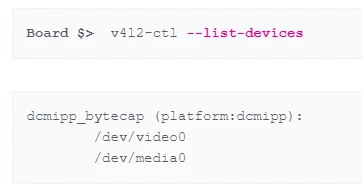
When I connect GC2145 camera, I succesfully list devices like below:

alpka_0-1720440618550.png

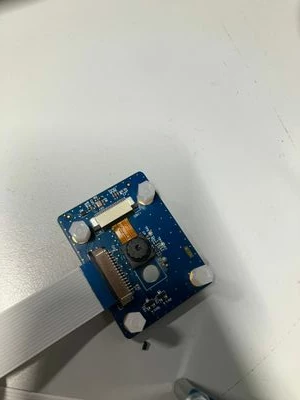
I removed GC2145 on the ST camera board and connected OV5640, like below image:


alpka_2-1720440756638.jpeg

But when i try to list devices, /dev/media0 is not visible. How can i get images from OV5640?

Best answer by Erwan SZYMANSKI

Hello @alpka ,
By default, the board device tree of STM32MP135F-DK board configure the Galcore camera and not anymore the OV5640. But it is very simple to switch by modifying the device tree. Please see below : 

In arch/arm/boot/dts/stm32mp135f-dk.dts in Linux sources, you will see : 

gc2145: gc2145@3c {
		compatible = "galaxycore,gc2145";
		reg = <0x3c>;
		clocks = <&clk_ext_camera>;
		IOVDD-supply = <&scmi_v3v3_sw>;
		AVDD-supply = <&scmi_v3v3_sw>;
		DVDD-supply = <&scmi_v3v3_sw>;
		powerdown-gpios = <&mcp23017 3 (GPIO_ACTIVE_LOW | GPIO_PUSH_PULL)>;
		reset-gpios = <&mcp23017 4 (GPIO_ACTIVE_LOW | GPIO_PUSH_PULL)>;
		status = "okay";

		port {
			gc2145_ep: endpoint {
				remote-endpoint = <&mipid02_0>;
				clock-lanes = <0>;
				data-lanes = <1 2>;
			};
		};
	};

	ov5640: camera@3c {
		compatible = "ovti,ov5640";
		reg = <0x3c>;
		clocks = <&clk_ext_camera>;
		clock-names = "xclk";
		DOVDD-supply = <&scmi_v3v3_sw>;
		status = "disabled";
		powerdown-gpios = <&mcp23017 3 (GPIO_ACTIVE_LOW | GPIO_PUSH_PULL)>;
		reset-gpios = <&mcp23017 4 (GPIO_ACTIVE_LOW | GPIO_PUSH_PULL)>;

		port {
			ov5640_0: endpoint {
				/*remote-endpoint = <&mipid02_0>;*/
				clock-lanes = <0>;
				data-lanes = <1 2>;
			};
		};
	};

Please change the status of ov5640 from disabled to okay and the one of gc2145 from okay to disabled.

Kind regards,
Erwan.

1 reply

Erwan SZYMANSKI
Erwan SZYMANSKIBest answer
Technical Moderator
July 8, 2024

Hello @alpka ,
By default, the board device tree of STM32MP135F-DK board configure the Galcore camera and not anymore the OV5640. But it is very simple to switch by modifying the device tree. Please see below : 

In arch/arm/boot/dts/stm32mp135f-dk.dts in Linux sources, you will see : 

gc2145: gc2145@3c {
		compatible = "galaxycore,gc2145";
		reg = <0x3c>;
		clocks = <&clk_ext_camera>;
		IOVDD-supply = <&scmi_v3v3_sw>;
		AVDD-supply = <&scmi_v3v3_sw>;
		DVDD-supply = <&scmi_v3v3_sw>;
		powerdown-gpios = <&mcp23017 3 (GPIO_ACTIVE_LOW | GPIO_PUSH_PULL)>;
		reset-gpios = <&mcp23017 4 (GPIO_ACTIVE_LOW | GPIO_PUSH_PULL)>;
		status = "okay";

		port {
			gc2145_ep: endpoint {
				remote-endpoint = <&mipid02_0>;
				clock-lanes = <0>;
				data-lanes = <1 2>;
			};
		};
	};

	ov5640: camera@3c {
		compatible = "ovti,ov5640";
		reg = <0x3c>;
		clocks = <&clk_ext_camera>;
		clock-names = "xclk";
		DOVDD-supply = <&scmi_v3v3_sw>;
		status = "disabled";
		powerdown-gpios = <&mcp23017 3 (GPIO_ACTIVE_LOW | GPIO_PUSH_PULL)>;
		reset-gpios = <&mcp23017 4 (GPIO_ACTIVE_LOW | GPIO_PUSH_PULL)>;

		port {
			ov5640_0: endpoint {
				/*remote-endpoint = <&mipid02_0>;*/
				clock-lanes = <0>;
				data-lanes = <1 2>;
			};
		};
	};

Please change the status of ov5640 from disabled to okay and the one of gc2145 from okay to disabled.

Kind regards,
Erwan.
In order to give better visibility on the answered topics, please click on 'Accept as Solution' on the reply which solved your issue or answered your question.