
Associate II
October 4, 2024
Solved

yocto in stm32mp1

  • October 4, 2024
  • 2 replies
  • 2988 views

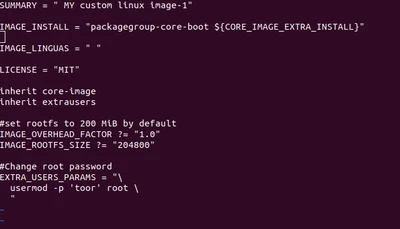
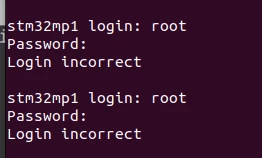
Hi, I'm new to yocto project, I'm trying to set password for  custom image in yocto in stm32mp157d-dk1(scarthgap) ,by editing the bb layer in image, its successfully build and flashed into SD card , but I'm trying to enter the login id and password , it says login Incorrect  ,I tried in all ways , but still it shows login incorrect ,
Anto_Z_0-1728038511821.png

I attached the Picture of the bb layer of my image above , Please anyone could tell me  what I'm missing there..
 

Anto_Z_1-1728038560263.png


Best answer by Erwan SZYMANSKI

Hello @Anto_Z ,
Are you sure the password is not blank here ? 

In you conf/local.conf file in <Yocto build folder>, we have a default setting that is :

EXTRA_IMAGE_FEATURES ?= "debug-tweaks"

This feature is supposed to remove password for root user. Maybe you can try to remove this feature and make another try.

Kind regards,
Erwan.

2 replies

Erwan SZYMANSKI
Erwan SZYMANSKIBest answer
Technical Moderator
October 6, 2024

Hello @Anto_Z ,
Are you sure the password is not blank here ? 

In you conf/local.conf file in <Yocto build folder>, we have a default setting that is :

EXTRA_IMAGE_FEATURES ?= "debug-tweaks"

This feature is supposed to remove password for root user. Maybe you can try to remove this feature and make another try.

Kind regards,
Erwan.

In order to give better visibility on the answered topics, please click on 'Accept as Solution' on the reply which solved your issue or answered your question.
Anto_ZAuthor
Associate II
October 15, 2024

Hi, Thanks for the help, i commented that line, and tried , then , I can't able to login as root , bcoz , commenting that line also remove the  root login, then i added the below line

EXTRA_IMAGE_FEATURES += "allow-root-login"

 and , i used encrypted password assignment instead of direct assignment ,  then, its worked fine

PatrickF
Technical Moderator
October 7, 2024

Hi @Anto_Z 

please have a look to this post https://community.st.com/t5/stm32-mpus-embedded-software-and/the-root-password-how-to-set-during-compilation-the-openstlinux/m-p/618515


Note: the password is not stored in plaintext, you should generate the correct hash string using e.g.:

openssl passwd -5 xxxx  

Then as stated in the linked post, manually escape all $ with \ before copying in the usermod line


This link (in french) could help too: https://www.blaess.fr/christophe/yocto-lab/sequence-II-1/index.html#utilisateurs-et-mots-de-passe


Regards.

In order to give better visibility on the answered topics, please click on 'Accept as Solution' on the reply which solved your issue or answered your question.NEW ! Sidekick STM32 AI agent, see here
Anto_ZAuthor
Associate II
October 15, 2024

Hi , Thanks for the Help, I tried in the way mentioned in that post , now its working, Thank you