

PHolt.1
Senior
July 26, 2024
Question

Cube IDE 1.16.0 and STlink v3 - cannot find debugger

  • July 26, 2024
  • 15 replies
  • 7428 views

This sort of thing is a way of life with these ST tools (been using Cube IDE for 6 years on this project) but this one I am unable to fix. Is there some special setting needed under Debug (under project/properties)?
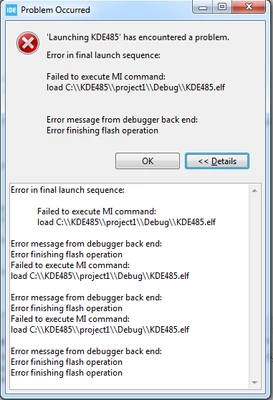
 

PHolt1_0-1721987017824.png


STMicroelectronics ST-LINK GDB server. Version 7.8.0

Copyright (c) 2024, STMicroelectronics. All rights reserved.


Starting server with the following options:

Persistent Mode : Disabled

Logging Level : 1

Listen Port Number : 61234

Status Refresh Delay : 15s

Verbose Mode : Disabled

SWD Debug : Enabled


ST-LINK device status: UNKNOWN

Waiting for debugger connection...

Debugger connected

Waiting for debugger connection...

Debugger connected

Waiting for debugger connection...

Encountered Error when opening C:\ST\STM32CubeIDE_1.16.0\STM32CubeIDE\plugins\com.st.stm32cube.ide.mcu.externaltools.cubeprogrammer.win32_2.1.400.202404281720\tools\bin\STM32_Programmer_CLI.exe

Error in STM32CubeProgrammer

Shutting down...

Exit.
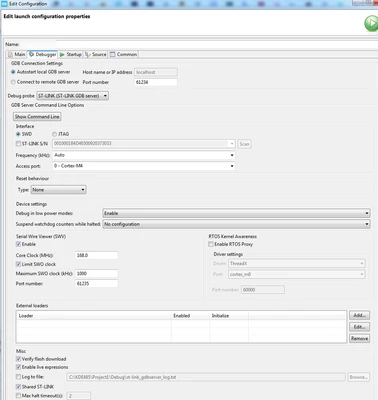
 

PHolt1_1-1721987204042.png

I've tried 2 x STLINK ISOL V3 and a STLINK ISOL v2. No success.

    15 replies

    PHolt.1
    PHolt.1Author
    Senior
    August 1, 2024

    Zero replies.

    Is there really no way to debug this very common scenario?

    AScha.3
    Super User
    August 1, 2024

    zero + 1 . :)

    So you had it working for years...what you changed, to stop it ?

    see my setting :

    AScha3_0-1722499107025.png

    Try...(software reset  ! )


    "If you feel a post has answered your question, please click ""Accept as Solution""."
    PHolt.1
    PHolt.1Author
    Senior
    August 1, 2024

    No; my point is that 1.16.0 broke it. I had been working with Cube IDE for several years, all the various versions.


    I see you are using OpenOCD. I've always used GDB Server mode. The others didn't seem to work. Which STLINK are you running?


    AScha.3
    Super User
    August 1, 2024

    Here i am on IDE V 1.14.1 .  (working fine - so why i should risk any "update" to unknown state ?? :) )

    + blocking all online/update search etc. -> offline mode seems helping a to keep stable workset .

    (If v 16... dont work, just use older Version and see next update for V16.. , maybe then ok again)

    +

    ST-links i use : V3-miniE , V3-mods , V2  (the "clones" , but all with STM chips..) ;

    and also GDB and OCD ...sometimes one not working, so i choose the other. ...and back.

    "If you feel a post has answered your question, please click ""Accept as Solution""."
    PHolt.1
    PHolt.1Author
    Senior
    August 1, 2024

    Right - I too froze updates on 1.14.1 and disabled looking for updates. 

    Not really a solution though :beaming_face_with_smiling_eyes:

    Peko
    Associate III
    August 1, 2024

    I have the same problem. I use STM32 CUBE IDE V1.16 and ST-LINK/V2. I could not solve the problem.


    screen_20240801_095042.bmp

    Associate II
    August 19, 2024

    I have the same problem with both the V1.14 and V1.16 versions.

    I use the STLINK-V3MINI and my OS is Windows 11.

    I should point out that everything was working 4 months ago.....

    I couldn't solve the problem !

    MESSAGE:

    Boris19_1-1724091102953.png

    STM32 CubeIDE:

    Boris19_2-1724091235412.png

    I really need a solution to move my project forward!


    AScha.3
    Super User
    August 19, 2024

    What you set for connecting mode?

    Try: hardware reset, + under reset.

    That's helpful, if you did anything to set the chip to a mode, that not allows normal access, maybe not set debug in Cube or using a debug pin for any other way, as I/o pin or so.


    "If you feel a post has answered your question, please click ""Accept as Solution""."
    Associate II
    August 20, 2024

    Hi @AScha.3 , thank you for your reply.
    I'm not sure I understand your question.
    My hardware connection mode is configured like this:

    Boris19_0-1724138229270.png

    Then I use a basic USB cable.
    This setup has always worked correctly.


    The BOOT0 pin is connected to GND.
    My DEBUG configuration is done like this:

    Boris19_1-1724138327603.png

    I also updated the STLINK-V3MINI and did a ‘clean’ of the project.

    I also want to say that I managed to flash the MCU the very first time with my programme, but then it wasn't possible any more.

    BarryWhit
    Lead
    August 24, 2024

    Does the same issue occur when programming with CubeProgrammer?

    Associate II
    August 26, 2024

    My hardware consists of several PCBs linked via connectors. On 2 of them there is a button that allows the uP to be reset. The aim is for the reset to be as accessible on the PCB containing the uP as it is on the one for the HMI.
    In the end, the uP reset is connected as follows:

    Boris19_0-1724661894336.png

    When I press S5, the 0 ohm resistor R50 causes a short circuit on NRST.

    According to the ST documentation, the pull-up resistor (Rpu, framed in red) for the NRST input is internal and fixed, so there is no need to add one.

    I didn't understand why it didn't work because when I used STMCubeProgrammer I could load the program without any problem.

    My intuition is that when using STMCubeIDE, at the time of debugging, the uP activates one of these outputs (framed in red) and pulls the transistor to ground. This causes the internal reset but it also causes the short-circuit due to my 0 ohm resistor R50. Conversely, when loading the program with STMCubeProgrammer, the uP does not activate the outputs because it uses the NJRST and this does not cause a short-circuit.

    Boris19_1-1724662050329.png

    I simply removed R50 and C50 and that solved the problem.

    I hope my answer is clear enough.

    BarryWhit
    Lead
    September 8, 2024

    @Boris19 wrote:

    When I press S5, the 0 ohm resistor R50 causes a short circuit on NRST. 


    @Boris19, not just that but (based on your schematic) every time you press S5 you're shorting the output of your power supply to ground. That's... novel.

    PHolt.1
    PHolt.1Author
    Senior
    September 8, 2024

    These solutions must be describing marginal systems which "just manage" to work afterwards.

    There are real issues with the ST debugger system. For example see here

    https://www.eevblog.com/forum/microcontrollers/10-pin-debug-connector-and-stlink-v3-isol-not-reliable/msg3564782/#msg3564782

    On at least two recent releases, the x.x.0 broke the debugger and the x.x.1 fixed it.

    BarryWhit
    Lead
    September 8, 2024

    @PHolt.1 , that thread is an issue with a particular board stacking arrangement, and the cause isn't really identified. The report simply says "this way works, this doesn't". That's not conclusive. Plus, that post is from 2021, well  before 1.6.0 came out. How is that support for your claim that the new version broke something?


    You said this has been working for 6 years and 1.6.0/STLink V3 broke it. Does that mean you rolled-back and it still works with 1.4.1? does it work with regular (non-ISOL) STLink V2/V3? Are you using your own board or an ST dev board? Did you upgrade the STLink firmware? did you NOT upgrade STLink firmware? Give us something to work with.


    It's certainly possible there are issues, but I would have expected a flood of similar complaints on the forum if that were the case (perhaps I just missed them). 


    These kinds of issues come up all the time, and in many (certainly not all) cases it ends up being due to user error, or a board issue. Boris's story is one example. Another forum post complained that a new version broke his (solid for years!) project, but eventually realized they had been been using a custom bootloader all those years, which somehow was missing after the upgrade (I don't remember the details) .


    One thing to try (beyond rolling back the version) is to cut out CubeIDE as a middleman, and try going through the same procedure using GDB from the command line. Since cubeIDE scripts the GDB session, when something goes wrong you lose visibility into what's happening. Get up close and personal and try to recreate the issue in an environment where you can poke and prod.


    PHolt.1
    PHolt.1Author
    Senior
    September 8, 2024

    Indeed being able to drive STLINK directly would be useful. Is there some doc on how to do this?

    I do also drive it from the old utilities e.g.

    STM ST LINK UTILITY

    PHolt1_0-1725797835464.png

    ST VISUAL PROGRAMMER

    PHolt1_1-1725797907681.png

    These are both old but there is AFAIK no current replacement. And when Cube IDE doesn't find the debugger, these sometimes find it and sometimes not.


    BarryWhit
    Lead
    September 8, 2024

    These are both old but there is AFAIK no current replacement. 

    Both STLink utility and STVP have been deprecated in favor of STM32CubeProgrammer, for several years.

    It also comes with CLI version. It's installed (somewhere) as part of the CubeIDE install.


    See UM2576: STM32CubeIDE ST-LINK GDB server . The gdb server talks to the STLink for you, and exposed a TCP port. You connect to that with gdb and off you go. You can also peruse any number of random tutorials around the web about remote debugging embedded targets with GDB. It's pretty standard stuff.


    Intermittent connection issues is more likely to be a hardware issue. Perhaps even with your motherboard/USB port/Cable. Did you try another computer? Does the same happen with all boards? With all firmware? With a blank project?


    PHolt.1
    PHolt.1Author
    Senior
    September 8, 2024

    PHolt1_0-1725808336177.png

    The usual :)

    It is a separate download, not a part of Cube IDE.

    I uninstalled it and fortunately Cube IDE still works. This mega bloated java stuff tends to be tricky as to dependencies but ST's stuff tends to be self contained so no idea what this is.

    BarryWhit
    Lead
    September 8, 2024

    It is a separate download, not a part of Cube IDE.

    No. it is also available as a separate download. CubeIDE actually calls the CLI version of CubeProgrammer to download programs to the chip. And you can launch the gui version using the appropriate jar file.


    Update: Only the CLI version is bundled with CubeIDE. I got the GUI mixed up with the bundled CubeMX, which can be launched as a standalond GUI through the installed jars. Sorry about that.

    Pavel A.
    Super User
    September 8, 2024

    CubeProgrammer API is installed with CubeProgrammer (not CubeIDE).

    However, as you've mentioned dependencies - it requires runtime DLLs of Qt,  encumbered by unclear licensing terms. 

    PHolt.1
    PHolt.1Author
    Senior
    September 8, 2024

    Next time I find problems with the debugger I will try one of the old utilities to narrow it down.

    However whenever I have an issue, it is fixed by

    - unplugging and replugging the STLINK (V3 ISOL usually) USB cable (this is the most common fix)

    - exiting and restarting Cube IDE

    - in very rare cases, rebooting Windows

    The above don't look like a cable issue!

    But in the grand scheme of things these things do work. That EEVBLOG thread I posted shows that the "obvious" STLINK V3 ISOL cable (the 10-way one) does not work, but an adaptor from OLIMEX (Ebay, since they don't sell to the UK below €200) from the 25W conn to the 10W conn does work. I spent ages on discovering that.

    Re running some jar file, I have no interest in that when I have work to do :) This is a joke:

    PHolt1_0-1725818556169.png