

PHolt.1
Senior
July 26, 2024
Question

Cube IDE 1.16.0 and STlink v3 - cannot find debugger

  • July 26, 2024
  • 15 replies
  • 7428 views

This sort of thing is a way of life with these ST tools (been using Cube IDE for 6 years on this project) but this one I am unable to fix. Is there some special setting needed under Debug (under project/properties)?
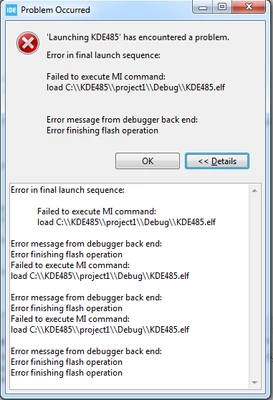
 

PHolt1_0-1721987017824.png


STMicroelectronics ST-LINK GDB server. Version 7.8.0

Copyright (c) 2024, STMicroelectronics. All rights reserved.


Starting server with the following options:

Persistent Mode : Disabled

Logging Level : 1

Listen Port Number : 61234

Status Refresh Delay : 15s

Verbose Mode : Disabled

SWD Debug : Enabled


ST-LINK device status: UNKNOWN

Waiting for debugger connection...

Debugger connected

Waiting for debugger connection...

Debugger connected

Waiting for debugger connection...

Encountered Error when opening C:\ST\STM32CubeIDE_1.16.0\STM32CubeIDE\plugins\com.st.stm32cube.ide.mcu.externaltools.cubeprogrammer.win32_2.1.400.202404281720\tools\bin\STM32_Programmer_CLI.exe

Error in STM32CubeProgrammer

Shutting down...

Exit.
 

PHolt1_1-1721987204042.png

I've tried 2 x STLINK ISOL V3 and a STLINK ISOL v2. No success.

    15 replies

    BarryWhit
    Lead
    September 9, 2024

    > However whenever I have an issue, it is fixed by

    > - unplugging and replugging the STLINK (V3 ISOL usually) USB cable (this is the most common fix)

    > [...]

    >The above don't look like a cable issue!


    ???

    Actually, I said motherboard/USB port/USB cable, and it does kinda look like these could be the issue. If you have unreliable electrical contacts then every time you touch the cable or the STLINK and move it slightly, you could be perturbing the electrical contacts slightly. This could explain why you're seeing intermittent errors.  


    I found the CLI exe by searching for "Programmer" through the entire ST directory. all 18,000 files of it. It took about 20 seconds.


    Best of luck to you. 

    PHolt.1
    PHolt.1Author
    Senior
    September 9, 2024

    Can you suggest which CLI commands I could try to find a "missing" STLINK?

    Pavel A.
    Super User
    September 9, 2024

    Make sure that ST-LINK is not in use by other application. Only one program can open ST-LINK at any time (no offence please, but sometimes people forget).

    PHolt.1
    PHolt.1Author
    Senior
    September 10, 2024

    Sure; I don't do that.

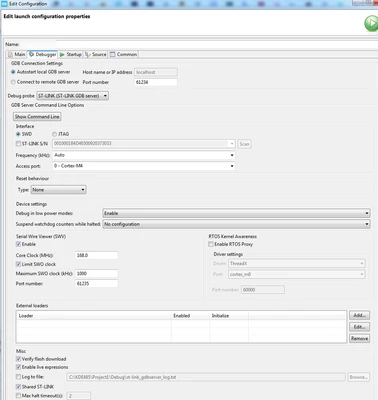
    But incidentally what does this option do? I have tried it both ways; makes no difference to frequency of what looks like USB related issues

    PHolt1_0-1725952747384.png


    PHolt.1
    PHolt.1Author
    Senior
    September 12, 2024

    I cannot find any help in Cube on the meaning of Shared ST-LINK.

    Does anyone know?

    AScha.3
    Super User
    September 12, 2024

    google tells :

    For debugging purposes, it can be of some interest to run simultaneously one IDE and STM32CubeMonitor. This feature is named "Shared mode".

    The Shared mode enables the use of STM32CubeMonitor in parallel with another application supporting Shared mode such as STM32CubeIDE, STM32CubeProgrammer or IAR Embedded Workbench.


    https://wiki.st.com/stm32mcu/wiki/STM32CubeMonitor:How_to_configure_shared_mode

    "If you feel a post has answered your question, please click ""Accept as Solution""."