Associate II
March 18, 2025
Solved

CubeIDE 1.18 cannot detect ST-Link anymore

  • March 18, 2025
  • 12 replies
  • 2505 views

Hi,

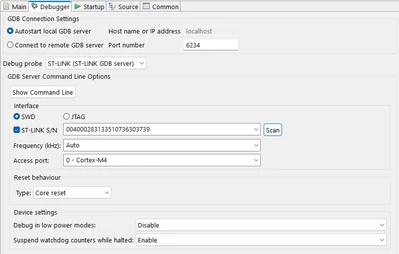
starting with Update 1.18  (update from 1.17) sth. broke and i cannot debug anymore.
I tried a nucleo Board with integrated St-Link and an ST-Link V3. All Screenshots were done with the v3 St-Link
I reinstalled CubeIDE already from the complete download-package, but still the same problem

i always get
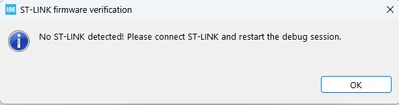
funky_0-1742308417257.png

But the update works ( so my st-link is found)
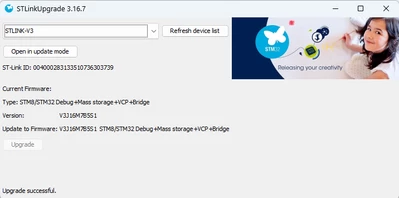
funky_1-1742308536498.png

funky_2-1742308587232.png

I can flash my image via st-link utility without problems.

but cannot get debug to work with 1.18.

With v1.17 i had no problems at all and debugging worked flawlessly.

So what can i do to fix this?

i tried with stlink-v3 and v2.1

and i use Windows 11 Enterprise
Regards

Best answer by AScha.3

Hi,

just because i have IDE 1.18 (on my MxLinux PC) also, no problems with st-link xxx whatever -

it might be something on Win as anti-virus or something about the "rights" you or part of new program has (or not.).

So try to disable all firewall, anti-virus and check rights... 

12 replies

Andrew Neil
Super User
March 18, 2025

@funky wrote:

I can flash my image via st-link utility without problems.


What about CubeProgrammer?

A complex system that works is invariably found to have evolved from a simple system that worked.A complex system designed from scratch never works and cannot be patched up to make it work.
funkyAuthor
Associate II
March 18, 2025

did not use it until now but will check

funkyAuthor
Associate II
March 18, 2025

hmmm...interesting. cubeprogrammer does not detect my st-link?!

funkyAuthor
Associate II
March 18, 2025

funky_0-1742310342731.png

this is what my device manager shows me. it is an st-link v3 but with the nucleo st-link v2 it is also not working :(

in the cubeprogrammer: when i try to upgrade my st-link it wants to downgrade the firmware.
this is the version i get via cubeprogrammer

funky_1-1742310537744.png

and via stm32cubeide
funky_2-1742310618011.png


funkyAuthor
Associate II
March 19, 2025

afte rebooting i see my st-link in the cubeide programmer. but as soon as i click on it it disappears and refreshing etc does not bring it back. i tried to reinstall all the drivers, but this did not help. in cubeprogrammer and cubeIDE the st-link is not usable. with the st-link utility i can still flash.

but all in all debugging is not working anymore. i'm lost here

funkyAuthor
Associate II
March 20, 2025

i downgrade to cubeIDE 1.17. Also not working anymore :(

funkyAuthor
Associate II
March 20, 2025

still no luck. 

what i noticed: cubeIDE does not even try to start GDBServer. it performas a prelaunch check and then the message box with "No St-Link connected..." appears

Andrew Neil
Super User
March 20, 2025

Well, that makes sense - if it can't find any ST-Link, then there's no point in it starting a GDB server.


You haven't got anything else using the ST-Link at the same time, have you?

A complex system that works is invariably found to have evolved from a simple system that worked.A complex system designed from scratch never works and cannot be patched up to make it work.
funkyAuthor
Associate II
March 21, 2025

nope, nothing. 

And as said...in the debugging configuration the IDE detects my st-link. But it is not usable when i want to debug.

I'm out of ideas

I downgraded the IDE, uninstalled all (old) drivers/devices in the device manager, nothing helps 

funkyAuthor
Associate II
March 24, 2025

No, the whole gdb-server start output was missing

funky_0-1742801845017.png

I did not see the whole startup output. As soon as i pressed the debug button the message box with the missing st-link notice appeared and none of the gdb server output

i don't know what triggered my firewall to behave like this. Because i'm pretty sure when i first installed cubeIDE in the past i did not hit any extra checkboxes in the firewall configuration. 
And my colleagues who also use cubeIDE 1.18 did not have these problems and everything worked flawlessly after the update

funkyAuthor
Associate II
March 24, 2025

ok, i'm starting to cry. monday morning in the office. same problem again.

no st-link found, no gdbserver started.  (on friday i was at home so little different network setup)

Andrew Neil
Super User
March 24, 2025

@funky wrote:

ok, i'm starting to cry. monday morning in the office. same problem again.


So have you re-checked the firewall settings?

A complex system that works is invariably found to have evolved from a simple system that worked.A complex system designed from scratch never works and cannot be patched up to make it work.
funkyAuthor
Associate II
March 24, 2025

ok... it seems the autostart of the gdb server does not work anymore. i absolutley do not know why.

in the debugger configuration there is the "show command line" button for the gdb server start. if i copy that command and start it manually via commandline i get another firewall popup for my gdb server, i accept that and my gdb server is started and listening for connection. when i configure my settings to connect to a remote gdb server with that port everthing works fine i can start my program and debug.

when i switch back to autostart local gdb server, nothing is started i get the no st-link connected message instantly

funkyAuthor
Associate II
March 24, 2025

after starting that gdb server manually it worked one time and now i switched back to automatic start and i get after reboot this logoutput ONCE

 
STMicroelectronics ST-LINK GDB server. Version 7.10.0

Copyright (c) 2025, STMicroelectronics. All rights reserved.


Starting server with the following options:

Persistent Mode : Disabled

LogFile Name :...\st-link_gdbserver_log.txt

Logging Level : 31

Listen Port Number : 6124

Status Refresh Delay : 15s

Verbose Mode : Enabled

SWD Debug : Enabled

ST-Link enumeration failed

Error in initializing ST-LINK device.

Reason: ST-LINK DLL error.


and the next try the "NO ST-Link detected" message box is back again.

this is *^°?!#111 :D

AScha.3
Super User
March 24, 2025

Hi,

so : > 

Reason: ST-LINK DLL error.


Just try:

close IDE ; 

load/install (actual) STM32CubeProgrammer , check connection to board (maybe : update st-link);

then try IDE again.

"If you feel a post has answered your question, please click ""Accept as Solution""."