
Associate
July 18, 2023
Solved

myST Login issue in STM32CubeIDE

  • July 18, 2023
  • 12 replies
  • 50965 views

Hello,


I just updated from 1.12.0 to 1.13.0 and now when i save changes it asks me to sign in to mySt to download a software package. 
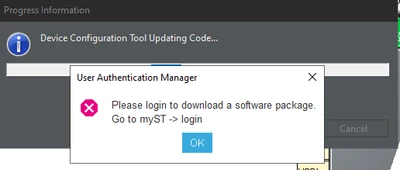
cmendi_0-1689698718278.png

When i try to login to my ST i get this error:
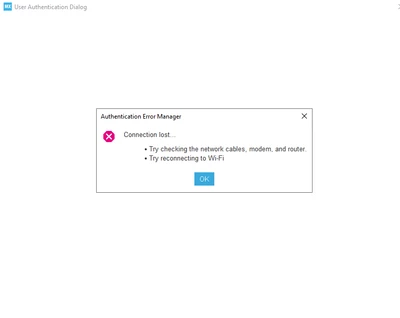
cmendi_1-1689698783053.png


I am on my work network, not sure if that matters. My internet is working fine with everything else but the STMCubeIDE

Thank you,


    Best answer by Peter BENSCH

    Welcome @cmendi, to the community!

    STM32CubeIDE uses the network settings under Window > Preferences > Network Connections. There you can choose between:

    • Direct (without proxy)
    • Manual (uses dedicated proxy settings)
    • Native (dynamic host)

    For Manual you have to enter your credentials if you are working over a VPN or a proxy. Please try if you can get it to work with one of these settings?

    Regards
    /Peter

    12 replies

    Peter BENSCH
    Peter BENSCHBest answer
    Technical Moderator
    July 19, 2023

    Welcome @cmendi, to the community!

    STM32CubeIDE uses the network settings under Window > Preferences > Network Connections. There you can choose between:

    • Direct (without proxy)
    • Manual (uses dedicated proxy settings)
    • Native (dynamic host)

    For Manual you have to enter your credentials if you are working over a VPN or a proxy. Please try if you can get it to work with one of these settings?

    Regards
    /Peter

    cmendiAuthor
    Associate
    July 19, 2023

    Hey Peter,

    Thank you for the response. I have tried everything besides Manual but i have IT coming in today. Ill have them enter in our credentials and see if that works.

    PGogt
    Associate II
    July 20, 2023

    I have the exact same issue. I have internet connection; the refresh of packages works but when I try to download any pack it asks me to login. I tried all the available network settings with no luck. Also, to log in where do I put in my credentials? CubeIDE is broken for me. I have no way to go back to earlier version as this is a fresh install on my machine after my hard disk died.

    Peter BENSCH
    Technical Moderator
    July 20, 2023

    @PGogt You have not yet mentioned where and how you have set and checked the available network settings. This must be done for the CubeIDE in the settings mentioned:

    • Window > Preferences > Network Connections

    Please note that this is not set in the operating system, but in the CubeIDE.

    Regards
    /Peter

    Kryten
    Explorer
    May 14, 2024

    Hello - first post,

    I am new to ST microcontrollers but not in general. Just purchased a STM32H745i discovery board and plugged in Micro USB via laptop and nothing happens but red LED glowing on back - I believe COM light. This is disappointing.

    Also, after watching a couple videos on CubeIDE getting started, downloaded IDE and tried to create project - I am affected by same bug and cannot authenticate to download package. It will flash either blank screens "Authentication Error Manager" or show connection lost like others have reported. This is also disappointing. So I have an IDE that is useless and a board that does nothing. 

    I did check Network Settings under Preferences and only HTTP is checked. 

    This is BS.

    MFuch.3
    Associate II
    August 3, 2023

    Hi,

    same here! CubeIDE is used behind corporate proxy under Linux with cntlm (for authentication). This works fine in general. 

    Proxy ist configured in IDE as:

    MFuch3_0-1691038678379.png

    The Connection check is "green" under STM32Cube-> Firmware updater: 

    MFuch3_1-1691038752464.png

    Below this successful check, I see a message with some "recommendations" to do some refreshes. These all work fine! E.G. run "Refresh" from Help->Embedded Software Package Manager. I can also monitor in cntlm log file as multiple .pack files are accessed on the web. (I must admit, that I also got the package manager stuck by explicitly selecting STM32H5 MCU Package 1.1.0 and clicking "Install").

    When I create a new STM32 project the wizard finally asks me to Login to myST: 

    MFuch3_2-1691038862452.png

    When I use myST -> Login from Eclipse menu I get the "Connection lost..." message as described in this thread. So I would say internet access works, but the myST login is the problem.Hope this helps.

    Testing with CubeIDE 1.13.1 under Ubuntu Linux.

    Piranha
    Principal III
    August 4, 2023
    MFuch.3
    Associate II
    September 1, 2023

    I have to connect to the internet via proxy. So my options are "Manual" and "Native". Native seems to use the system settings. Under Linux they come from http_proxy and https_proxy. On my system they point to a local running cntlm instance that does the authentication for my local application (e.g. browser). But STM32Cube IDE seems to have problems with cntlm. So I switch to "Manual" and had to enter proxy settings manually - including credentials. This works, but it is not nice to have the credentials being entered inside an application. cntlm would be nice. No idea what makes the IDE unhappy with this.

    Visitor II
    February 11, 2024

    I also had that problem, in my case I downloaded the program without creating an account. The solution was to uninstall, create an account and then download the IDE for my account, with this I was able to log in to myST with my credentials. With that I was able to establish a connection and download the packages that, due to the lack of these packages, prevented me from continuing.

    It wasn't a problem with proxy settings or anything like that :)

    Visitor II
    April 6, 2024

    I'm using Mac OS Ventura 13.0 on my personal laptop

    I logged into my account and downloaded the latest STM32CubeIDE, installed the 'install me first' package, then the main package.

    I get the same error, even though I'm already logged in:


    Screenshot 2024-04-06 at 20.28.15.png

    Visitor II
    May 14, 2024

    Same here on macOS Sonoma 14.4.1. Even tried saving my username and password in Updater settings > connection parameters 

    Had to download & install my MCU packages manually. 

    Why does it need to behind a login and is it not properly tested? Why not save your developers & users a lot of headaches and write native SW instead of trying to get something to work with Java?

    Kryten
    Explorer
    May 14, 2024

    Couldn't agree more. This is BS.

    Visitor II
    May 15, 2024

    Sorry, I've got the same problem. 

    Can you please tell me - Which solution - I couldn't find one

    Thanks, WInfried

    Kryten
    Explorer
    May 15, 2024

    Sure, no problem, I got everything working by doing the following:

    Searching for my MCU in st.com - in my case, I have STM32H745I-DISCO discovery kit. Enter in exact product name ‘STM32xxxxx’

    Then, under ‘Tools & Software’ tab downloading the MCU package - in my case it was latest version of ‘STM32CubeH7’ try to get latest version. Do not unzip package!

    In STM32CubeIDE navigating to ‘Manage Embedded MCU Packages’ and installing local package. Point to zip file on your drive.

    It will take a few minutes to install and that’s it! You will everything you need and can use new project wizard to create project / generate boilerplate code.

    For my STM32H745I-DISCO, I had to set JP8 back to ‘STLK’ default from factory (Duh) and plug  Micro USB into STLink port.

    If you get this far you can try and compile an example code under Project Wizard. After that click Bug Icon and start debugging, you should see something…if you need additional help I will try to assist.

    Visitor II
    May 20, 2024

    Thanks for your help

    WInfried

    msavi.11
    Associate
    May 15, 2024

    Thankyou very much!

    Explorer
    May 16, 2024

    I have the same problem under Ubuntu 24.04. I have direct Internet connectivity so I don't need a proxy. 

    It just times out while trying to open the log-in page. 

    I installed the application using the generic Linux installer. (The Debian one complained about missing packages).

    I really appreciate any help you can provide.

    Raúl Salinas-Monteagudo

    Kryten
    Explorer
    May 16, 2024

    Hello,

    Please note my last post to Winfried above. Should be everything you need to get going. Good luck!

    -Kryten

    Explorer
    May 20, 2024

    Thanks for your answer, Kryten, but I think that such a basic functionality needs to work. 

    Today I could log in. Apparently, they had something broken in their servers.