

BTay.1
Associate
June 6, 2022
Solved

Extraction of bin file from microcontroller

  • June 6, 2022
  • 18 replies
  • 17955 views

Hey, sorry, I am pretty new to this. I have a rather basic question. I took apart a module that I have, within which there is STM32 microcontroller (part marking: STM32F103T8U77BA7E93PHL739). I want to know if it's possible to use the IDE to extract the existing bin file in the microcontroller, via JTAG or some other method? Reason being I have my own bin file that I'd like to test, but in case I screw things up, I'd like to be able to restore the module back to its original condition by reinstating the original bin file into the microcontroller. So my plan is to extract the current contents of the microcontroller by reading back, store the bin file safely before i do any kind of experimentation so that at least the original condition can be restored. Hope my question is clear.
This topic has been closed for replies.
Best answer by Mike_ST

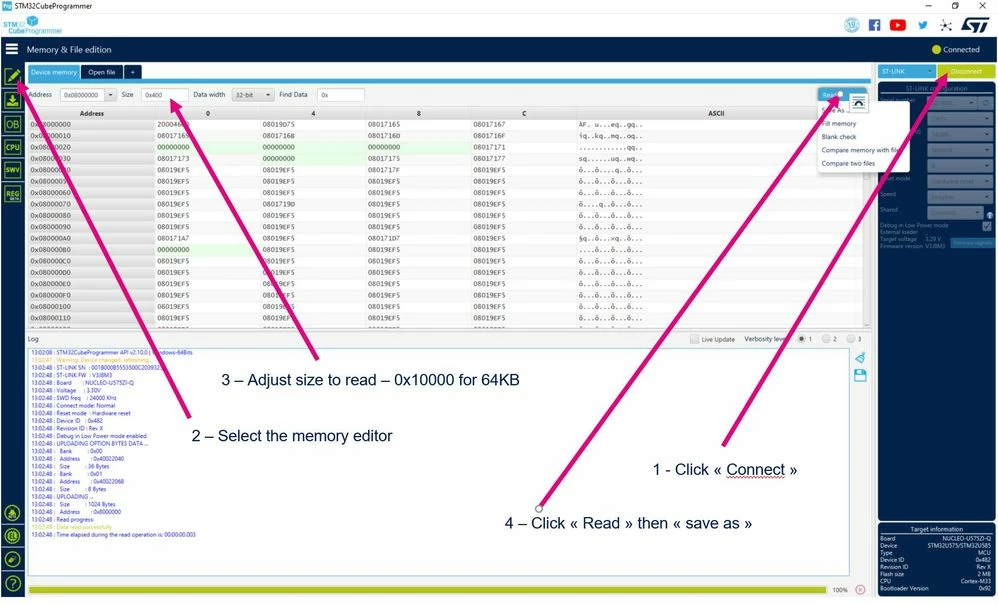
Hello please use STM32CubeProgrammer:

0693W00000NrG76QAF.jpg

18 replies

Tesla DeLorean
Guru
June 6, 2022

STM32 Cube Programmer should be able to Read and Save the memory content provided that the device isn't protected to prevent that.​

Tips, Buy me a coffee, or three.. PayPal VenmoUp vote any posts that you find helpful, it shows what's working..
Andrew Neil
Super User
June 6, 2022

@BTay.1​ "I am pretty new to this"

To what, exactly?

A complex system that works is invariably found to have evolved from a simple system that worked.A complex system designed from scratch never works and cannot be patched up to make it work.
Mike_ST
Mike_STBest answer
Technical Moderator
June 6, 2022

Hello please use STM32CubeProgrammer:

0693W00000NrG76QAF.jpg

BTay.1
BTay.1Author
Associate
June 7, 2022

Thank you for your assistance. I am pretty new to microcontrollers in general. My next question is, I have to connect to this microcontroller. I have no idea what part number it is exactly, as there was no design information or schematics given with this module that I am tasked to investigate. I spot that the microcontroller on the PCB has 36 legs, 9 on each side, which means it is some kind of LQFP36 package, but googling the part number yields no datasheets, the closest datasheet I could find only carries microcontrollers in LQFP48, 64 or 100, so clearly doesnt correspond to the part I have on the board.

There is a small 4-pin header next to the microcontroller, presumably it is the JTAG header, I need to figure out which pins in the header correspond to TMS, TCK, TDI, TDO, by probing with my multimeter. But first I need to know which of the 36 pins on my microcontroller correspond to TMS, TCK, TDI, TDO. This is where I am stuck for now.

I attach the datasheet I found.

Andrew Neil
Super User
June 7, 2022

@BTay.1​ "I am pretty new to microcontrollers in general"

Thanks.

Then, as @Community member​ suggested, I would also suggest that you spend some time gaining familiarity on a Nucleo, Discovery, and/or similar board(s) - rather than risk potentially wasting time on this "unknown" module and/or bricking it.

Reverse-engineering does require a good understanding of what you're looking at, and the tools you're using.

"I am tasked to investigate"

Tasked by who? Have you sought help from them?

They should understand that this is not really a beginner's task...

" I have no idea what part number it is exactly"

The STM32CubeProgrammer should be able to read the device ID and, thus, tell you what chip it is. Unless, of course, your unit is locked.

@Community member​ "There's a nonzero likelyhood that the mcu under question is locked"

Possibly significantly greater than zero?

A complex system that works is invariably found to have evolved from a simple system that worked.A complex system designed from scratch never works and cannot be patched up to make it work.
waclawek.jan
Super User
June 7, 2022

There's a nonzero likelyhood that the mcu under question is locked, i.e. firmware cannot be read out.

I recommend you to experiment on some testing target first, a Nucleo or Disco board with a similar STM32 than is your target.

JW

BTay.1
BTay.1Author
Associate
June 7, 2022

Hey JW,

Yes, I am aware, but without trying, I wouldn't know. I am only concerned about extracting the bin file from this particular microcontroller, and if it's not possible, then I won't even go down this route

BTay.1
BTay.1Author
Associate
June 7, 2022

Hi Andrew,

It is a task given to me by my boss, I am an electrical engineer.

The STM32CubeProgrammer should be able to read the device ID and, thus, tell you what chip it is. Unless, of course, your unit is locked. -- In order to this, I need to connect the device to the STM32CubeProgrammer. The only way for me to do this is via a header on the PCB, for which I don't know which pins are TCK,TMS,TDO,TDI and I can only find out via manual probing. And in order to do manual probing I need to first find out which of the 36 pins on the microcontroller on the PCB correspond to TCK, TMS, TDO and TDI.

Andrew Neil
Super User
June 7, 2022

@BTay.1​  "It is a task given to me by my boss"

And you're getting him to help you with this, and/or getting (an) experienced colleague(s) to help?

"a header on the PCB, for which I don't know which pins are TCK,TMS,TDO,TDI"

ARM defines some standards for this - is it a standard header?

https://developer.arm.com/documentation/ka001776/latest

As @Community member​ said, most STM32 use SWD - which is just 2 lines (or, preferably, 3 - to include Reset).

"part marking: STM32F103T8U77BA7E93PHL739"

That's plenty of information to be able to identify it sufficiently for this purpose:

https://www.st.com/en/microcontrollers-microprocessors/stm32f103t8.html

A complex system that works is invariably found to have evolved from a simple system that worked.A complex system designed from scratch never works and cannot be patched up to make it work.
waclawek.jan
Super User
June 7, 2022

> which of the 36 pins on the microcontroller

While you can program some STM32 (including the 'F103) through full-fledged JTAG, most users use SWD which has two signals - SWDIO and SWCLK.

0693W00000NrJqEQAV.pngJW

BTay.1
BTay.1Author
Associate
June 30, 2022

Hey JW, thanks for your reply and I am sorry for my late response. Those pins you highlighted correspond to the VFQFPN36 package, but the one I see on the board has 36 physical legs, meaning it can only be a LQFP package, but the min. number of legs for the LQFP packages stated on the datasheet goes only to 48. This is why I am confused as to which of the 36 pins correspond to the JTAG lines.

Tesla DeLorean
Guru
June 30, 2022

>>This is why I am confused as to which of the 36 pins correspond to the JTAG lines.

You're overthinking this, it's not that complicated.

STM32F103T8U7

https://www.mouser.com/ProductDetail/STMicroelectronics/STM32F103T8U7?qs=Fn3VdHBzkclnP9j4Vr0IVA%3D%3D

UFQFPN-36

https://www.mouser.com/datasheet/2/389/stm32f103c8-1851025.pdf

0693W00000Nt73YQAR.jpgPA13 JTMS/SWDIO

PA14 JTCK/SWCLK

PA15 JTDI

PB3 SWO/TDO

PB4 JNTRST

Tips, Buy me a coffee, or three.. PayPal VenmoUp vote any posts that you find helpful, it shows what's working..
BTay.1
BTay.1Author
Associate
June 30, 2022

The chip I have has pins sticking out, so it's definitely not this package

Tesla DeLorean
Guru
June 30, 2022

Then perhaps you've misread the part#

The pins on 36-pin packages are not randomly assigned.

Trace the pins to your supposed debug header.

Look at what the powers and grounds are connecting too.

Look at the pins the crystals attach.

If these things mismatch, perhaps a different part.

But you've provided no pictures. Or any connectivity details on any of the pins.

Probe the identified pins against the header.

Look at the board traces.

Tips, Buy me a coffee, or three.. PayPal VenmoUp vote any posts that you find helpful, it shows what's working..