

BTay.1
Associate
June 6, 2022
Solved

Extraction of bin file from microcontroller

  • June 6, 2022
  • 18 replies
  • 17955 views

Hey, sorry, I am pretty new to this. I have a rather basic question. I took apart a module that I have, within which there is STM32 microcontroller (part marking: STM32F103T8U77BA7E93PHL739). I want to know if it's possible to use the IDE to extract the existing bin file in the microcontroller, via JTAG or some other method? Reason being I have my own bin file that I'd like to test, but in case I screw things up, I'd like to be able to restore the module back to its original condition by reinstating the original bin file into the microcontroller. So my plan is to extract the current contents of the microcontroller by reading back, store the bin file safely before i do any kind of experimentation so that at least the original condition can be restored. Hope my question is clear.
This topic has been closed for replies.
Best answer by Mike_ST

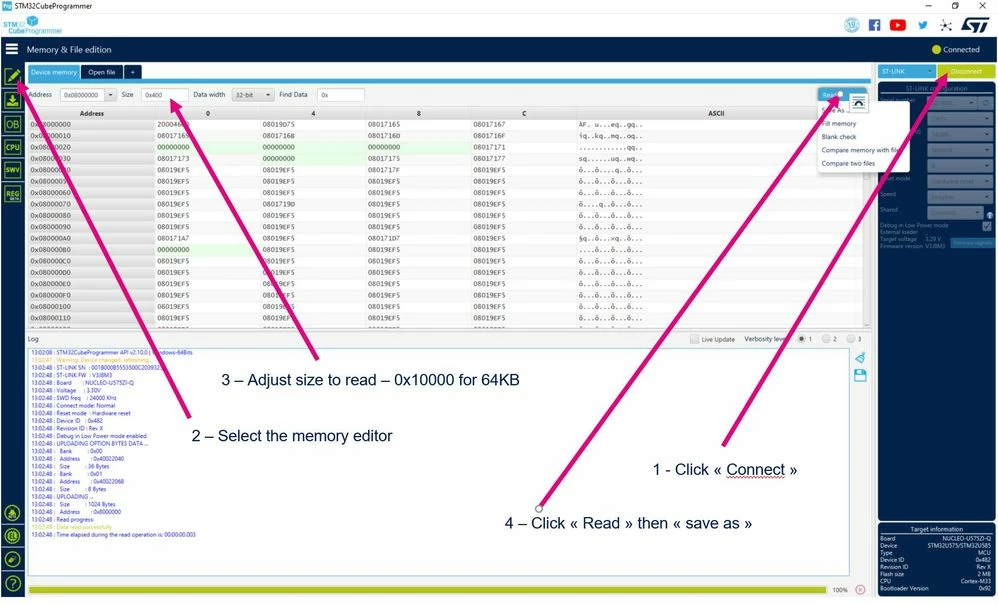
Hello please use STM32CubeProgrammer:

0693W00000NrG76QAF.jpg

18 replies

BTay.1
BTay.1Author
Associate
June 30, 2022

0693W00000Nt7YJQAZ.jpgSo as you can see it is 36 legs, 9 legs on each side, and the 4 pin header (i believe it's use for programming). Tried probing but didnt have much success so far.

Andrew Neil
Super User
June 30, 2022

@BTay.1​ "the 4 pin header (i believe it's use for programming)"

You "believe"?

What have you done to confirm that belief?

If it's only 4 pins, unlikely that it'll be JTAG.

But it might be a UART or other bootloader...

"Tried probing but didnt have much success so far"

you're the only one that has the board - so nobody can help you with that.

I'd start by getting some decent high-resolution images of both sides of the board.

You may need to invest in a better camera (or a camera with better macro capability).

Sometimes a flatbed scanner can be good for this - if other components aren't too tall.

Use an image-processing tool to reverse the image of the back side of the board - so that it corresponds to the front image.

Then you can trace the tracks, and see where vias join layers...

A complex system that works is invariably found to have evolved from a simple system that worked.A complex system designed from scratch never works and cannot be patched up to make it work.
Andrew Neil
Super User
June 30, 2022

Have you tried putting images of the board and/or the complete unit into Google Image Search?

A complex system that works is invariably found to have evolved from a simple system that worked.A complex system designed from scratch never works and cannot be patched up to make it work.
Andrew Neil
Super User
June 30, 2022

@BTay.1​ "part marking: STM32F103T8U77BA7E93PHL739"

The datasheet for that says:

0693W00000Nt7h4QAB.png 

So that part number is for either a VFQFPN or a UFQFPN:

0693W00000Nt7hTQAR.png0693W00000Nt7hYQAR.png 

Neither of those matches the image you posted so, as @Community member​ said, it looks like you've mis-read the part number.

Or it's a fake part ...

EDIT

@Piranha​  and @Community member​  have pointed out that it is (or could be) a QFN, but with PCB pads that would also take a QFP.

A complex system that works is invariably found to have evolved from a simple system that worked.A complex system designed from scratch never works and cannot be patched up to make it work.
BTay.1
BTay.1Author
Associate
July 1, 2022

Thank you for the responses!

  1. I work with classified information, which is why there are a lot of things about this board that I have to be deliberately vague about. This is also why the image I've furnished is heavily cropped, and therefore of a lower quality. Still, I appreciate the responses so far, and I apologize for my vagueness which I imagine only serves to hinder your ability to help me figure things out. Since this board I have acquired isn't a widely and commercially available product, a Google Image Search would be futile. When we acquired this board it came with zero design information, so our attempt is to try and figure out if extraction of the current program within the microcontroller is possible, and if so via what means. The assumption of the 4-socket header being a way to connect to the microcontroller is a pure conjecture, and I have nothing to back up this conjecture. There was no design information given to describe the 4-socket header's function.
  2. I was laboring under the false assumption that the "legs" were physical pins, but as mentioned above, it is likely that they are just long solder traces instead. Therefore, the VQFPN36 package seems highly plausible. Now I just need to figure out how to connect to it, to read out the program - any ideas? It might well be the case that I need to manually solder wires to the tiny 36 solder traces in order to access the microcontroller, since probing the 36 pins yielded no connection to the 4-socket header.
  3. Again I'd like to thank everyone for the keen detective work and at the very least, pointing out the mistake that this wasn't a LQFP package as I had previously thought.
  4. I will try and provide more information as much as I am authorized to, but please understand my constraints if I am not able to do so.

Thank you again for all your responses!

Andrew Neil
Super User
July 1, 2022

@BTay.1​  "I work with classified information"

and you really don't have any colleagues or supervisors in your organisation who can assist you with this?

"Thank you again for all your responses!"

I hope you will be giving due credit in your report/whatever ...

A complex system that works is invariably found to have evolved from a simple system that worked.A complex system designed from scratch never works and cannot be patched up to make it work.
BTay.1
BTay.1Author
Associate
July 1, 2022

An update. Turns out I made the rookie mistake of using a faulty probe. After changing the probe, I was able to deduce the following:

0693W00000QKF2fQAH.jpgSocket 1 = Pin 18 of microcontroller

Socket 2 = Pin 25 of microcontroller

Socket 3 = Pin 28 of microcontroller

Socket 4 = Pin 1 of microcontroller

Again the solder traces were tiny so there might be a mistake, but this corresponds to:

VDD_1, VSS_1, PA13, PA14. (ie, power, ground, SWDIO, SWCLK)

Would that make sense?

Andrew Neil
Super User
July 1, 2022

@BTay.1​  "the solder traces were tiny"

LOL - those traces are huge by modern standards! :face_with_tears_of_joy: :grinning_face_with_sweat:

"(ie, power, ground, SWDIO, SWCLK) Would that make sense?"

Yes, that's exactly what you'd need for an SWD programming/debug connection

(it'd be nice to also have Reset, but not essential).

A complex system that works is invariably found to have evolved from a simple system that worked.A complex system designed from scratch never works and cannot be patched up to make it work.
BTay.1
BTay.1Author
Associate
July 4, 2022

what is the part number of the programmer I have to buy in order to connect my microcontroller to the PC, using this SWD socket?

Regards

Ben

Andrew Neil
Super User
July 4, 2022

It's a non-standard socket, so you won't find anything "plug-and-go".

But any SWD program/debug probe (which supports your Target voltage) will work - you just need to make an appropriate adaptor.

Since you're on the ST forum, an ST-Link must be the obvious suggestion.

Tools are listed on the Product Page for the microcontroller:

https://www.st.com/en/microcontrollers-microprocessors/stm32f103t8.html#tools-software

A complex system that works is invariably found to have evolved from a simple system that worked.A complex system designed from scratch never works and cannot be patched up to make it work.
BTay.1
BTay.1Author
Associate
July 6, 2022

Thank you for the suggestion, I am looking at:

this programmer

So I can connect this to the STM32CubeProgrammer, using that?

I have to manufacture a cable linking:

Socket 1 = Pin 18 of microcontroller = VSS_1 = GND (pins 4,6,8,10,12 of ribbon cable)

Socket 2 = Pin 25 of microcontroller = SWDIO = Pin 7 of ribbon cable

Socket 3 = Pin 28 of microcontroller = SWDCLK = pin 9 of ribbon cable

Socket 4 = Pin 1 of microcontroller = VDD = pin 1 of ribbon cable

That would work, I hope.0693W00000QKWDzQAP.jpg0693W00000QKWDuQAP.jpg

Piranha
Principal III
July 6, 2022

> So I can connect this to the STM32CubeProgrammer, using that?

No. More detailed answer:

https://community.st.com/s/question/0D53W00001SdsrCSAR/cubeprogrammer-with-jlink

In addition to CubeIDE supporting J-Link, you will have these:

https://wiki.segger.com/UM08001_J-Link_/_J-Trace_User_Guide#J-Link_Software_and_Documentation_Pack

As far as I understand, CubeIDE has an integrated J-Link GDB Server. I don't understand why they don't just call the normally installed J-Link GDB Server like some other IDEs do, but hey - we're talking about ST's software...

BTay.1
BTay.1Author
Associate
July 6, 2022

Oh, that's unfortunate. Is there a similar device which is compatible? Thanks!