

Soner23
Associate
May 4, 2024
Solved

STM32Cube Programmer installation error

  • May 4, 2024
  • 12 replies
  • 9294 views

Hello,

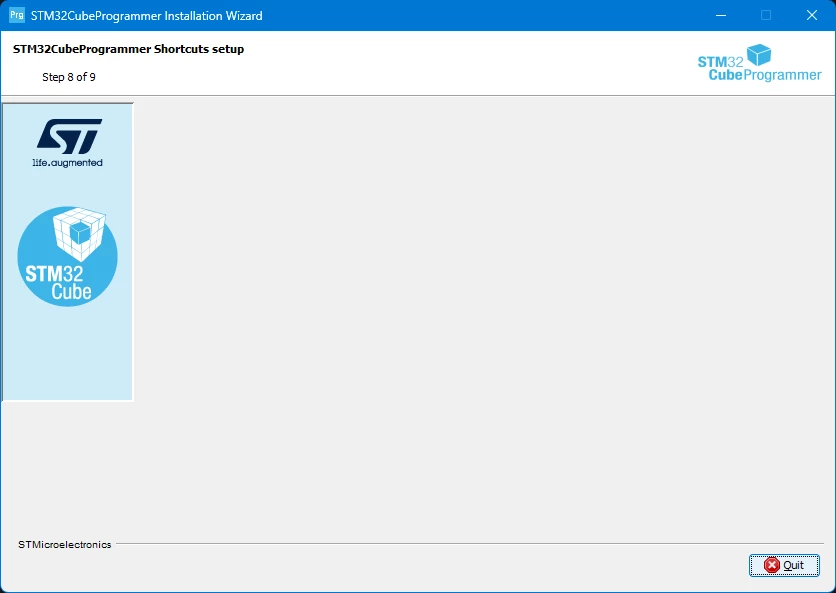
Stm32cubeprogrammer installation does not proceed to the final stage, it remains at step 8 and is not completed. I tried the program on three different PCs with administrator rights, the result is the same, the installation does not complete.
st32prog hata.png

Best answer by Soner23

Hello @Aziz BRIGUI 

Let me share an update on the issue.
I tried to make a fresh installation with English (USA) Language Windows 11 and install the program, it was installed without any problems.
My computer's language is Turkish, I added an English language pack to this computer, then I tried the installation again and it was installed without any problems.
Turkish I cannot complete the installation with Windows 11 and Windows 10. I hope you can solve this problem as soon as possible.

12 replies

Tesla DeLorean
Guru
May 4, 2024

Which version?

What version of Windows?

Blocked by AV software?

Tips, Buy me a coffee, or three.. PayPal VenmoUp vote any posts that you find helpful, it shows what's working..
Soner23
Soner23Author
Associate
May 4, 2024

Which version?

2.16.0 64 bit and 2.15.0 64 bit

What version of Windows?

Windows 11pro  23H2

Blocked by AV software?

No, the antivirus did not block it, but I will turn it off and try again.

Visitor II
May 7, 2024

I have the problem with installation under Win7-64 ultimate, after installing it didn't work- may be because of Micro not support Win7?

Tesla DeLorean
Guru
May 7, 2024

Using Win7 here, that's not the problem.

Unfortunately "doesn't work" isn't a helpful diagnostic observation. 

Tips, Buy me a coffee, or three.. PayPal VenmoUp vote any posts that you find helpful, it shows what's working..
Visitor II
May 8, 2024

I've reinstalled the app some times, but the same error appeared again.

Soner23
Soner23Author
Associate
May 13, 2024

Hello,

I tried to reinstall the program after formatting, the result remains the same at step 8 and the installation is not completed. Note do not install any anti virus software.

Pavel A.
Super User
May 13, 2024

Unfortunately Windows 7 is not as alive now as it used to be.... to say it mildly.

Look in the installation directory. If the binary files are already there, you can kill the installer and just run the CubeProgrammer from the install directory or create a shortcut manually.

Visitor II
May 15, 2024

We have the same problem. Tried on many computers. No luck. Anybody solved this problem on Windows?

Soner23
Soner23Author
Associate
May 15, 2024

@Pavel A. @FatihGunes 

Yes, I am aware of this, the program runs from the directory even if the installation is not completed.
What I'm curious about is that I always encounter the same error when I try it with different versions and different computers, or that many people experience this situation but the problem cannot be solved.

Aziz BRIGUI
Technical Moderator
May 16, 2024

Hello @Soner23

Do you have feedback after suggestions from @Tesla DeLorean and @Pavel A. ? Do you have any specific details to share regarding the failing case (are you using a proxy for example) ? And lastly, are you seeing the same behavior offline (Without being connected to a network) ?

Aziz

In order to give better visibility on the answered topics, please click on 'Accept as Solution' on the reply which solved your issue or answered your question.
Soner23
Soner23Author
Associate
May 16, 2024

Hello @Aziz BRIGUI 

I experienced this problem on the PC where I first installed the program. I was aware that the program was running from the directory where it was installed, so I didn't worry about it.

I installed the program on two different PCs for my work. Likewise, the installation was not completed on these PCs, but the program was running from the directory.

After doing a little research, I saw that other users were also experiencing this problem. I turned off the administrator rights and the anti-virus program and installed it again using the recommended methods, but the result did not change.

I tried again with a new Windows 11 installation and administrator rights without installing antivirus, but the same installation was not completed.

As a result, the program works from the directory, but I wondered why the installation could not be completed on three different PCs and I brought it to the forum.

Regarding your questions, it does not use a proxy, yes, I installed it online, connected to a network.

I will try the installation offline without a network connection and report back to you.

Soner23
Soner23Author
Associate
May 16, 2024

Hello @Aziz BRIGUI 

I tried to install it offline without being connected to a network, the installation cannot be completed.

Aziz BRIGUI
Technical Moderator
May 16, 2024

Hello @Soner23,

Ok, thanks for the reply. I will try to reproduce on my side and update you if anything pops-up.

Aziz

In order to give better visibility on the answered topics, please click on 'Accept as Solution' on the reply which solved your issue or answered your question.