
Associate II
June 24, 2025
Solved

Automotive Motor Control using SPC560

  • June 24, 2025
  • 1 reply
  • 2383 views

Dear all,

Currently, I'm trying to test the SPC560P50L3 MCU for a Motor Control application. I know that I can do it easily by clicking on "import samples from application library". However, every time I try to create the project manually by adding the components like the screenshot below, I always face a lot of errors.
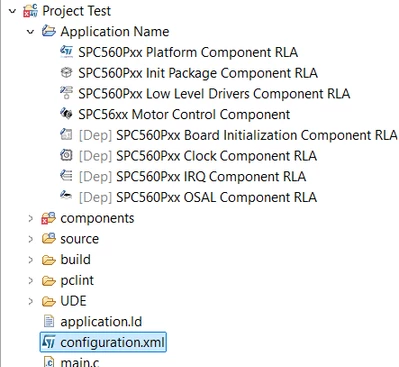
Agga_1-1750735451062.png


I noticed that even though I set up the pins in "SPC56xx Motor Control Component," nothing is updated in the pin MAP view, which is not like in the MCSDK versions. In MCSDK, we set up a lot of things in the GUI, like PWM pins, ADC pins, and so on. After that, we can see it also in the CUBE MX after the code generation. However, SPC5 studio is not like that. I'm not sure whether I'm doing something wrong or not. Please correct me if I'm wrong.

I would like to know if there is any step-by-step document or manual to create a custom motor control project in SPC5 Studio.


Thanks and regards,

Agga

Best answer by Max VIZZINI

Hi,

You should you AutoDevKit Studio and not SPC5Studio. 

Please download it from www.st.com/autodevkitsw 

For a step-by-step approach please refer to the User Manual of our AEK-MOT-3P99081 (or AEK-MOT-3P9908M:(

https://www.st.com/resource/en/user_manual/um2932-getting-started-with-the-aekmot3p99081-cancontrolled-brushless-motor-evaluation-board-based-on-spc560p-and-l9908-stmicroelectronics.pdf

Best Regards,

AutoDevKit Team

1 reply

Max VIZZINI
Max VIZZINIBest answer
Technical Moderator
July 10, 2025

Hi,

You should you AutoDevKit Studio and not SPC5Studio. 

Please download it from www.st.com/autodevkitsw 

For a step-by-step approach please refer to the User Manual of our AEK-MOT-3P99081 (or AEK-MOT-3P9908M:(

https://www.st.com/resource/en/user_manual/um2932-getting-started-with-the-aekmot3p99081-cancontrolled-brushless-motor-evaluation-board-based-on-spc560p-and-l9908-stmicroelectronics.pdf

Best Regards,

AutoDevKit Team