Bwang.3
Associate III
May 27, 2024
Solved

Hello! Ask a question about the debugger!

  • May 27, 2024
  • 1 reply
  • 1167 views

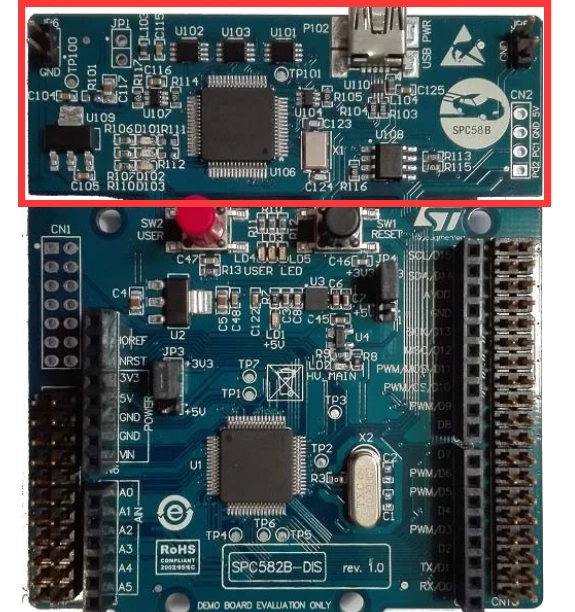
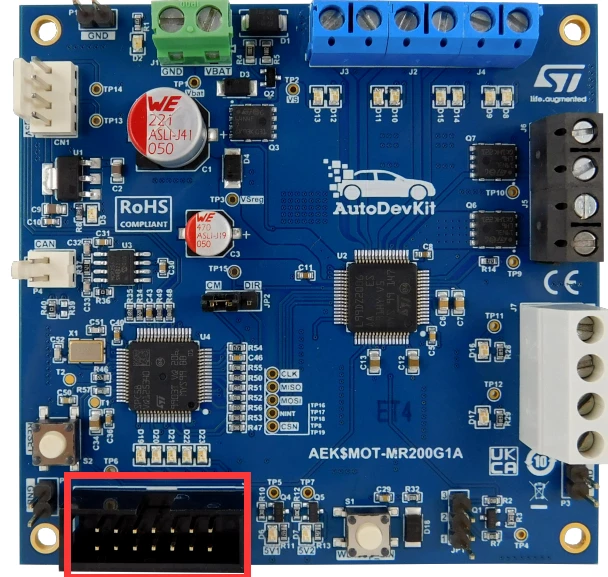
May I use the onboard debugger on the SPC582B-DIS Discovery board to download debugging programs for the AEK-MOT-MR200G1 development board? Can you tell me which specific pins need to be connected? As shown in the following picture!
QQ图片20240527225204.pngQQ图片20240527225444.png

Best answer by Max VIZZINI

Hi Bwang, 

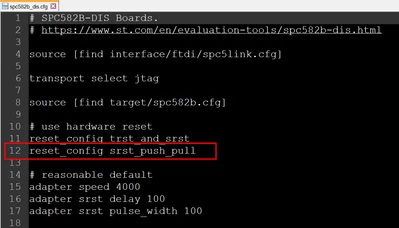
The following changes are required for programming and debugging the AEK-MOT-MR200G1 board with OpenOCD:

step 1: Under C:\AutoDevKitStudio-2.2.1\openocd\scripts\board open the file spc582b_dis.cfg

step2: at line 12 insert: reset_config srst_push_pull as showed in the image below.

MaxVIZZINI_0-1717514331994.png


step3: save the file.

step4: program and debug your code using OpenOCD in AutoDevKIt Studio


Thanks,

AutoDevKit Team

1 reply

Max VIZZINI
Technical Moderator
May 27, 2024

Hi,

This kind of connection is too error prone. We do not suggest it.

Best Regards,

AutoDevKit Team

Max VIZZINI
Max VIZZINIBest answer
Technical Moderator
June 4, 2024

Hi Bwang, 

The following changes are required for programming and debugging the AEK-MOT-MR200G1 board with OpenOCD:

step 1: Under C:\AutoDevKitStudio-2.2.1\openocd\scripts\board open the file spc582b_dis.cfg

step2: at line 12 insert: reset_config srst_push_pull as showed in the image below.

MaxVIZZINI_0-1717514331994.png


step3: save the file.

step4: program and debug your code using OpenOCD in AutoDevKIt Studio


Thanks,

AutoDevKit Team