Associate II
June 25, 2025
Solved

issue in disassembly view

  • June 25, 2025
  • 1 reply
  • 912 views

Hi Team,


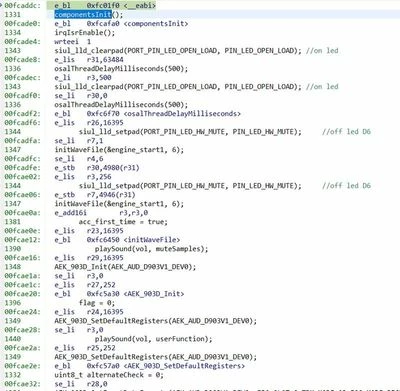
We are facing issue in debugging like dissambly view is not showing correct flow even though we clean build the ws.


code:
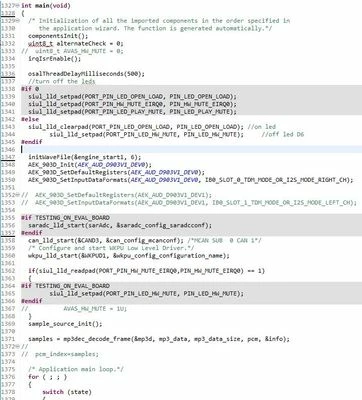
MohitManvar_0-1750840761908.jpeg


disassembly view:

MohitManvar_1-1750840761910.jpeg

Tried methods:
- changed workspace

- clean and rebuild

- changed HW

- changed machine


Let me know how it could be resolved ?
 

Best answer by Max VIZZINI

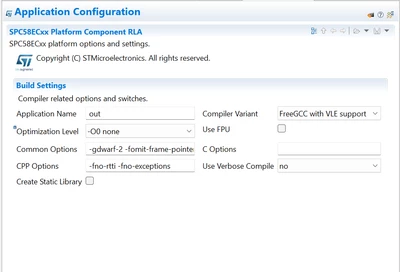
In AutoDevKit click on the platform component of your project and set "-00 none" in the optimization parameters:

MaxVIZZINI_0-1750842563803.png

Clear the project and re-generate everything and finally compile.

Best Regards,

AutoDevKit Team

1 reply

Max VIZZINI
Technical Moderator
June 25, 2025

Hi Mohit,

The generated code depends upon the compiler and not AutoDevKit.

The compiler normally tries to perform code optimization therefore the resulting assembly flow might not be same.

If you want to remove all compiler optimizations you should remove from the compiling options.

Best Regards,

AutoDevKit Team

Associate II
June 25, 2025

can you guide me from where I can do this ?

like reduce optimization ...

Max VIZZINI
Max VIZZINIBest answer
Technical Moderator
June 25, 2025

In AutoDevKit click on the platform component of your project and set "-00 none" in the optimization parameters:

MaxVIZZINI_0-1750842563803.png

Clear the project and re-generate everything and finally compile.

Best Regards,

AutoDevKit Team