Associate III
January 9, 2025
Solved

Issue rised during flasing and debugging

  • January 9, 2025
  • 2 replies
  • 1643 views

Hello Team,

I hope this message finds you well.

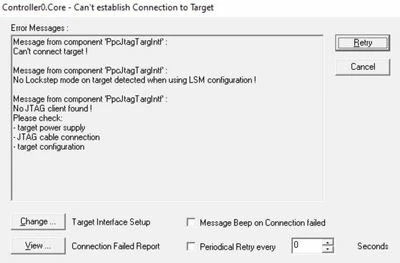
I am reaching out to seek your guidance regarding an issue I am encountering while flashing software. Despite following the standard procedures, I am facing the following errors (as shown in the attached snippet):

1. Getting the following errors shown in the snippet.

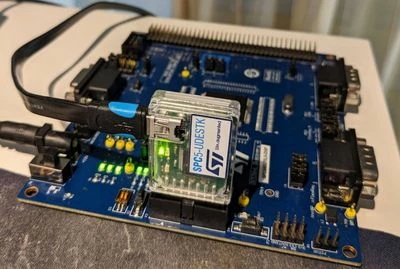
2. Even pressing on the hardware MUTE, reset and STOP/START key, noticed that the LED are not blinking as previous.

This happened sudden in between the flashing process
Aishwaryaum_1-1736424682036.jpeg

Aishwaryaum_2-1736424690531.jpeg

Steps Already Tried:

1. Tried by changing the power supply.

2. Waited some time so that hardware will be cooled.

3. Rebooted my PC.

4. Uninstalled and again installed UDE debugger.

Upon doing all the above trials I am not able to connect debugger.

Request for Assistance:

I would greatly appreciate any advice or solutions on:

  1. Understanding the root cause of these errors.
  2. Steps or methods to resolve these issues.
  3. Any best practices or recommendations to avoid such problems in the future.

Thank you in advance for your support and valuable insights. I look forward to hearing from the community.

Thank You,

Aishwarya


Best answer by ATROI

Hello Aishwaryaum, 

looking the image, you sent, it seems to me that the code you are trying to flash on the board SPC56EL70L5DISP is not compatible with the micro on board (SPC56EL70L5).

Please could you check that the code you are flashing is compatible with the micro?

Thanks,

AutoDevKit  Teams.

2 replies

ATROI
ATROIBest answer
ST Employee
January 13, 2025

Hello Aishwaryaum, 

looking the image, you sent, it seems to me that the code you are trying to flash on the board SPC56EL70L5DISP is not compatible with the micro on board (SPC56EL70L5).

Please could you check that the code you are flashing is compatible with the micro?

Thanks,

AutoDevKit  Teams.

Associate III
January 13, 2025

Hello Atroi,

Thank you for your valuable feedback.

Actually, I have been flashing the same code with some modification since so many months, I had never faced this issue.

Even during time when I got this error, I was flashing the code before and then modified and tried to flash latest version during that time I got this error.

So, I guess code is compatible with the micro on the board and this issue is due to some other reasons.

I appreciate your assistance and valuable input and looking forward to the community's responses.


Thanks 

Aishwarya

ATROI
ST Employee
January 14, 2025

Hello Aishwaryaum, 

below are some steps to try to solve your problem:

1) Try to uninstall and reinstall the USB driver. Under the following path: C:\Program Files\pls\UDE 

    Starterkit 2021\Driver\JtagUsbDriver there are the files UninstallPlsUsbJtagDriver.bat and 

    InstallPlsUsbJtagDriver.bat that have to be executed as administrator.

2) If the issue persists, while press reset button on the board, try to connect with udestk,

    if you can connect, erase the flash. After that, try again to flash your code.

3) To verify that the PC are able, to connect to UDESTK, in the log window verify that the line 5 appears as shown below:

ATROI_0-1736867156405.png


Thanks,

AutoDevKit Team

Associate III
January 15, 2025

Hello Atroi,

Thank you for your valuable feedback.

I have tried all the steps which you have mentioned but getting the same error (shown in the snippet).

I have attached the "Connection_Failed_Report", and I am requesting you to cross check once and let me know in what further ways I can resolve this issue.

Aishwaryaum_1-1736921623626.png

Thank you,

Aishwarya