Siva Sankar Chandika
Associate II
February 10, 2017
Question

Controller0.Core2- Can't establish Connection to Target

  • February 10, 2017
  • 2 replies
  • 3107 views
Posted on February 10, 2017 at 05:46

Hi, we are using Spc5 studio as IDE, UDE STK - 4.8 as Debugger.

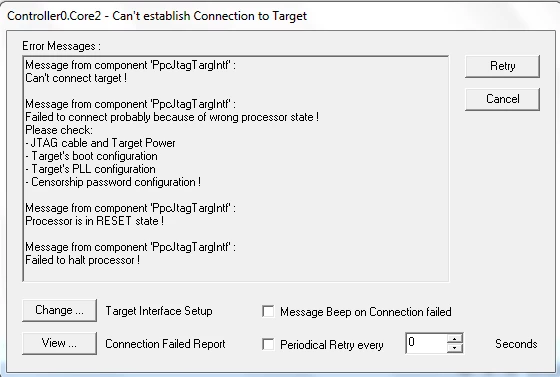
Initially we flashed, debugged and observed output, After that we modified the code and flashed, Disconnected target connection. Then after we are trying to flash we are getting the following error messages and unable to flash.

0690X00000606CSQAY.png

we checked JTAG cable and Target power these are fine, Tried PC restart also still the same status. 

Help us to where we can check Target's boot, PLL and Censorship password configuration, Processor RESET state.  

Please look into this issue ASAP and let us know if we have to do anything else to flash the code.

Thanks in advance.

Looking forward for your response.

    This topic has been closed for replies.

    2 replies

    Erwan YVIN
    ST Employee
    February 10, 2017
    Posted on February 10, 2017 at 10:09

    Hello Siva ,

    You have to install the drivers located in c:\Program Files (x86)\pls\UDE Starterkit 4.8\Driver\JtagUsbDriver\

    PLS Drivers should be installed

    Could you check your device manager ?

    0690X00000606HgQAI.png

             Best regards

                                   Erwan

    Siva Sankar Chandika
    Associate II
    February 10, 2017
    Posted on February 10, 2017 at 14:46

    Hi Erwan Y,

             We already checked  Device manager settings, C drive program files folder these are fine.

    Please help us how to resolve this issue. 

    Thanks for your support.

    Looking forward for your response.

    Erwan YVIN
    ST Employee
    February 13, 2017
    Posted on February 13, 2017 at 10:03

    Hello Siva ,

    You have to check your Target device (cfg file)

    you can try in creating a new workspace debug

    Which target do you use ?

        Best regards

                    Erwab

    Erwan YVIN
    ST Employee
    February 14, 2017
    Posted on February 14, 2017 at 14:32

    Hello Siva ,

    Did you update the censorship password ?

    or maybe your board is in reset escalation.

    try to connect in pushing the reset button.

                   Best regards

                                      Erwan

    Siva Sankar Chandika
    Associate II
    February 15, 2017
    Posted on February 15, 2017 at 06:23

    Hi Erwan Y,

         We are using default configuration (

    censorship password and others are default only) to debug.

    We already tried to connect in pushing the reset button, still the same behaviour. 

    May I know how to find board is in Reset escalation or not.

    Thanks for your support.

    Looking forward for your response.