

SIBIN THOMAS
Associate II
February 8, 2018
Solved

How to disable Censorship on SPC560C50L3

  • February 8, 2018
  • 3 replies
  • 2564 views
Posted on February 08, 2018 at 11:55

Hello Everyone,

   I am working on SPC560C50L3 controller and using UDE STK 4.8 software for loading the firmware. I wanted to enable censorship. After going through the community I was able to get a code to erase shadow flash an enable censorship from below link.

https://community.st.com/0D50X00009XkXR7SAN

I took the SPC560BCxx_RLA Flash Test Application from SPC5 Studio which runs from RAM. I commented CFlash and DFlash testing part along with the Shadow flash locking from the above code. Then I copied the code for enabling the censorship from the above link and build it. Then using the JTAG and UDE STK 4.8 I loaded the code to my MCU step by step using the Debug option. After power on reset, my MCU is running my application code (not the example). But I am not able to update new firmware because JTAG is not connecting to target.

Message from component 'PpcJtagTargIntf' :

Can't connect target !

Message from component 'PpcJtagTargIntf' :

Failed to connect probably because of wrong processor state !

Please check:

- JTAG cable and Target Power

- Target's boot configuration

- Target's PLL configuration

- Censorship password configuration !

Message from component 'PpcJtagTargIntf' :

Processor is in UNKNOWN state !

Message from component 'PpcJtagTargIntf' :

Failed to halt processor !

 I have already tried the censorship unlock feature under xPC56x/xPC57 Options in UDE STK 4.8. I have also tried reversing the password. Password I used is the default password (0xFEEDFACE,0xCAFEBEEF). Did I enable the censorship correctly, or did I miss something. Any suggestion would be helpful.

Regards

SIBIN.

#censorship
    This topic has been closed for replies.
    Best answer by Erwan YVIN
    Posted on February 12, 2018 at 11:16

    Hello Thomas ,

    The Code to enable / disable the censorship is valid.

    it is a PLS Synchro Issue

    • Try to connect you shoudl have : Message from component 'PpcJtagTargIntf' :
    • Power-off the power supply
    • when clicking on Retry , switch-on te power-supply


    i can take the hand and flash again.

    0690X00000609hNQAQ.png

                   Best regards

                              Erwan

    3 replies

    Erwan YVIN
    ST Employee
    February 9, 2018
    Posted on February 09, 2018 at 09:56

    Hello Sibin ,

    Yes , the code should work.

    Have you enabled 0xFEEDFACE,0xCAFEBEEF in your debug configuration ?

    0690X00000609bgQAA.png

    Could you try in the same time ,

    • pushing the reset button of your board & Click on Connect with PLS to bypass the Reset Escalation

    Have you got Lautechbach T32 ?

                    Best regards

                                       Erwan

    SIBIN THOMAS
    Associate II
    February 10, 2018
    Posted on February 10, 2018 at 16:17

    Hi Erwan

    Can you please let me know where can I find 'Connect with PLS'. I tried with pushing the reset button along with the 'Retry' option which comes up when 'Connect target system' is selected under the 'File' in toolbar, but the result was same.

    Regards

    SIBIN

    Erwan YVIN
    Erwan YVINBest answer
    ST Employee
    February 12, 2018
    Posted on February 12, 2018 at 11:16

    Hello Thomas ,

    The Code to enable / disable the censorship is valid.

    it is a PLS Synchro Issue

    • Try to connect you shoudl have : Message from component 'PpcJtagTargIntf' :
    • Power-off the power supply
    • when clicking on Retry , switch-on te power-supply


    i can take the hand and flash again.

    0690X00000609hNQAQ.png

                   Best regards

                              Erwan

    SIBIN THOMAS
    Associate II
    February 14, 2018
    Posted on February 14, 2018 at 08:53

    Hello Erwan ,

    Thank you for your reply.

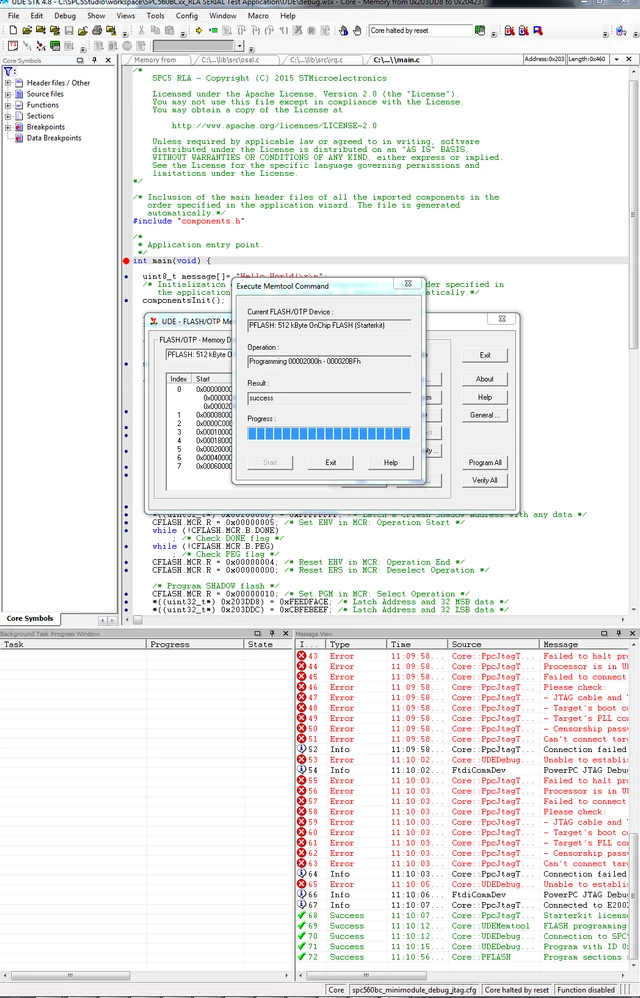
    I tried to follow your instructions and if I power ON my module soon after pressing ''Retry'' option, I am able to connect to SPC560C50 target. But when I select my hex file or even try to program the module, it is giving the error as shown below.

    0690X00000609epQAA.png

    I think the UDE STK software is trying to reset my module several times while trying to program. I was able to erase my flash one time. After that I am not able to erase or program it again.

    Regards

    Thomas

    Erwan YVIN
    ST Employee
    February 14, 2018
    Posted on February 14, 2018 at 09:14

    Hello Thomas ,

    Good news , your target is not locked.

    you should check in your PLS Debug options

    'Reset target when connect'

                           Best regards

                                          Erwan

    SIBIN THOMAS
    Associate II
    February 16, 2018
    Posted on February 16, 2018 at 17:41

    Hello Erwan ,

    I tried every options in the PLS Debug options, still I am not able to load any firmware to the MCU. I can only erase my flash when I power on my MCU just after clicking the Retry option. I tried it on another controller also, the result is same.

    When I try to select my hex file, I get the below warnings.

    0690X00000609gtQAA.png

    what does the warning at 44 mean ? when I try to program, errors at 50 and 51 are occurring.

    Regards

    Thomas.