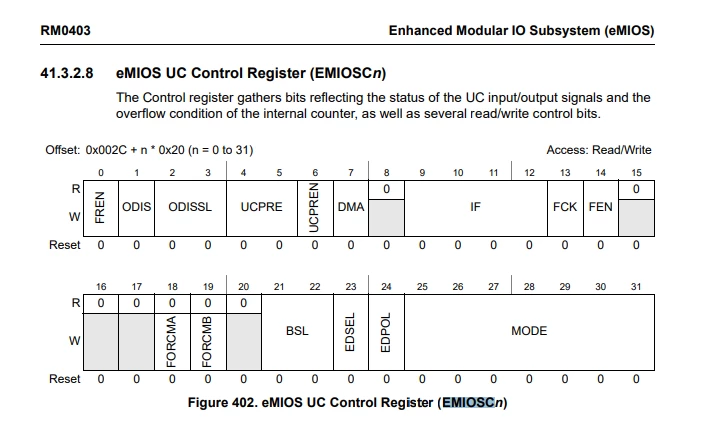
How to setup IPWM on channels UC13, UC14 and UC15 with Low Level Driver component?
Hi everyone,
I am using an AEK-MCU-C1MLIT1 development kit to in and output PWM, which work at least for EMIOS0 channel 0 output on pin PD15 of the SPC582B60E1 processor.
Nevertheless, it is not easy to comprehend, which group and channel number in the SPC5Studio Low Level Driver Wizard corresponds to the UC0-UC31 pins of the processor. According to RM0403 on page 752, the different channels support different modes.
Here as a picture for easy reference:
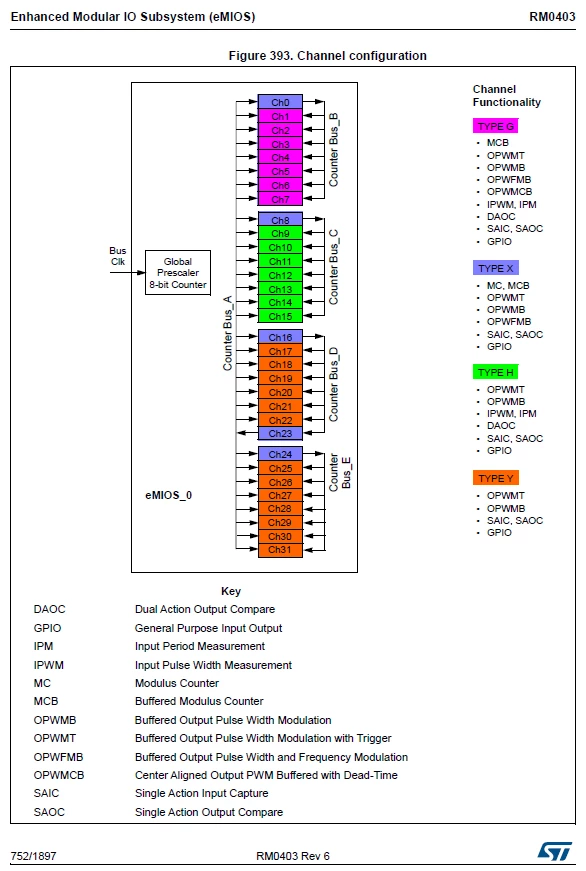 So far so good. That's why I planned using pins UC13,UC14 and UC15 as IPWM inputs and using UC16 as OPWFMB.
In the configuration wizard groups 1-3 only allow OPWMB or OPWMT mode. And on the group 0 channels, IPWM is not a selectable option.
So my questions:
- Is there a way to setup UC13,14 and 15 in IPWM mode with the LLD tool in SPC5Studio?
- If not, how is the correct order of steps to manually configure the eMIOS channels accordingly?
- Is it possible to set UC16 as output PWM mode while the other UCs are configured as IPWM?
- In the PWM configuration seetings, each group has channel number 0 to 6. How does that correspont to UC0-UC31?
- How do groups 0, 1-3 correspond to the picture above?
After reading the RM0403 and the datasheet of the processor itself, I still don't know how to set it up or if that is even possible.
Thanks in advance for an answer.
Best regards,
Christopher Seifert