
VGani.1
Associate III
July 2, 2021
Solved

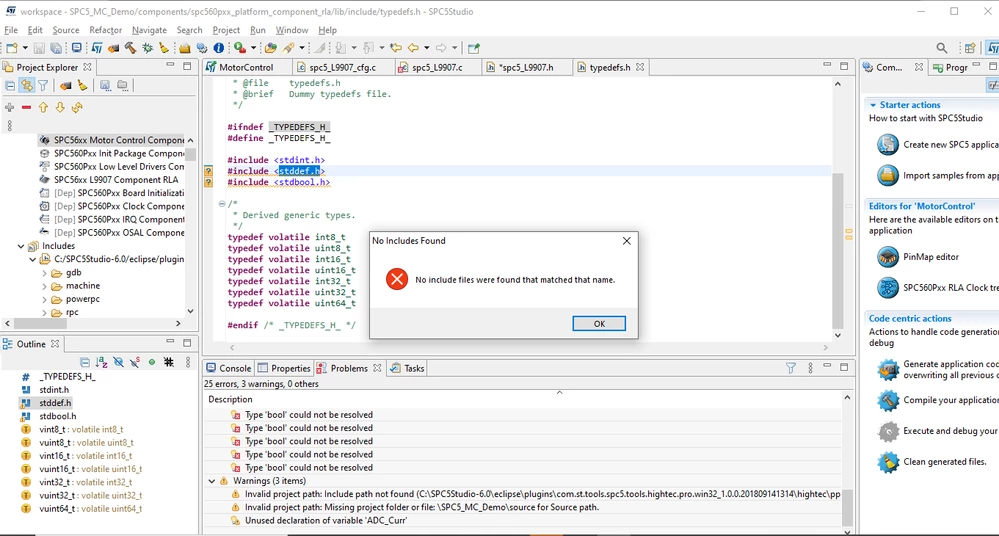
In motor control applications, , are not defined. How to include these libraries??
  • July 2, 2021
  • 3 replies
  • 1123 views

0693W00000BcdERQAZ.png

    This topic has been closed for replies.
    Best answer by PChia.2237

    Look what you have include.

    One time folder us under gnu.gcc and other is under hightec. These are 2 different compilator. Dont mix files.

    Remove folder under hightec and search file (in windows) under

    C:\SPC5Studio-6.0\eclipse\plugins\com.st.tools.spc5.tools.gnu.gcc.ppcvle.win32_4.9.4.20200908161514\

    The you find the files that you need, the include the folder.

    ok?

    3 replies

    PChia.2237
    Senior
    July 5, 2021

    Hi, i am newbee too, but i have solve 'uint32_t, 'uint16_t' 'uint8_t doing:

    Right click on SPC5XXXXXTestApplication ->Properties

    Under C/C++ General->Path and Symbols

    Selec Tab Includes, then GNU C->Add..

    write C:\SPC5Studio-6.0\eclipse\plugins\com.st.tools.spc5.tools.gnu.gcc.ppcvle.win32_4.9.4.20200908161514\toolchain\lib\gcc\powerpc-eabivle\4.9.4\include

    VGani.1
    VGani.1Author
    Associate III
    July 5, 2021

    Hi Chia,

    I already have these includes in my project. But one include shows error which you can see from the attachment. Can you help me out?

    0693W00000Bcn2pQAB.jpg

    PChia.2237
    PChia.2237Best answer
    Senior
    July 5, 2021

    Look what you have include.

    One time folder us under gnu.gcc and other is under hightec. These are 2 different compilator. Dont mix files.

    Remove folder under hightec and search file (in windows) under

    C:\SPC5Studio-6.0\eclipse\plugins\com.st.tools.spc5.tools.gnu.gcc.ppcvle.win32_4.9.4.20200908161514\

    The you find the files that you need, the include the folder.

    ok?
