
x7yu
Associate
October 17, 2020
Solved

In the CAN Bus sample code, PIN73 and 74 can be set to output SIUL only. However, when I try in the PIN Map, there is no GIOxx SIUL Option for me to select. How to achieve that?
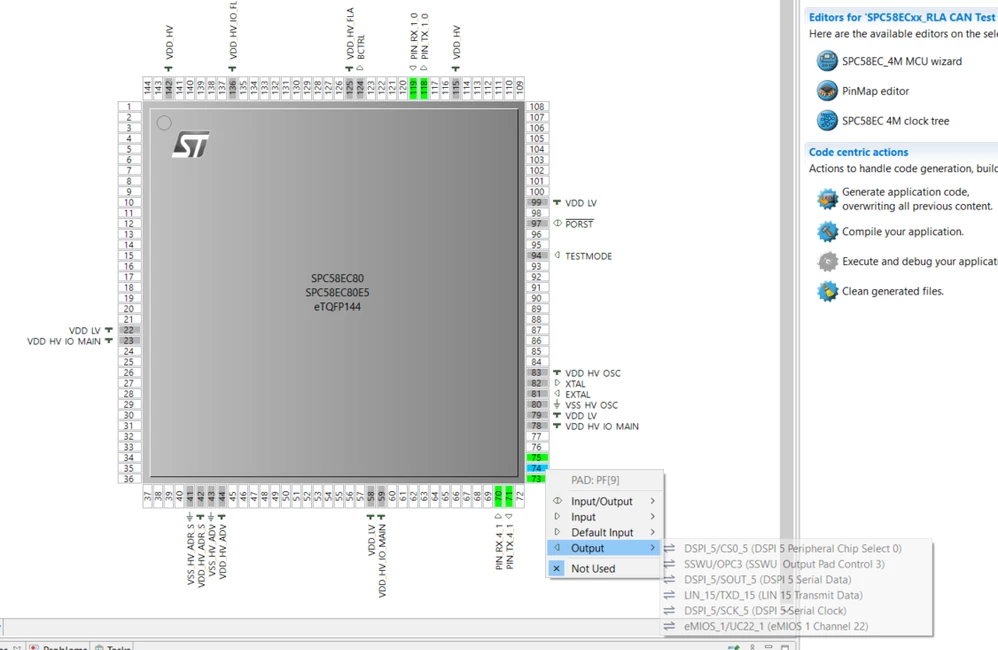

  • October 17, 2020
  • 4 replies
  • 2179 views

0693W000004K7ZiQAK.png

    This topic has been closed for replies.
    Best answer by Angelo Castello

    Hello,

    in order to change the PINs setting enabled by means of Pinmap wizard you need to save the change and close the Pinmap view. After that, the main application tab must be also saved in order the changes comes saved into the project.

    So that:

    1. click on Board Initialization Component of your project
    2. click on Pins List into the Outline view
    3. click on the pin do you want to change options
    4. see picture siul_1
    5. a new view on the pin option will be displayed
    6. change whats do you want
    7. see picture siul_2

    Save everything and regenerate the code to have in place the new settings.

    Hoping to have meet your request please let me know.

    Regards,

    Angelo

    4 replies

    Angelo Castello
    Angelo CastelloBest answer
    ST Employee
    January 18, 2021

    Hello,

    in order to change the PINs setting enabled by means of Pinmap wizard you need to save the change and close the Pinmap view. After that, the main application tab must be also saved in order the changes comes saved into the project.

    So that:

    1. click on Board Initialization Component of your project
    2. click on Pins List into the Outline view
    3. click on the pin do you want to change options
    4. see picture siul_1
    5. a new view on the pin option will be displayed
    6. change whats do you want
    7. see picture siul_2

    Save everything and regenerate the code to have in place the new settings.

    Hoping to have meet your request please let me know.

    Regards,

    Angelo

    Angelo Castello
    ST Employee
    January 18, 2021

    ..

    PSing.5
    Associate II
    January 12, 2022

    @Angelo Castello​ Your solution worked like a charm but how is one supposed to know this? Is there some documentation I missed?

    Angelo Castello
    ST Employee
    January 12, 2022

    Hello,

    you can follow two roads to acquire these concepts:

    • look at the documentation present into SPC5Studio itself clicking on: Help -> Help Contents
    • look at youtube SPC5Studio available demos and applications.

    Hoping this help you.

    Regards