

Yannek
Associate III
June 13, 2020
Solved

Incoherence in clock tree for SPC582 in SPC5Studio

  • June 13, 2020
  • 4 replies
  • 2619 views

Hello,

I found unexpected behaviour in clock tree: when I change CGM_SC_DC2 divider - it affects another line in the diagram (the one with "FBRIDGE_CLK"). And when I change CMG_SC_DC3 divider - it affects the line above ("PBRIDGE_CLK").
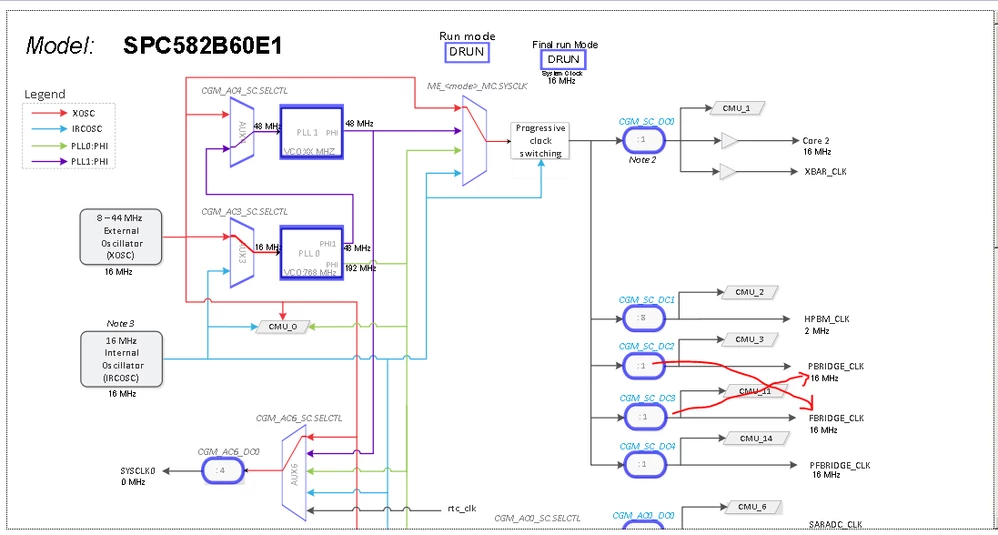
0693W000001qeTQQAY.png

Best,

Yannek

    This topic has been closed for replies.
    Best answer by zambrano.luigi

    Hi Yannek,

    you are right. Thanks for the report. The issue will be fixed with the next update of SPC5Studio.

    Regards,

    Luigi

    4 replies

    zambrano.luigi
    zambrano.luigiBest answer
    ST Employee
    June 15, 2020

    Hi Yannek,

    you are right. Thanks for the report. The issue will be fixed with the next update of SPC5Studio.

    Regards,

    Luigi

    DKuma.3
    Associate II
    December 14, 2021

    Hi Luigi,

    Unfortunately the issue is not fixed yet.

    Regards

    D.Kumar

    zambrano.luigi
    ST Employee
    December 14, 2021

    Hi,

    we have already solved the issue. Please, could you check if there are some pending updates for your installation of SPC5Studio (Help -> Check for Updates). In particular, if you select Help -> About SPC5Studio -> Installation Details, could you check that the feature SPC5-RLA_SPC582Bxx_Support_Feature is updated at least to version 1.15.0?

    Regards,

    Luigi

    DKuma.3
    Associate II
    December 15, 2021

    Hi,

    I have checked the version is 1.16.1

    The issue still exists.

    Regards,

    D.Kumar

    zambrano.luigi
    ST Employee
    December 15, 2021

    Hi,

    I'm sorry, I have your same version, but the issue is not present anymore: changing the value of DC2, only the value of PBRIDGE_CLK will change, instead, changing the value of DC3, only the value of FBRIDGE_CLK will change. Could you try to import in your workspace another project for SPC582B e verify again? If the issue is still present, you could try to re-install SPC5Studio e update it to the last version.

    Regards,

    Luigi

    DKuma.3
    Associate II
    December 15, 2021

    Hi,

    You are right. I checked with my project which was created with older version of SPC5 Studio. Therefore the configuration xml was older version.

    Newly created project does not have this problem.

    Thank you for clear and detailed answer.

    Regards,

    D.Kumar

    zambrano.luigi
    ST Employee
    December 15, 2021

    Great news. You are welcome.

    Regards,

    Luigi