srosen
Associate
November 27, 2014
Solved

Problems with UDE visual platform

  • November 27, 2014
  • 7 replies
  • 6226 views
Posted on November 27, 2014 at 15:02

Hello,

It is a while that I am working on the SPC5Studio with the SPC560B-DIS discovery board.

I always had problems connecting to the board using the USB connection.

Each time that I couldn't connect, I uninstalled the UDE and re installed it. Not very convenient but it worked.

Now nothing works. Can you advice?

error report:

Message from component 'PpcJtagTargIntf' :

Can't connect target !

Message from component 'PpcJtagTargIntf' :

No JTAG client found !

Please check:

- target power supply

- JTAG cable connection

- target configuration

Message from component 'UDEDebugServer' :

Unable to establish connection . To correct the situation, check configuration file entries and try again.

I am using windows 8.1

SPC5Studio ver 3.0.0

UDE version 4.02.07

Thank you,

Shachar
    This topic has been closed for replies.
    Best answer by Erwan YVIN

    Hello,

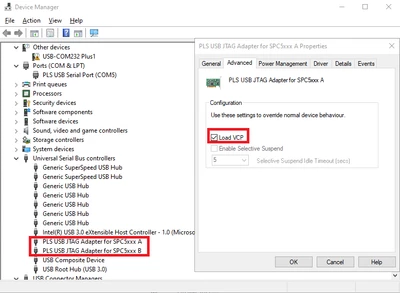
    to enable VCP you should enable it on device manager cf screenshot

    ErwanYVIN_0-1692952653082.png

    if PLS USB Jtag is not present, maybe your board is ko or in reset escalation.

    Do not hesitate to update your PLS Debugger

    Download SPC5-UDESTK (pls-mc.com)

                              Best Regards

                                          Erwan


    7 replies

    Erwan YVIN
    ST Employee
    November 27, 2014
    Posted on November 27, 2014 at 15:23

    Hello Shachar ,

    Your driver PLS USB/JTAG (FTDI) is not installed.

    The driver is present in the following directory


    c:\Program Files (x86)\pls\UDE 4.2\Driver\

    Do not forget to enable VCP (Virtual Com Port)

       Best Regards

                        Erwan

    Erwan YVIN
    ST Employee
    January 5, 2015
    Posted on January 05, 2015 at 14:34

    Hello Rosen ,

    Cf Screenshots Attached

    In device manager,

    1) Check if PLS USB JTAG Adapter for SPC5XXX A / B is well present

    If not , reinstall from thec:\Program Files (x86)\pls\UDE 4.2\Driver\

    2) From Drivers Properties , Load VCP (Virtual Com Port)

    3) Unplug USB cable and replug USB Cable

    4) In Device Manager, You should see PLS USB Serial Port (COMX/COMY)

    I have checked on Windows 8. it is working well.

    Best regards

    Erwan

    ________________

    Attachments :

    Screenshot_-_05_01_2015___11_30_07.png : https://st--c.eu10.content.force.com/sfc/dist/version/download/?oid=00Db0000000YtG6&ids=0680X000006qV5A&d=%2Fa%2F0X0000000bnr%2Fqly7m75_xxwKIr0FffNo7Ospz0Li.15_IpA.OvXDoLM&asPdf=false

    Screenshot_-_05_01_2015___11_30_30.png : https://st--c.eu10.content.force.com/sfc/dist/version/download/?oid=00Db0000000YtG6&ids=0680X000006qUOV&d=%2Fa%2F0X0000000bnj%2FMOWSYyXLlpPeaB6r0htS6e6ns4oKV2nkU4ZiQpUms8s&asPdf=false

    Screenshot_-_05_01_2015___11_30_53.png : https://st--c.eu10.content.force.com/sfc/dist/version/download/?oid=00Db0000000YtG6&ids=0680X000006qUrD&d=%2Fa%2F0X0000000bnp%2FdJKpaF_dMbD8eDnt6L7XUdS7orz43TKA4Wpuj91YYaw&asPdf=false
    srosen
    srosenAuthor
    Associate
    December 29, 2015
    Posted on December 29, 2014 at 12:14

    Hello Erwan,

    It has been a while, now i bought 2 more boards and unfortunately I am facing the same difficulties  as i had with my previous board.

    Just to remind you,

    The board is working fine but i can not access it with the UDE.

    the set up is on an SPC560B-DIS board with SPC560B54L5 controller.

    12V adapter is connected to the power supply jack.

    A miniUSB cable connected to the boards and to my LapTop.

    My LapTop is working with Windows 8.1

    I am using SPC5Studio version 3.0.0

    For debugging I am using the PLS UDE version 4.02.07 with the free license for up to 125K.

    The problem I am facing is that at first (first 2 days) I managed to build and run my application on the board.

    Then I started to get problems connecting to the board.

    Then I came to a point that I can no longer connect to the board but my application is still running.

    My questions are

    1. Why is it starting OK for a while (1-3 days) and then stop connecting?

    2. Is there anything to do? 

    3. What do you mean by enabling VCP?

    regards,

    Shachar

    Associate
    July 20, 2023

    Is the issue resolved or not? We are facing the same problem, so kindly help us with your solution @srosen @Erwan YVIN 

    Erwan YVIN
    Erwan YVINBest answer
    ST Employee
    August 25, 2023

    Hello,

    to enable VCP you should enable it on device manager cf screenshot

    ErwanYVIN_0-1692952653082.png

    if PLS USB Jtag is not present, maybe your board is ko or in reset escalation.

    Do not hesitate to update your PLS Debugger

    Download SPC5-UDESTK (pls-mc.com)

                              Best Regards

                                          Erwan


    Associate II
    August 26, 2024

    I am using Windows 11 with UDESTK 5.02.04 Build 8310 version for my SPC560P50. I even enabled Load VCP and tried, but still the board is not connecting. I did verify all the pins on the board and the JTAG connector. 

    I did reinstall the drivers as well. 

    Error:

    Message from component 'PpcJtagTargIntf' :
    Can't connect target !

    Message from component 'PpcJtagTargIntf' :
    No JTAG client found !
    Please check:
    - target power supply
    - JTAG cable connection
    - target configuration


    asn_0-1724681463346.png


    AN.4
    Associate II
    December 11, 2023

    Hello,

    I am using SPC574S4 & UDE debugging tool on SPC studio 6.0.

    I am getting below error message on windows 11 machine


    Message from component 'PpcJtagTargIntf' :
    Can't connect target !

    Message from component 'PpcJtagTargIntf' :
    Failed to open communication channel !

    Message from component 'FtdiCommDev' :
    Failed to open FTDI device driver !

    Message from component 'UDEDebugServer' :
    Unable to establish connection . To correct the situation, check configuration file entries and try again.


    AN4_0-1702289768528.png


    When I connect EVAL board through mini usb port, device manger shows USB serial port & not PLS USB/JTAG adapter

    AN4_1-1702289919649.png


    Please suggest solution.

    Also


    xqing.1
    Associate II
    May 18, 2024

    i have meet the same problem.  enable VCP you should enable it on device manager  the way also cannot work!!!

    why Failed to open FTDI device driver !   my driver is ok!!!


    Message from component 'PpcJtagTargIntf' :
    Can't connect target !

    Message from component 'PpcJtagTargIntf' :
    Failed to open communication channel !

    Message from component 'FtdiCommDev' :
    Failed to open FTDI device driver !

    Message from component 'UDEDebugServer' :
    Unable to establish connection . To correct the situation, check configuration file entries and try again.