Wilhelm Bairlein
Associate
January 8, 2018
Solved

Processor is in unknown state!

  • January 8, 2018
  • 1 reply
  • 1316 views
Posted on January 08, 2018 at 16:10

hello everybody,

we use the SPC56EL70 discovery board with Spc5 studio as IDE and UDE STK - 4.8 as Debugger.

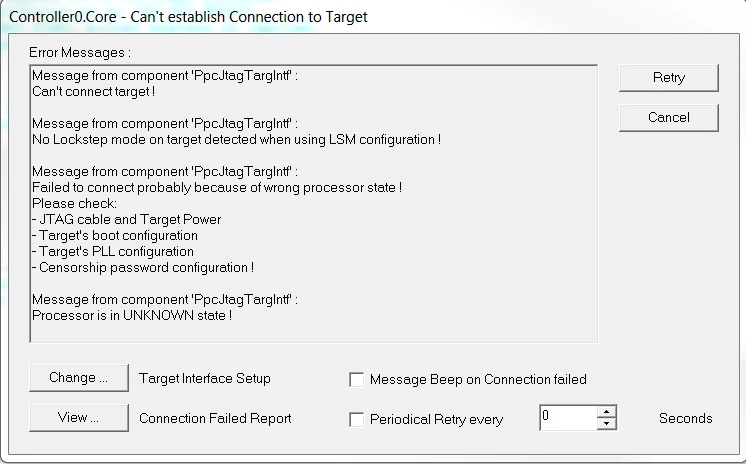
Today we got the following failure message - please see the following picture.

0690X00000609O6QAI.png

The only thing we changed was the additional usage of the A/D-port E12. After downloading the extended code we got the above failure message. Now we can�t flash the SPC with another source code.

Please let us know how we can put the SPC back into operation.

Thanks in advance.

#processor-in-unknown-state
    This topic has been closed for replies.
    Best answer by david tomsa
    Posted on January 09, 2018 at 06:59

    Hi,

    you can try the following: Interface Setup -> Connect and choose under connect: Keep application running. 

    1 reply

    david tomsa
    david tomsaBest answer
    Associate III
    January 9, 2018
    Posted on January 09, 2018 at 06:59

    Hi,

    you can try the following: Interface Setup -> Connect and choose under connect: Keep application running. 

    Erwan YVIN
    ST Employee
    January 9, 2018
    Posted on January 09, 2018 at 10:10

    Hi ,

    Yes , in LSM (Lock Step Mode) , you should update your debug configuration

    Wilhelm Bairlein
    Associate
    January 9, 2018
    Posted on January 09, 2018 at 15:15

    Hi Erwan,

    how can I update the debug configuration respectively which settings do you mean?