

Rassom
Associate II
November 11, 2021
Solved

SPC5Studio 6.0 - make not found in PATH

  • November 11, 2021
  • 1 reply
  • 1949 views

First time building a sample project after installation of SPC5Studio 6.0 + autodevkit + MCTK_LIB and got this:

22:10:13 **** Incremental Build of configuration Default for project SPC560Pxx_RLA AEK_MOT_3P99081_3Phase_Motor_Control_via_CAN ****

make all 

Cannot run program "make": Launching failed

Error: Program "make" not found in PATH

PATH=[C:/SPC5Studio-6.0/eclipse/jre/bin/server;C:/SPC5Studio-6.0/eclipse/jre/bin; ...
    This topic has been closed for replies.
    Best answer by Erwan YVIN

    Hello Rassom ,

    I think that you have broken you environment variable or your settings.

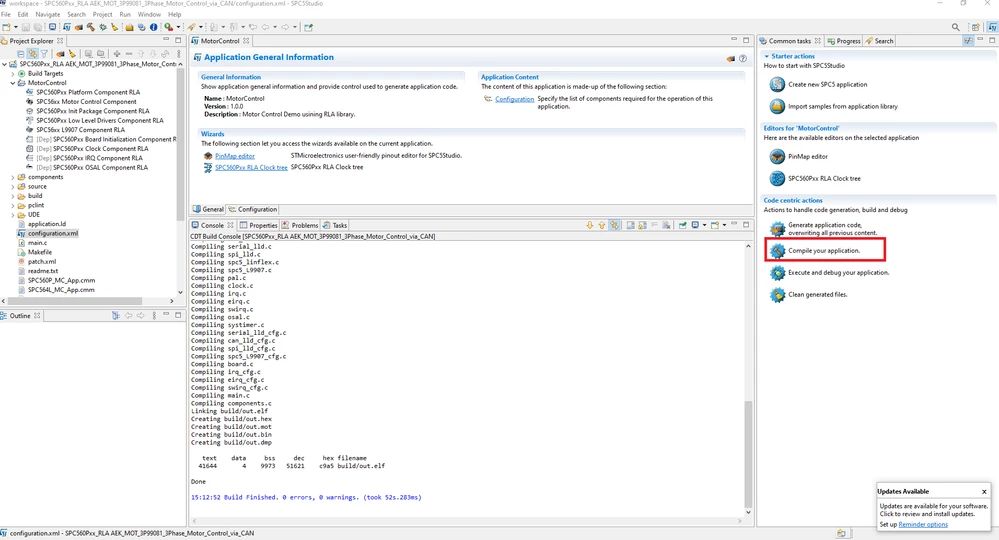
    Could you try the button Compile your application on the right not the CDT Button ?

    (cf screenshot)

    make should be installed in the gnutools feature.

    0693W00000GXOoAQAX.png 

    Best Regards

    Erwan

    1 reply

    Erwan YVIN
    Erwan YVINBest answer
    ST Employee
    November 12, 2021

    Hello Rassom ,

    I think that you have broken you environment variable or your settings.

    Could you try the button Compile your application on the right not the CDT Button ?

    (cf screenshot)

    make should be installed in the gnutools feature.

    0693W00000GXOoAQAX.png 

    Best Regards

    Erwan

    Rassom
    RassomAuthor
    Associate II
    November 13, 2021

    Thank you, that works.

    I regularly use STMCubeIDE on a different computer. This one is a fresh Windows 10 installation. In the last few days, I have been trying to get AEK-MOT-3P99081 up and running. I finally got it working. However, my experience with SPC5Studio has been very poor so far compared to CubeIDE and Nucleo series.