

Chamber Ling
Associate
January 15, 2018
Solved

SPC5Studio build failure, too

  • January 15, 2018
  • 2 replies
  • 3374 views
Posted on January 15, 2018 at 18:20

My problems same as 

https://community.st.com/message/10560


The SPC5Studion was upgraded to 5.7.1

But I selected SPC56-DISCOVERY(BOARD) , DRIVERS --STM 

My toolchains is the GNU make builder of spc5studio default.

Keep the example codes from code generation...

it is giving following errors,


- Symbol 'NULL' could not be resolved


- Symbol 'uint32_t' could not be resolved


- Symbol 'int32_t' could not be resolved


- Symbol 'uint16_t' could not be resolved


- Symbol 'uint8_t' could not be resolved

...


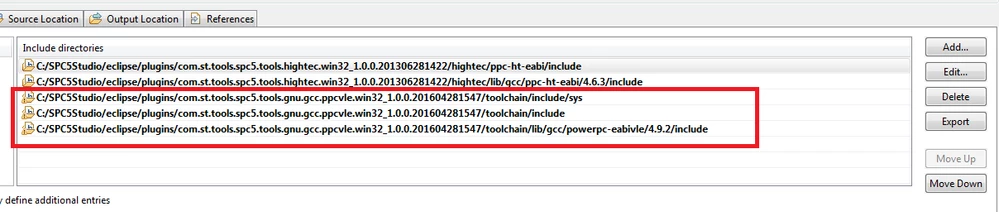
I was tried to set 

in


C/C++ general ==> Preprocesseur Include

It cannot be to solved these problems.

Can you help me resolve these?

Thanks in advance for all your help.

Chamberplus


#spc56
    This topic has been closed for replies.
    Best answer by Erwan YVIN
    Posted on January 16, 2018 at 09:59

    Hello Chamber ,

    It is not a build failure.

    it is just a configuration issue on CDT perspective on your SPC5Studio project on the symbols synchronization.

    https://stackoverflow.com/questions/37466808/type-uint32-t-could-not-be-resolved


    your should update your configuration in GNU C not GNU C++.

    0690X00000609OVQAY.png

              Best regards

                                        Erwan

    2 replies

    Chamber Ling
    Associate
    January 16, 2018
    Posted on January 16, 2018 at 09:13

    I tried to solve it myself, and I did it.

    Share my settings

    Both of GNU C and GNU C++ are same setting. 

    0690X00000604GMQAY.jpg0690X00000604DAQAY.jpg
    Erwan YVIN
    Erwan YVINBest answer
    ST Employee
    January 16, 2018
    Posted on January 16, 2018 at 09:59

    Hello Chamber ,

    It is not a build failure.

    it is just a configuration issue on CDT perspective on your SPC5Studio project on the symbols synchronization.

    https://stackoverflow.com/questions/37466808/type-uint32-t-could-not-be-resolved


    your should update your configuration in GNU C not GNU C++.

    0690X00000609OVQAY.png

              Best regards

                                        Erwan

    Chamber Ling
    Associate
    January 17, 2018
    Posted on January 17, 2018 at 04:44

    Erwan

    OK. I got it !

    I will exactly update my configuration in GNU C.

    Thanks

    Chamber