

hasankaynar
Associate
September 8, 2021
Solved

SPC5Studio - No such file or directory

  • September 8, 2021
  • 2 replies
  • 1186 views

Hi,

I'm getting a lot of errors in SPC5Studio. If I use it with main.c without separating the library directory I'm working in, I don't have a problem. But when I want to separate the libraries, it doesn't work like an ordinary eclipse. Likewise, I don't have any problems with STM32CubeIDE, but SPC5Studio gives a lot of errors. The errors I get are:

make -j8 all

Compiling main.c

main.c:4:21: fatal error: nextion.h: No such file or directory

#include "nextion.h"

^

compilation terminated.

make: *** [components/spc560bxx_platform_component_rla/lib/rsc/rules.mk:137: build/obj/main.o] Error 1

"make -j8 all" terminated with exit code 2. Build might be incomplete.

For example, when I write the library I have reserved as nextion.h directly into main, it works. I will share with you the settings I made and the library I created.
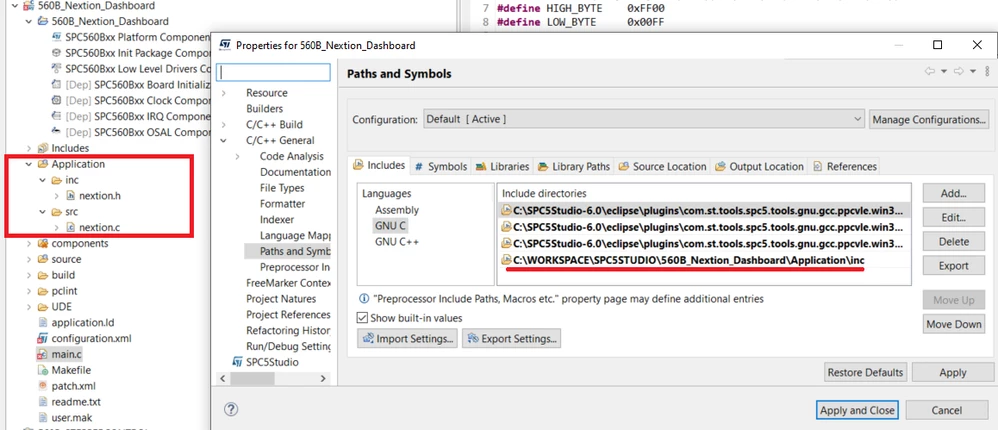
0693W00000DmXMSQA3.png 

Regards.

    This topic has been closed for replies.
    Best answer by Erwan YVIN

    Hello ,

    SPC5Studio test application does not use CDT Settings.

    i recommend to add the include library or source in user.mak. (nextion.c nextion.h)

    # List of all user C source files
    U_C_SRC = ./main.c
     
    # List of all user C++ source files
    U_CPP_SRC =
     
    # List of all user ASM source files
    U_ASM_SRC =
     
    # List all user C define here, like -D_DEBUG=1
    UDEFS =
     
    # Define ASM defines here
    UADEFS =
     
    # List all user directories here
    UINCDIR =
     
    # List the user directory to look for the libraries here
    ULIBDIR =
     
    # List all user libraries here
    ULIBS =

    Best Regards

    Erwan

    2 replies

    Erwan YVIN
    Erwan YVINBest answer
    ST Employee
    September 8, 2021

    Hello ,

    SPC5Studio test application does not use CDT Settings.

    i recommend to add the include library or source in user.mak. (nextion.c nextion.h)

    # List of all user C source files
    U_C_SRC = ./main.c
     
    # List of all user C++ source files
    U_CPP_SRC =
     
    # List of all user ASM source files
    U_ASM_SRC =
     
    # List all user C define here, like -D_DEBUG=1
    UDEFS =
     
    # Define ASM defines here
    UADEFS =
     
    # List all user directories here
    UINCDIR =
     
    # List the user directory to look for the libraries here
    ULIBDIR =
     
    # List all user libraries here
    ULIBS =

    Best Regards

    Erwan

    hasankaynar
    Associate
    September 9, 2021

    Hello,

    I made the user.mak file as you said, but it still doesn't see the library. For example, I opened a led project and I include it, and I get an error. Can you post a sample project with an external library? Thanks a lot for your support.

    0693W00000DmdkVQAR.jpg 

    Best Regards