
Associate III
September 11, 2024
Solved

SPI Communication ( Single Master Multiple Slave)

  • September 11, 2024
  • 3 replies
  • 8447 views

Dear Community,

I am working on an SPI-based setup where I have one SPI master and four SPI slaves, each connected to the master via their respective Slave Select (SS) lines. The configuration for the SPI master and the chip select lines is set up using SPC5 Studio, with each slave having a separate SPI configuration.

I am using the following function to start SPI communication with each slave:


void spi_lld_start(SPIDriver *spip, SPIConfig *config);

and I'm using this like this

spi_lld_start(&SPID2, &config1);
spi_lld_start(&SPID2, &config2);
spi_lld_start(&SPID2, &config3);
spi_lld_start(&SPID2, &config4);


he challenge arises when I need to start all four SPI slaves simultaneously. Currently, I need to pass a different configuration to this function for each slave. However, when I start one slave, the previous one stops working, as the SPI driver is reconfigured for the new slave.

In my use case, each slave has a watchdog bit that needs to be toggled periodically to keep the slave in normal operation. This necessitates keeping all four slaves active in parallel, but I am unsure how to achieve this with the spi_lld_start function, as it seems to deactivate the previous configuration when a new one is applied.

Is there a way to keep all four slaves running in parallel or to manage the SPI communication in such a way that all slaves remain active? Any guidance or suggestions would be highly appreciated.

Thank you in advance!

Example Setup:
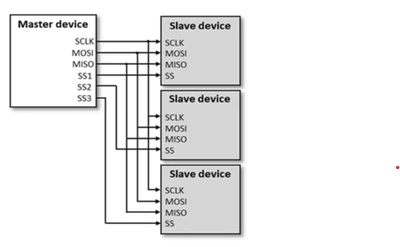
Ali5_0-1726036518024.png

Best answer by Peter BENSCH

SPI can only communicate with one slave at a time. In your example, the select lines SS1, SS2, SS3 each select which slave device you currently want to talk to. You can therefore only talk to the slaves in your example one after the other.

If you want to communicate in parallel via SPI, you must use a corresponding number of SPI ports, i.e. three SPI ports in your example.

Hope that helps?

Regards
/Peter

3 replies

Peter BENSCH
Peter BENSCHBest answer
Technical Moderator
September 11, 2024

SPI can only communicate with one slave at a time. In your example, the select lines SS1, SS2, SS3 each select which slave device you currently want to talk to. You can therefore only talk to the slaves in your example one after the other.

If you want to communicate in parallel via SPI, you must use a corresponding number of SPI ports, i.e. three SPI ports in your example.

Hope that helps?

Regards
/Peter

Ali5Author
Associate III
September 11, 2024

Hi Peter,

Thank you for the detailed explanation, it definitely helps!

Could you please elaborate a little more on this part: "If you want to communicate in parallel via SPI, you must use a corresponding number of SPI ports, i.e. three SPI ports in your example." Are you suggesting that to communicate with multiple SPI devices simultaneously, I would need a separate SPI port for each device (MOSI / MOSI and CLK), or is there another approach I could consider?

Thanks again for your help!

Peter BENSCH
Technical Moderator
September 11, 2024

Correct, for parallel access you need separate SPI ports, i.e. separate MOSI, MISO and CLK.

Ali5Author
Associate III
September 11, 2024

I appreciate your response, it helps me a lot.

Thanks again!