

lclor
Associate III
July 11, 2024
Solved

StellarStudio.AI GUI

  • July 11, 2024
  • 1 reply
  • 1057 views

hello,


I had read the "um3201-getting-started-with-stellar-studio-ai-plugin-for-artificial-intelligence-ai-stmicroelectronics" document, where can I find the AI Editor software to be launched like in page 5 ?

Best regards,


Laurent
 

Best answer by Erwan YVIN

Hello Laurent ,

You can find StellarStudioAI here :

https://www.st.com/en/development-tools/stellarstudioai.html

or use https://www.st.com/en/development-tools/stellarstudio.html 

and install the component AI by update site mecanisme

After you can create your AI Configuration by File ==> New

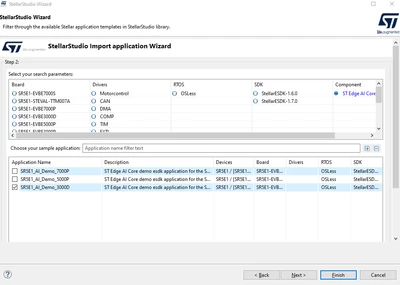
or use the application wizard to take a demo application :

ErwanYVIN_1-1720709680321.png

by double clicking on AI file , you can access to the AI Editor in StellarStudio Ecosystem                 

Best regards

                                      Erwan

1 reply

Erwan YVIN
Erwan YVINBest answer
ST Employee
July 11, 2024

Hello Laurent ,

You can find StellarStudioAI here :

https://www.st.com/en/development-tools/stellarstudioai.html

or use https://www.st.com/en/development-tools/stellarstudio.html 

and install the component AI by update site mecanisme

After you can create your AI Configuration by File ==> New

or use the application wizard to take a demo application :

ErwanYVIN_1-1720709680321.png

by double clicking on AI file , you can access to the AI Editor in StellarStudio Ecosystem                 

Best regards

                                      Erwan