nishil raj
Associate
February 28, 2017
Question

unable to flash the development SPC560B-Dis

  • February 28, 2017
  • 2 replies
  • 1463 views
Posted on February 28, 2017 at 11:42

Hi All,

Appreciate your time and help.

i am using the SPC560B-DIS development board with the spc5studio IDE.

all of a sudden when i tried to flash the development board i got an error in the log saying : Error, Core::PpcJtagTargIntf, Connection to target lost !

i suspected a loose cable to be the culprit but then the same cable works perfectly fine with the other EVM(evaluation board).

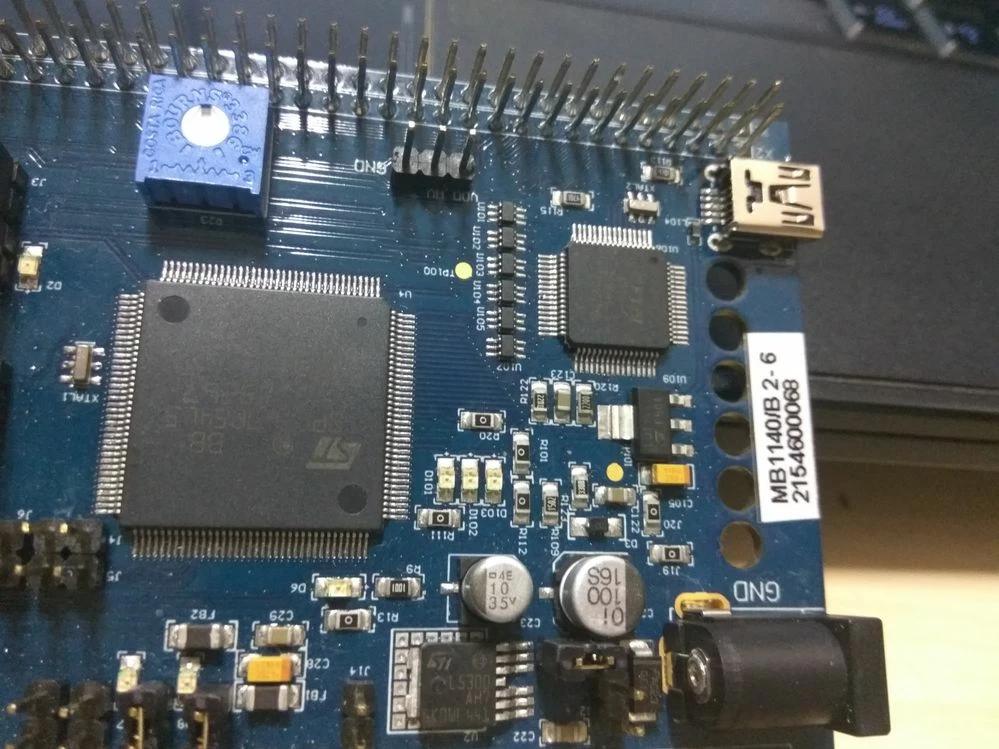
Then i also checked the mini usb power/debug female port connector on the board which is fine as well.(did not see any physical damage on it attached is the image below).

i have attached my boards log file from the UDE when i got the board connection lost error.

0690X00000603hMQAQ.jpg

#development-board #spc5-studio #spc560b-dis
    This topic has been closed for replies.

    2 replies

    Erwan YVIN
    ST Employee
    March 2, 2017
    Posted on March 02, 2017 at 10:10

    Hello Raj ,

    You have to install PLS FTDI drivers located in <PLS Folder Programs>/Drivers

    check your windows manager.

                         Best Regards

                                          Erwan

    nishil raj
    Associate
    March 2, 2017
    Posted on March 02, 2017 at 11:08

    Hi Erwan,

    First of all thank you for your reply on the quire,

    i have installed the required driver already, the board was working fine before and it stopped getting flashed recently on tuesday the 28th FEB.

    i have checked for the system setup using another SPC560B-dis development board, all is well i am able to dump and execute the code, it works all fine.

    so i would appreciate your help of guidance in hardware debugging procedures, if any can you please guide me to the documents, using the links.

    thanks for your valuable time sir.

    With Thanks & Regards,

    Nishil.

    Erwan YVIN
    ST Employee
    March 3, 2017
    Posted on March 03, 2017 at 12:13

    Hello Raj ,

    It seems to be a HW issue.

    Could you put additional powersupply (12V) + USB Cable on B-Discovery board ?

    have you played with censorship ?

             Best Regards

                                  Erwan

    Erwan YVIN
    ST Employee
    March 9, 2017
    Posted on March 09, 2017 at 09:30

    Hello Raj,

    The Jumper settings seem to be correct.

    Could you check the document B Discovery (cf Document) ?

    You can try :

    http://www.st.com/en/development-tools/spc5-udestk.html

    Best Regards

    Erwan

    ________________

    Attachments :

    DM00094991_B_DISCOVERY.pdf : https://st--c.eu10.content.force.com/sfc/dist/version/download/?oid=00Db0000000YtG6&ids=0680X000006HypO&d=%2Fa%2F0X0000000bCv%2FD.aOPCE5SRB6Gxbj6CeOn_pc8v8v.T_Z1OjGPSfypBI&asPdf=false