VLELE.1
Associate II
October 3, 2020
Solved

UNABLE to install PLS UDE

  • October 3, 2020
  • 6 replies
  • 3240 views

i AM TRYING TO INSTALL PLS UDE uising the recommended link: http://spc5.drive.cloudforge.com/projects/spc5tools/updates

but all i can see is the following message.

Forbidden

You don't have permission to access /projects/spc5tools/updates on this server.

SPE 5 ide version 6.0
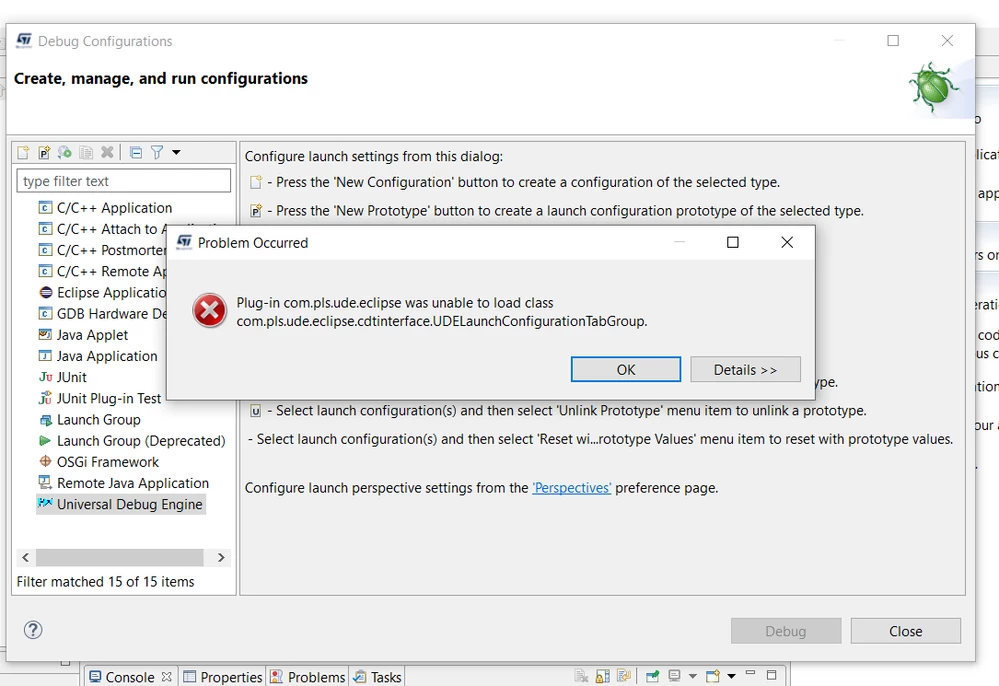
0693W000004Ia8cQAC.png

0693W000004Ia8hQAC.png

Similarly i am getting the above error.

Is some posts it was recommended to use UDE Visual Platform.

but i am unable to locate its directory.

Do we need to download UDE Visual Platform externally? is it a paid service?

    This topic has been closed for replies.
    Best answer by Erwan YVIN

    Hello ,

    Sorry i have missed the post ,

    the 2 issues are PLS issues :

    1) PLS UDE Plugin (32 bits) is not compliant anymore with SPC5Studio 6.0 (64 Bits)

    (Delivery planned by PLS for Q1 2021)

    You need to use PLS UDE External Tool directly.

    There are a lot of posts on this subject

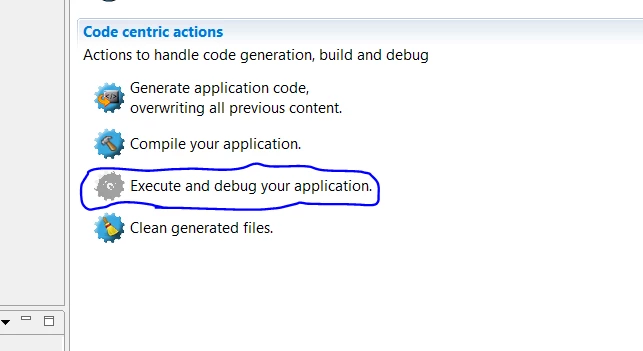
    2) the button is disable because the installation of PLS UDE Tool Setup is not correct on Windows 10, Windows 7

    (Default program for wsx file)

    you can use the tool externally ..

    I have submitted this ticket 3 years ago ... (link of the post) .. still no news...

    you can use this tool to correct the default association of wsx file. (workspace pls)

    https://community.st.com/s/global-search/PLS%20Default

    Please ask to PLS

    support@pls-mc.com

    Best regards

    Erwan

    6 replies

    VLELE.1
    VLELE.1Author
    Associate II
    October 3, 2020

    0693W000004Ia8cQAC.pngExecute and debug your application is not active0693W000004Ia8hQAC.png

    x7yu
    Associate
    October 3, 2020

    I am having same issues..

    1. It prompt me Either org.eclipse.equinox.p2.iu; com.pls.ude.udefeature.feature.group [5.0.3.201907101655,5.0.3.201907101655] cannot be installed in this environment because its filter is not applicable.
    2. Unable to load class bundle.activat....

    I also tried below method:

    1. Reinstall SPC5-Studio 6.0
    2. Download UDE 5 EVAL from https://www.pls-mc.com/service/downloads/download-spc5-udestk/
    3. Install UDE Starterkit 5.0, I can launch the application outside Eclipse.
    4. However when trying to integrate it with Eclipse - Using Eclipse Add Archive : .. pls/UDE Starterkit 5.0/UDEEclipse4Integration.zip!/ (I tried also 4.10 version, same problem)

     0693W000004IaHoQAK.png

    After bundle of software updates... Then it managed to install version 2.8 UDESTK...

    However, another error...

    0693W000004IaI8QAK.png

    VLELE.1
    VLELE.1Author
    Associate II
    October 4, 2020

    hi,

    @x7yu​ 

    I downloaded the UDE 5 EVAL from https://www.pls-mc.com/service/downloads/download-spc5-udestk/

    I am trying to flash a simple led blink firmware

    I tried to open debug.wsx

    0693W000004IaM5QAK.png

    0693W000004IaMFQA0.png

    I am using AEK-MCU-C1MLIT1 development board.

    Is there any setting we need to do in the SPC5 IDE

    x7yu
    Associate
    October 16, 2020

    @VLELE.1​ 

    When you loaded the debugging file, it will show below windows to link up, then click ok. you should have your debugger works.

    0693W000004JzWqQAK.pngActually I prefer to work on the debugger mode in SPC5 Studio, however I'm not managed to enable the button. If you success to do so?

    0693W000004JzXyQAK.png 

    Erwan YVIN
    Erwan YVINBest answer
    ST Employee
    October 16, 2020

    Hello ,

    Sorry i have missed the post ,

    the 2 issues are PLS issues :

    1) PLS UDE Plugin (32 bits) is not compliant anymore with SPC5Studio 6.0 (64 Bits)

    (Delivery planned by PLS for Q1 2021)

    You need to use PLS UDE External Tool directly.

    There are a lot of posts on this subject

    2) the button is disable because the installation of PLS UDE Tool Setup is not correct on Windows 10, Windows 7

    (Default program for wsx file)

    you can use the tool externally ..

    I have submitted this ticket 3 years ago ... (link of the post) .. still no news...

    you can use this tool to correct the default association of wsx file. (workspace pls)

    https://community.st.com/s/global-search/PLS%20Default

    Please ask to PLS

    support@pls-mc.com

    Best regards

    Erwan

    PRuiz.1
    Associate
    March 5, 2021

    Hello,

    I'm working with SPC5-UDESTK-EVAL USB/JTAG Adapter and I have the same problem with SPC5Studio debug. I tried install the SPC5Studio in Windows 7 (32 bits) but there isn't SPC5Studio 32 bits so What I can do?