
Associate
July 18, 2023
Question

stm32 vscode extension debug issue

  • July 18, 2023
  • 3 replies
  • 4648 views

I recently started working the STM32 project on VS Code.

I could apparently compile it with no problem.

However, I have a very hard time trying to make the debugging work. 

Error looks like this:stm32 vscode extension debugging error.PNG
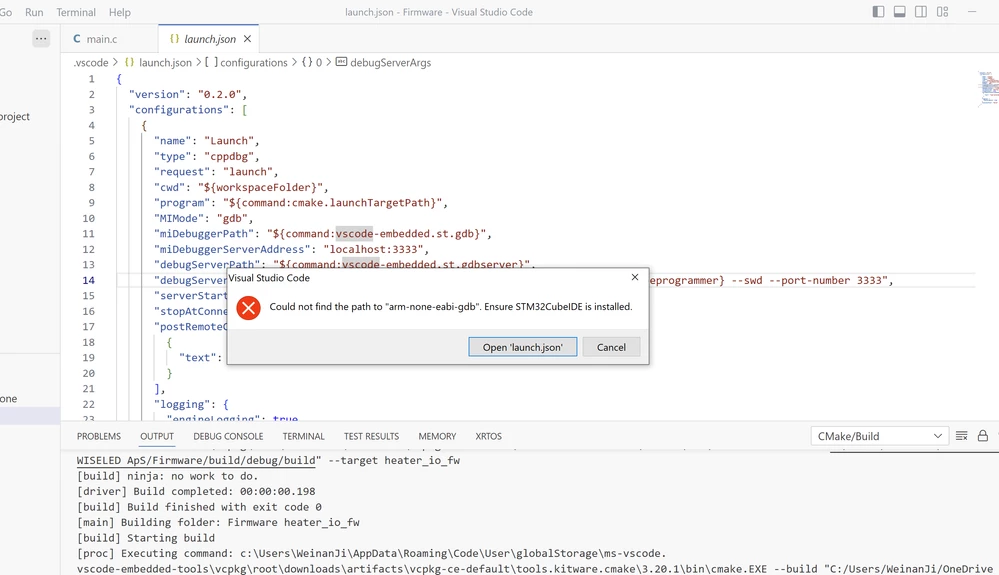
Normally there should be a place to configure the debug mode (JTAG/SWD), and the interface (STLINK, JLINK) etc. But I could not find any of them.
Anyone who could give me some tutorials about how to make the debugging to work, please? 
Thanks very much!

3 replies

Firmtronics
Visitor II
August 29, 2023

I had the same issue as you. For some reason none of the path environment variables for the STM32CubeCLT seem to resolve. Hence as workaround, I replaced these with absolute links and this enabled me to run and debug.

I am using a macOS but if you convert to the windows paths for the respective STM32CubeCLT files it should hopefully work for you.

This is what I changed:

1) "miDebuggerPath": "/opt/ST/STM32CubeCLT/GNU-tools-for-STM32/bin/arm-none-eabi-gdb",

2) "debugServerPath": "/opt/ST/STM32CubeCLT/STLink-gdb-server/bin/ST-LINK_gdbserver",

3) "debugServerArgs": "--stm32cubeprogrammer-path /opt/ST/STM32CubeCLT/STM32CubeProgrammer/bin/ --swd --port-number 3333",

4) "svdPath": "/opt/ST/STM32CubeCLT/STMicroelectronics_CMSIS_SVD/STM32F0x0.svd"

wejiAuthor
Associate
August 30, 2023

Hi,

For some reason, when I installed STM32CubeIDE, I could debug it. 

It seems like the debugger set paths are referenced to some internal path of CubeIDE. 

I thought I could avoid downloading and installing the IDE, but I was wrong. 

However, as long as I don't have to open it and use it, it is fine with me.

Thank you for sharing your solution though!


Firmtronics
Visitor II
May 16, 2024

Hi Weji,

Please watch my 2 tutorials (link below) which should hopefully help you out. They are targeted towards macOS but VS code debugger setup is very similar on windows:


VS Code STM32 macOS - CMake Project (STM32 VS Code Extension):

https://youtu.be/JogKig9NUiM


VS Code STM32 macOS - Makefile Project

https://youtu.be/sCDL6xibQK4


If you still having problems after watching then let me know and ill try to assist further,


Jesse

Nawres GHARBI
Technical Moderator
May 16, 2024

check that your CubeCLT path is correct in the settings

NawresGHARBI_0-1715874201985.png