
Adapt "How to build an AI app from scratch on STM32N6570-DK" to NUCLEO-N657X0-Q
I am trying to make a minimal working example of a neural network running on the NUCLEO-N657X0-Q. To achieve this I followed this guide for the STM32N6570-DK on my own NUCLEO-N657X0-Q board. (https://community.st.com/t5/stm32-mcus/how-to-build-an-ai-application-from-scratch-on-the-stm32n6570-dk/ta-p/825591#!/825591)
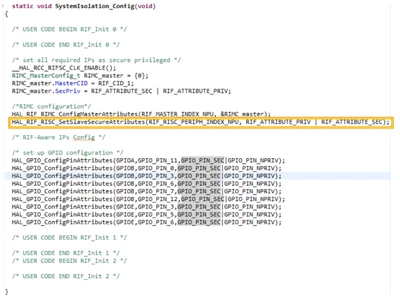
However, CubeMX did not initialize the required code lines noted in the guide under "Important note 2".
Guide's screenshot:
My screenshot:
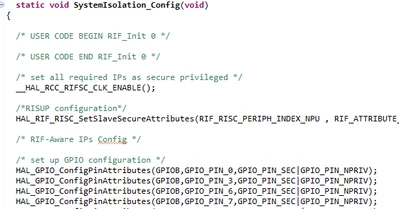
I did small address adaptions for the NUCLEO-N657X0-Q
- LEDs: PG0, PG8
- EXT_SMPS_MODE: PB12
I will attach the project below. Did I make a mistake or is CubeMX not able to configure the NUCLEO-N657X0-Q in the same way it supports the STM32N6570-DK yet? I also tried adding the lines from the screenshot of the guide myself, but it didn’t change the results and I assume there is more missing than is visible in the guide's screenshot. I also assume the missing RIF and RIMC code lines are the main reason why the application didn’t work.
I still wrote all necessary files to flash, but the result is that I don’t get any messages from the serial port. Only the FSBL LED turns on and off again. The LED toggled in the Appli remains turned off.
I appreciate any help on this issue.
Is there another minimal AI example out for the Nucleo board, not the Discovery Kit?
Used SW:
CubeIDE 1.19.0
CubeMX 6.15.0
CubeProgrammer 2.20.0
X-Cube-AI 10.2.0
STM32Cube MCU package N6: 1.2.0
Used HW:
NUCLEO-N657X0-Q
OTP124=0x00008000