
qqzlqqzlqqzl
Associate III
April 1, 2025
Solved

Critical Problems After NanoEdge Update to Version 5.0.0

  • April 1, 2025
  • 2 replies
  • 851 views

Hello ST team, I've encountered some serious issues after updating NanoEdge from version 4.6.0 to the latest 5.0.0 version.

  1. All my training results from version 4.6.0 have disappeared after updating to version 5.0.0. These old training results are important for my paper. How can I recover them? I only performed an update operation, why was all the data lost?
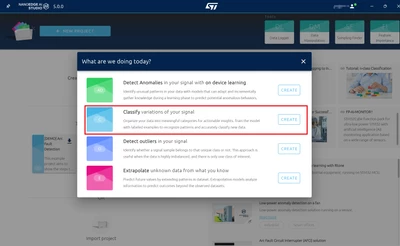
  2. When using NanoEdge version 5.0.0, clicking "create" on any training project doesn't produce any response or pop-up window. I've tried this on two different computers with the same issue. How can I solve this problem? I want to create a new project and start training.
  3. Is there a way to keep old versions of NanoEdge or get an upgrade notification? Yesterday during my group meeting presentation, NanoEdge suddenly prompted me to upgrade, and it would exit if I didn't upgrade. However, the upgrade process was extremely slow - I waited for tens of minutes when it should have only taken a few minutes with my internet speed.
qqzlqqzlqqzl_0-1743470340686.png


Best answer by Julian E.

Hello @qqzlqqzlqqzl ,


After investigation, there is a bug due a character that is not the same in UTF-8 and GBK (these are encodings).

We found a fix that should correct all your issues.


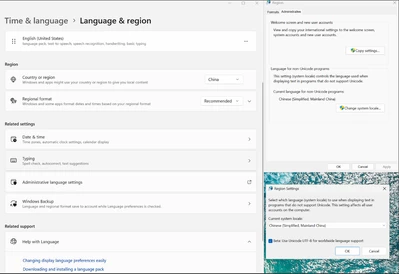
You can activate UTF-8 compatibility with the Chinese version of windows:

JulianE_0-1743520841905.png

Go to Time & Language -> Language & Region -> Administrative language settings -> Change system locale -> and check Beta: Use UTF-8.


You may have to restart your pc for it to be applied.


Let me know if it worked.

Julian

2 replies

Associate
April 1, 2025

I’m experiencing the same issue. On my PC with an AMD R9 9950X processor, the program gets stuck on the loading screen and never successfully launches.

https://community.st.com/t5/edge-ai/can-t-create-new-or-open-existing-projects-after-nanoedge-ai/td-p/788859

Julian E.
Technical Moderator
April 1, 2025

Hello @qqzlqqzlqqzl,


I am sorry to hear that.


1/ Concerning your project disappearing, I think the workspace space may have change. Go to settings and look at the path selected (first setting)

JulianE_0-1743492643978.png

On windows, it is supposed to be in C/users/YOURUSER/AppData/Roaming/workspaceNanoEdgeAI

On Linux: /local/home/user/.config/workspaceNanoEdgeAi


2/Can you try to create a project than send me the log. They should be in the workspace I write above.
The file I need is nanoedge.log


3/It is very strange that it took that long. I will see if there is a way to download the previous version. What I know for sure is that it will only be a temporary solution as the backend for compilation will not support the 4.6 for ever.


Have a good day,

Julian

​In order to give better visibility on the answered topics, please click on 'Accept as Solution' on the reply which solved your issue or answered your question.
qqzlqqzlqqzl
Associate III
April 1, 2025

The log has been sent to you via private message. Thank you for your reply and have a pleasant day.

Julian E.
Julian E.Best answer
Technical Moderator
April 1, 2025

Hello @qqzlqqzlqqzl ,


After investigation, there is a bug due a character that is not the same in UTF-8 and GBK (these are encodings).

We found a fix that should correct all your issues.


You can activate UTF-8 compatibility with the Chinese version of windows:

JulianE_0-1743520841905.png

Go to Time & Language -> Language & Region -> Administrative language settings -> Change system locale -> and check Beta: Use UTF-8.


You may have to restart your pc for it to be applied.


Let me know if it worked.

Julian

​In order to give better visibility on the answered topics, please click on 'Accept as Solution' on the reply which solved your issue or answered your question.