
deploy.py from Model Zoo Github does not recognize board nor STM32AI installation
I have been able to follow all instructions on the ModelZoo Github page (https://github.com/STMicroelectronics/stm32ai-modelzoo) to successfully download the repository and download all requirements. However, I am getting 2 different errors when I run deploy.py.
For context, I was attempting to follow this tutorial: https://github.com/STMicroelectronics/stm32ai-modelzoo/blob/main/object_detection/scripts/deployment/README.md
When I set footprints_on_target to false on the user_config.yaml file in order to benchmark my model using the local download of STM32CubeAI, I get the following error:
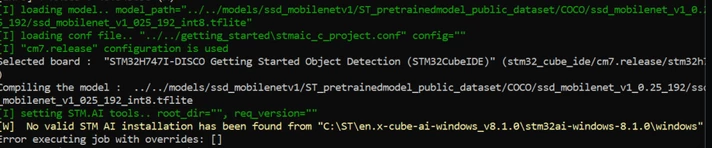
I have followed every other instruction in the tutorial above, making sure that the paths to the model, cube IDE, and STM32CubeAI are correct. However, deploy.py is unable to recognize the STM32CubeAI despite being given the correct path to the executable. I followed the instructions in the tutorial to unzip both the .zip and .pack files that came with the STM32Cube.AI download. I then used STM32CubeMX to install STM32CubeAI onto my machine, alongside the OS-dependent part of STM32CubeAI. This however did not resolve the error.
Benchmarking and validating my model through Developer Cloud Services (by setting footprints_on_target to STM32H747I-DISCO) works, but when the script then attempts to flash the generated C code onto my board (connected via micro-USB from the ST-Link port), it produces the following error:
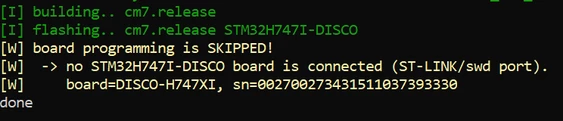
I was wondering how I could resolve both of these issues in the deploy.py script.