LMart.12
Associate
June 28, 2022
Question

Error 200 and error 801 Validate on target on STM32F4291-DISCO

  • June 28, 2022
  • 7 replies
  • 4256 views

Hello,

I'm a newcomer in the STM32 machine learning world and I tried to make a AI model work on my STM32F429I-DISCO. Unfortunately the "Validate on target" option does not work... Errors are E200 and E801. Here is my thought process :

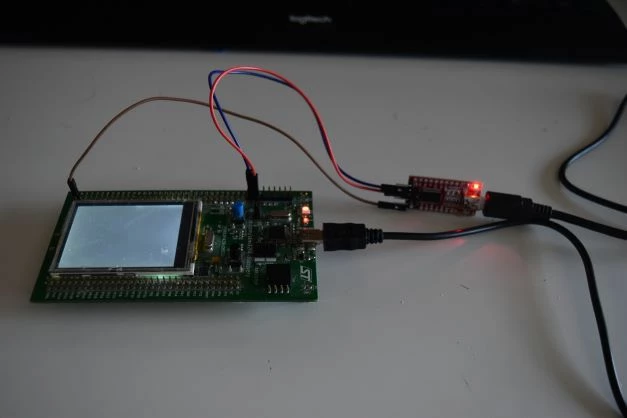
Iinstall a ftdi to my board to send data trough serial port : 0693W00000NstnmQAB.jpgThen I launch stm32cube mx, select the board STM32F429I-DISC1 and start project without initialize all peripheral with their default mode. Then :
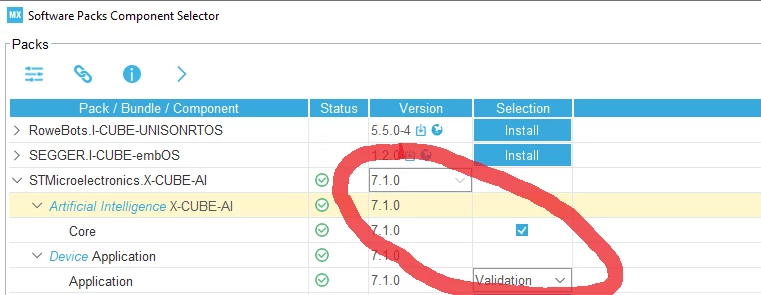
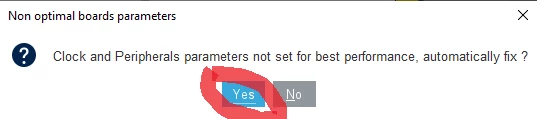
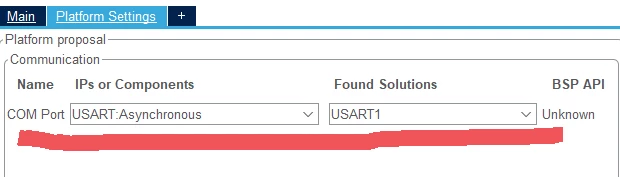
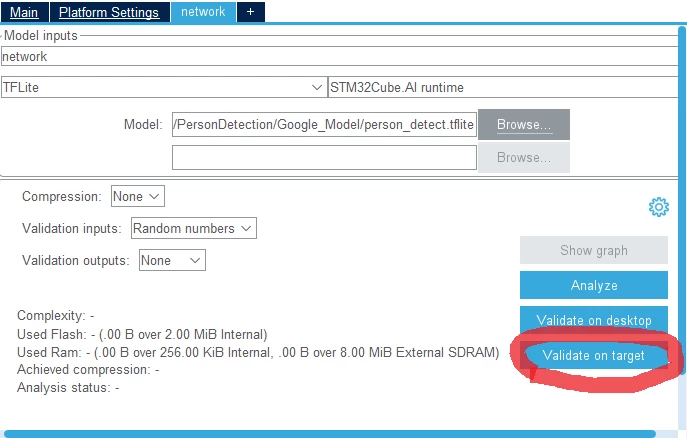
0693W00000NsttGQAR.png0693W00000NsttWQAR.png0693W00000NstXlQAJ.png0693W00000NstxmQAB.pngAnd finally :

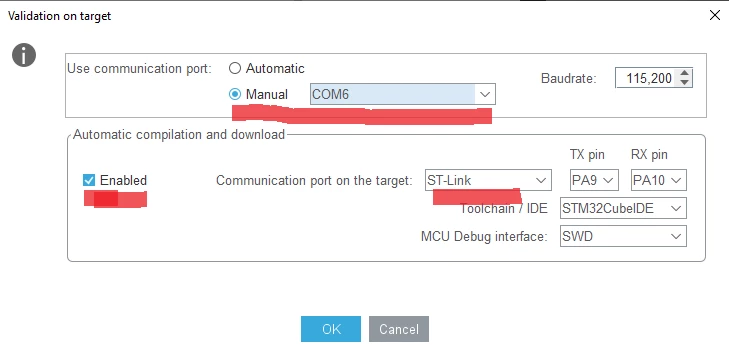
0693W00000NstzxQAB.pngI also tried validate on target on my other COM (COM4) and with communication port on the target : USART 1.

Each time I get the same result :
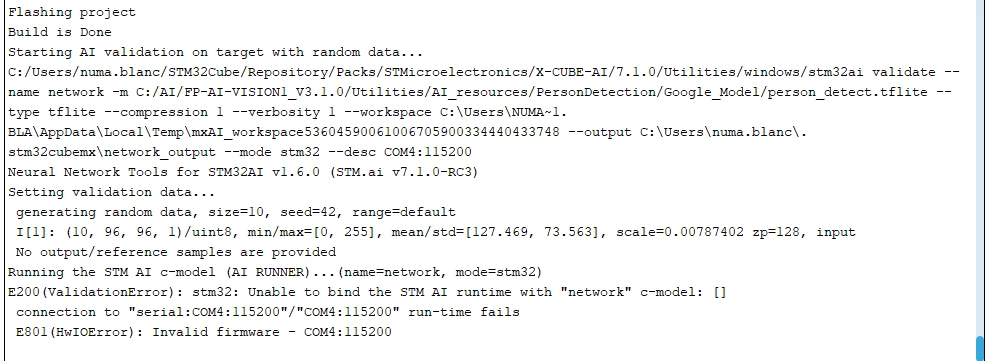
0693W00000Nsu2NQAR.pngI don't know what to do, can someone know the solution of my problem ?

Thank in advance !

Best regards,

Martin

    This topic has been closed for replies.

    7 replies

    fauvarque.daniel
    ST Employee
    June 28, 2022

    Did you try in automatic mode for the choice of the COM port ?

    Regards

    Daniel

    LMart.12
    LMart.12Author
    Associate
    June 28, 2022

    Yes I did, with the same result.

    Regards,

    Martin

    fauvarque.daniel
    ST Employee
    June 28, 2022

    By default on this board the STLink VCP is connected to USART1 and the bridges SB11, 15 (RX,TX) are ON.

    You may want to disconnect the other board connected to discovery and verify the SB11 and 15 bridges.

    One way to verify that at least the communication is ok is to use a terminal emulator like Putty on the COM port, hit the reset button on the board. You should have a message on the COM port

    Regards

    Daniel

    LMart.12
    LMart.12Author
    Associate
    June 28, 2022

    Hello,

    Thank you for your answer, I use MobaXterm as terminal emulator and nothing happen when :

    1)I plug the discovery board on the USB (no new Port COM)

    2)I choose port COM 4 (the default one) and reset the board

    Does that mean that the communication is not ok ? If so what do you think is the problem ? Just as a reminder I'm using a f429I-DISCO not a DISC1

    Regards,

    Martin

    fauvarque.daniel
    ST Employee
    June 28, 2022

    I think you nailed it, the STM32F429I-DISCO doesn't have STLink VCP as far as I remember (the DISC1 board has been created for that)

    .

    If you have this board, you need to connect an external USART / USB dongle to one of the USART TC/RX external pins.

    Then you need to modify the configuration in STM32CubeMX to use the correct USART in asynchronous mode (i.e. configure by hand the USART and set the correct platform settings in X-Cube-AI to point to the correct USART)

    Regards

    Daniel

    LMart.12
    LMart.12Author
    Associate
    June 28, 2022

    Hello,

    Tank you for your quick answer.

    I have already installed a ftdi (red board on the photo) and connect it as such on my board :0693W00000NswmmQAB.jpgAnd I was already setting my USART1 on PA9 and PA10 :0693W00000NswjKQAR.png0693W00000NswuWQAR.pngBut still, same errors as before, I will downgrade to a more ancient version, maybe that's what causing a problem.

    Best regards,

    Martin

    fauvarque.daniel
    ST Employee
    June 28, 2022

    If your ftdi is correctly connected you should have at least a message on the pseudo terminal

    I must look at the wrong user manual but for me PA9 and PA10 pins on the boards are more close to the LCD

    0693W00000NsxEbQAJ.png 

    Maybe you could also try to swap the rx/tx pins on your ftdi

    Regards

    Daniel

    fauvarque.daniel
    ST Employee
    June 28, 2022

    If you are using USART1, I would connect the ftdi to for example PA9/PA10.

    fauvarque.daniel
    ST Employee
    June 29, 2022

    To detect a hard fault you need to flash and debug the validation application using your favorite IDE (for example STM32CubeIDE). The hard fault handler is located in stm32f4xx_it.c file (void HardFault_Handler(void)), just put a breakpoint in this function.

    You may also want to verify that the CRC IP is enabled. Normally it is done automatically by X-Cube-AI.

    Regards

    Daniel

    LMart.12
    LMart.12Author
    Associate
    June 29, 2022

    Hello,

    I add breakpoint and nothing happen, I assume this is because there is no hard fault. ANd the CRP is enabled in main.c, I don't see any issues here (Even so I may be wrong).

    Regards,

    Martin

    fauvarque.daniel
    ST Employee
    June 29, 2022

    I'm running out of ideas :) but still 2 more, maybe linked to your ftdi

    • can you put a breakpoint in aiPbMgr,c function aiPbMgrWaitAndProcess the line after if (pb_decode_delimited... or after the pb_io_flush_istream

    this is to make sure you are receiving the commands from the PC

    • If you receive something from the PC you may want to lower the baud rate of the USART because maybe you are losing packets as there is no flow control

    Regards

    Daniel

    fauvarque.daniel
    ST Employee
    June 29, 2022

    If you can, it will be helpful to write a simple echo program that will loop receiving on the USART from the host and sending it back to the host.

    At least we'll know that the communication is working both ways

    LMart.12
    LMart.12Author
    Associate
    June 29, 2022

    I write a quick program and visibly the communication is working both ways :

    0693W00000Nt2fmQAB.pngSo the problem must be from X-Cube-AI or STM32CubeMX.

    Regards,

    Martin