Associate II
May 15, 2025
Solved

Error executing python stm32ai_main.py

  • May 15, 2025
  • 7 replies
  • 1511 views


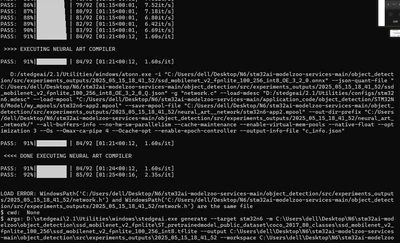
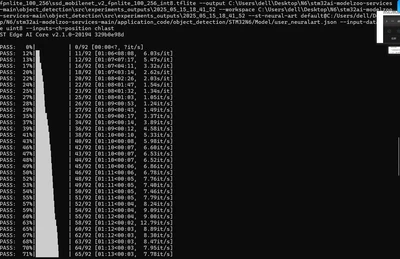
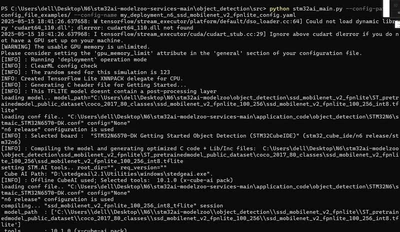
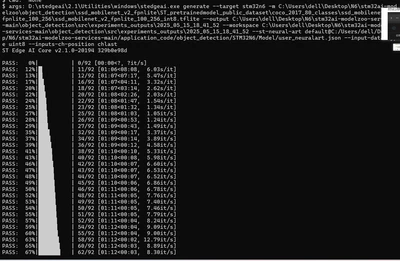
I'm currently deploying the object detection of stm32modelzoo. After entering the command "python stm32ai_main.py --config-path ./config_file_examples/ --config-name deployment_n6_ssd_mobilenet_v2_fpnlite_config.yaml", an error occurred. Could someone please help me solve it?


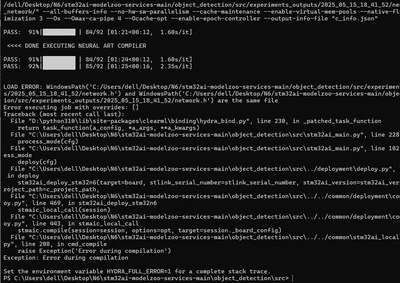
imization 3 --Os --Omax-ca-pipe 4 --Ocache-opt --enable-epoch-controller --output-info-file "c_info.json"

PASS: 91%|█████████▏| 84/92 [01:21<00:12, 1.60s/it]

<<<< DONE EXECUTING NEURAL ART COMPILER

PASS: 91%|█████████▏| 84/92 [01:24<00:12, 1.60s/it]
PASS: 92%|█████████▏| 85/92 [01:25<00:16, 2.35s/it]


LOAD ERROR: WindowsPath('C:/Users/dell/Desktop/N6/stm32ai-modelzoo-services-main/object_detection/src/experiments_outputs/2025_05_15_18_41_52/network.h') and WindowsPath('C:/Users/dell/Desktop/N6/stm32ai-modelzoo-services-main/object_detection/src/experiments_outputs/2025_05_15_18_41_52/network.h') are the same file
Error executing job with overrides: []
Traceback (most recent call last):
File "D:\python310\lib\site-packages\clearml\binding\hydra_bind.py", line 230, in _patched_task_function
return task_function(a_config, *a_args, **a_kwargs)
File "C:\Users\dell\Desktop\N6\stm32ai-modelzoo-services-main\object_detection\src\stm32ai_main.py", line 228, in main
process_mode(cfg)
File "C:\Users\dell\Desktop\N6\stm32ai-modelzoo-services-main\object_detection\src\stm32ai_main.py", line 102, in process_mode
deploy(cfg)
File "C:\Users\dell\Desktop\N6\stm32ai-modelzoo-services-main\object_detection\src\../deployment\deploy.py", line 111, in deploy
stm32ai_deploy_stm32n6(target=board, stlink_serial_number=stlink_serial_number, stm32ai_version=stm32ai_version, c_project_path=c_project_path,
File "C:\Users\dell\Desktop\N6\stm32ai-modelzoo-services-main\object_detection\src\../../common/deployment\common_deploy.py", line 469, in stm32ai_deploy_stm32n6
stmaic_local_call(session)
File "C:\Users\dell\Desktop\N6\stm32ai-modelzoo-services-main\object_detection\src\../../common/deployment\common_deploy.py", line 443, in stmaic_local_call
stmaic.compile(session=session, options=opt, target=session._board_config)
File "C:\Users\dell\Desktop\N6\stm32ai-modelzoo-services-main\object_detection\src\../../common\stm32ai_local\compile.py", line 208, in cmd_compile
raise Exception('Error during compilation')
Exception: Error during compilation

Set the environment variable HYDRA_FULL_ERROR=1 for a complete stack trace.
PS C:\Users\dell\Desktop\N6\stm32ai-modelzoo-services-main\object_detection\src>
 

dianzijun_0-1747316784060.png

dianzijun_1-1747316792898.png

dianzijun_2-1747316808890.png

dianzijun_3-1747316817571.png

dianzijun_4-1747316825705.png


Best answer by GHORT.1

The new version of the model zoo is available:

STMicroelectronics/stm32ai-modelzoo-services at v3.1.0

We released the STM32N6 code in it. You don't have to retrieve the source code in ST.com anymore.
It is compatible with STEdgeAI 2.1 for the deployment.

7 replies

Senior
May 16, 2025

Hello, I'm facing the same issue. Did you manage to resolve it?Thanks!

dianzijunAuthor
Associate II
May 16, 2025

I haven't solved it yet

Senior
May 16, 2025

OK. If you've solved this issue, could you please share the solution with me? Thanks.

Associate III
May 16, 2025

Have you solved it? I also encountered this problem today. How did you solve it? Looking forward to your reply.

GRATT.2
ST Employee
May 16, 2025

Hello, 

A new release is on its way and will be published next week. Thus, we won't address these bugs. 

Guillaume

Associate III
May 17, 2025

Hello,
So is there any other solution for now? Can I use another version of stedgeai? For example, 10.0.0,
I can't download ST EdgeAI Core 2.0.0. I need to provide STEdgeAI-NPU component, but I can't find where to download the component? Do you have a solution?

LQC__0-1747451420807.png


Senior
May 17, 2025

I'm also experiencing this issue.

GHORT.1
ST Employee
May 19, 2025

A new release will be pushed this week. It will fix this issue. You are using stedgeai 2.1 which is not compatible with the current version of the model zoo.

I'll update the post when it's pushed in github.

Associate III
May 20, 2025

Hello,
Where will you update it? Can you give me an address and I will keep an eye on it. Thank you.

Associate
May 20, 2025

THANK you very much @GHORT.1 I am looking forward to that push thank you!

Visitor II
May 20, 2025

@GHORT.1  Is there a Discord or Reddit community to discuss N6? I believe just a handful of developers are currently working on it, and having a close-to-real-time conversation would allow all of us to move quickly. I was banging my head on this issue for the past 8 hours till I found this thread. Just now I noticed the new version is released on GitHub, trying my hand!
https://github.com/STMicroelectronics/stm32ai-modelzoo-services/releases/tag/v3.1.0

Associate
May 20, 2025

I made a discord server now! Send it to as many people as you would like :)

https://discord.gg/dcUzJGKA

GHORT.1
GHORT.1Best answer
ST Employee
May 20, 2025

The new version of the model zoo is available:

STMicroelectronics/stm32ai-modelzoo-services at v3.1.0

We released the STM32N6 code in it. You don't have to retrieve the source code in ST.com anymore.
It is compatible with STEdgeAI 2.1 for the deployment.

Visitor II
May 21, 2025

@LQC_ You should be able to run following the instructions here: https://github.com/STMicroelectronics/stm32ai-modelzoo-services/blob/main/image_classification/deployment/README_STM32N6.md

TLDR; you need to put both the boot switches to the right and reconnect the power cable before you run the command

python stm32ai_main.py --config-path ./src/config_file_examples/ --config-name deployment_n6_config.yaml

Once done, as seen in your screenshot; put both the switches back to the left and reconnect the power cable.

Associate III
May 21, 2025

I tried turning both switches to the right and executing


python stm32ai_main.py --config-path ./src/config_file_examples/ --config-name deployment_n6_config.yaml


but it still didn't work. Do I have to use a USB-C to USB-C cable? I use a 5V-USB-SNK power supply and an STLink USB to USB-C.

LQC__0-1747827983484.png


LQC__1-1747828014645.png

LQC__2-1747828037327.png