

Jf.1
Associate II
June 9, 2021
Solved

Hi, I am using a STM32L496RE MCU and I am confused as to how the in_data should be formatted in the app_x_cube-ai.c file.

  • June 9, 2021
  • 4 replies
  • 3642 views

I have a model with 14 float inputs in a single array and 3 array output each with a size of 4 float numbers.

However the AI_input_size is ((1*1*14)*4) when I need it to be ((1*1*14)*1) and the AI_output_size is ((1*1*3)*4)

#define AI_NN1_IN_NUM (1)
#define AI_NN1_IN { \
 AI_BUFFER_OBJ_INIT(AI_BUFFER_FORMAT_FLOAT, 1, 1, 14, 1, NULL), \
}
#define AI_NN1_IN_SIZE { \
 (1 * 1 * 14), \
}
#define AI_NN1_IN_1_SIZE (1 * 1 * 14)
#define AI_NN1_IN_1_SIZE_BYTES ((1 * 1 * 14) * 4)


#define AI_NN1_OUT_NUM (3)
#define AI_NN1_OUT { \
 AI_BUFFER_OBJ_INIT(AI_BUFFER_FORMAT_FLOAT, 1, 1, 3, 1, NULL), \
 AI_BUFFER_OBJ_INIT(AI_BUFFER_FORMAT_FLOAT, 1, 1, 3, 1, NULL), \
 AI_BUFFER_OBJ_INIT(AI_BUFFER_FORMAT_FLOAT, 1, 1, 3, 1, NULL), \
}
#define AI_NN1_OUT_SIZE { \
 (1 * 1 * 3), \
 (1 * 1 * 3), \
 (1 * 1 * 3), \
}
#define AI_NN1_OUT_1_SIZE (1 * 1 * 3)
#define AI_NN1_OUT_2_SIZE (1 * 1 * 3)
#define AI_NN1_OUT_3_SIZE (1 * 1 * 3)
#define AI_NN1_OUT_1_SIZE_BYTES ((1 * 1 * 3) * 4)
#define AI_NN1_OUT_2_SIZE_BYTES ((1 * 1 * 3) * 4)
#define AI_NN1_OUT_3_SIZE_BYTES ((1 * 1 * 3) * 4)

I'm not sure how to insert the correct values as well as output and process them. The code above is the declarations of the model's outputs & inputs. How can I change or use them to produce my desired array sizes mentioned above.

The model inserted is a keras model with 1 input (array of 14 float values) and 3 outputs (each with an array of 3 values).

Thanks in advance
This topic has been closed for replies.
Best answer by Romain LE DONGE

Hi,

Sorry if I wasn't precise enough,

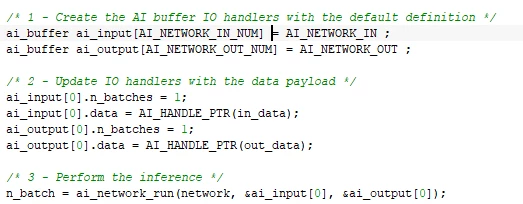
In the code above, in_data is the buffer I used to perform the network inference, I am just assigning values to the in_data buffer like a normal C array (using indices). Let's dig a little bit deeper into the process : 0693W00000BadOXQAZ.pngIn this code sample, you can see how to inject your data into the network and use the inference function "ai_network_run(...)".

  • First I am declaring ai_buffer array to store input and output data. Those buffers are initialized using AI_NETWORK_IN and AI_NETWORK_OUT C Macros (generated in yournetwork.h file). I am also using the AI_NETWORK_IN/OUT_NUM here to create as many elements as there is of inputs/outputs.
  • Then you need to fill some fields of the ai_buffer array. In the example I am setting a number of batch of 1, and I am specifying also the in_data buffer (the data you want to use) as you can see using the C Macro AI_HANDLE_PTR(...). In this example I have only one input and one output so I only configured ai_input[0] and ai_output[0], but in your usecase you would have to fill the 3 outputs you have: ai_output[0], ai_output[1], ai_output[2]. You can configure each output with AI_HANDLE_PTR using 3 different buffers or you can use a single one using C addresses to separates each outputs
  • Finally once all your input and output buffers a configured correctly you can call "ai_network_run(...)" to perform the inference.

Hope it's clearer ! :)

Romain

4 replies

Romain LE DONGE
Associate
June 9, 2021

.

Romain LE DONGE
Associate
June 9, 2021

Hi,

You can use the size provided in this file this way:

0693W00000BaXTHQA3.pngIn this example I was feeding accelerometer inputs to the network like that:

0693W00000BaXTRQA3.pngAnd using outputs this way: 

0693W00000BaXTlQAN.png 

Best regards,

Romain

Jf.1
Jf.1Author
Associate II
June 9, 2021

Hi,

Thank you for your reply, but can you explain further what is buffer length and why they need to be incremented when declaring the values for the in_data?

And for multiple outputs, do you have any suggestions as to how the values could be accessed? I am quite new to STM32 so I'm not familiar with how to implement this.

Many thanks

Romain LE DONGE
Romain LE DONGEBest answer
Associate
June 10, 2021

Hi,

Sorry if I wasn't precise enough,

In the code above, in_data is the buffer I used to perform the network inference, I am just assigning values to the in_data buffer like a normal C array (using indices). Let's dig a little bit deeper into the process : 0693W00000BadOXQAZ.pngIn this code sample, you can see how to inject your data into the network and use the inference function "ai_network_run(...)".

  • First I am declaring ai_buffer array to store input and output data. Those buffers are initialized using AI_NETWORK_IN and AI_NETWORK_OUT C Macros (generated in yournetwork.h file). I am also using the AI_NETWORK_IN/OUT_NUM here to create as many elements as there is of inputs/outputs.
  • Then you need to fill some fields of the ai_buffer array. In the example I am setting a number of batch of 1, and I am specifying also the in_data buffer (the data you want to use) as you can see using the C Macro AI_HANDLE_PTR(...). In this example I have only one input and one output so I only configured ai_input[0] and ai_output[0], but in your usecase you would have to fill the 3 outputs you have: ai_output[0], ai_output[1], ai_output[2]. You can configure each output with AI_HANDLE_PTR using 3 different buffers or you can use a single one using C addresses to separates each outputs
  • Finally once all your input and output buffers a configured correctly you can call "ai_network_run(...)" to perform the inference.

Hope it's clearer ! :)

Romain

Khoo.B
Associate III
August 11, 2021

Hi,

I have the same question also. My input size as below:-

#define AI_NETWORK_AUDIO_AI_IN_1_HEIGHT   (32)

#define AI_NETWORK_AUDIO_AI_IN_1_WIDTH    (32)

#define AI_NETWORK_AUDIO_AI_IN_1_CHANNEL   (1)

#define AI_NETWORK_AUDIO_AI_IN_1_SIZE    (32 * 32 * 1)

#define AI_NETWORK_AUDIO_AI_IN_1_SIZE_BYTES (AI_NETWORK_AUDIO_AI_IN_1_SIZE * 4)

The size should be 32*32*1. But looking at the application template, it seems like I will need to use (32*32*1)*4. Why do we need multiplication of 4?

ST Employee
August 11, 2021

Hi,

AI_NETWORK_AUDIO_AI_IN_1_SIZE  indicates the total size of the input buffer in term of number of items/elements. AI_NETWORK_AUDIO_AI_IN_1_SIZE_BYTES  indicates the associated size in bytes. I suppose in your case that the type of data for the input is float, this explains the 4 ( = sizeof(float)).

AI_NETWORK_AUDIO_AI_IN_1_SIZE_BYTES  can be used to allocate or to define the input data buffer to store the input data.

If the buffer is allocated statically, you have two possibilities:

ai_float in_data[AI_NETWORK_AUDIO_AI_IN_1_SIZE]
// or
AI_ALIGNED(4) // to align the buffer on 4-byte boundary 
ai_unit8 in_data[AI_NETWORK_AUDIO_AI_IN_1_SIZE_BYTES];

Arrangement/layout of the data/items inside the buffer is dependent of the shape but it follows the standard C-definition for the arrays. See "C-memory layouts" section in the embedded documentation ("Embedded Inference Client API" article.

(typical location of the doc in the X-CUBE-AI pack: C:\Users\<user_name>\STM32Cube\Repository\Packs\STMicroelectronics\X-CUBE-AI\7.0.0\Documentation\index.html).

br,

Jean-Michel

Khoo.B
Associate III
August 12, 2021

Thank you very much!