
Associate II
July 23, 2024
Solved

How to manually flash the chip after Model zoo has generated the C-code

  • July 23, 2024
  • 1 reply
  • 1071 views

Hello! I recently used stm model zoo and deployed an image classification model on a chip. The flashing part is made automatically if the chip is connected, but I was wondering how to do it manually (using another software)?

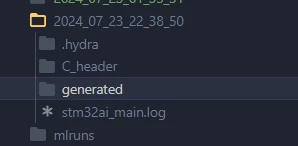
I get these folders after processing the deployment code but I do not really understand which files to use. 
TECO_0-1721743925812.png

If someone familiar with Model zoo can help me figure this out!

Thanks in advance!

Best answer by fauvarque.daniel

You want to look at .elf or .bin files and flash those files using STM32CubeProgrammer.

The other option is to open the project in your favorite IDE that supports this STM32 and flash/start the program using the IDE (STM32CubeIDE for example)

1 reply

fauvarque.daniel
fauvarque.danielBest answer
ST Employee
July 26, 2024

You want to look at .elf or .bin files and flash those files using STM32CubeProgrammer.

The other option is to open the project in your favorite IDE that supports this STM32 and flash/start the program using the IDE (STM32CubeIDE for example)

TECOAuthor
Associate II
August 2, 2024

Thank you for your answer Daniel!