Hello @IsmailYangui,
Thank you for reaching out!
Create a STM32CubeIDE Project:
First, you need basic knowledge about STM32 embedded development to create a STM32CubeIDE project for your hardware. If you have never done that you can start here:
Getting started with STM32: STM32 step-by-step - stm32mcu
I can also suggest looking at the available data logger and the sensors in NanoEdge AI Studio, find something that suits you need, get the corresponding board and use the data logger code to create a project.
In the linked github, you will find the source code to read data of the selected sensor and send the data via serial: https://github.com/stm32-hotspot/stm32ai-nanoedge-datalogger/
Example:
STEVAL-STWINKT1B with ISM330DHCX accelerometer (source code on the github)
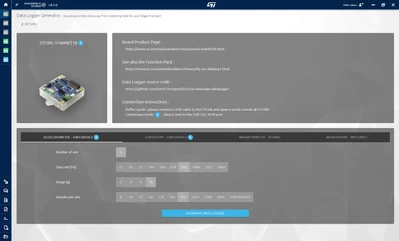
Once you have a CubeIDE project and you are able to send data coming from your sensor via serial, using a NanoEdge AI Library is pretty easy. The process is very similar for the 4 kinds of project in NanoEdge. Here I will explain the N class classification as it is your question:
NanoEdge AI Library Integration:
In the last step of NanoEdge, you will compile your library and get a .zip file that contains:
- (Arduino file if compiling for an Arduino target)
- A Docs folder with link to the documentation
- A Emulator folder to run the model on your pc with command lines
- knowledge.h: the weight of the model
- libneai.a: the compiled library
- metadata.json
- NanoEdgeAI.h: the function header and variable to use in your main.c
The files that you need are in bold.
Open your STM32CubeIDE project and import knowledge.h, libneai.a and NanoEdgeAI.h. Generally, you want to had knowledge.h and NanoEdge.h in the Inc folder and the libneai.a in the src folder. Like this:
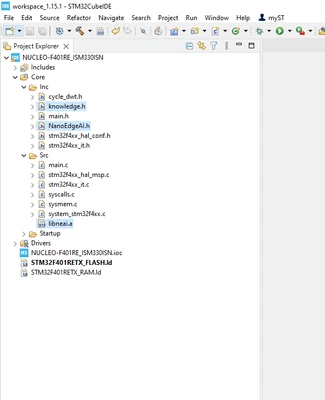
Make sure that the path to the libneai is set:
- right click on your project > properties > Settings > MCU GCC Linker and add the path if not set
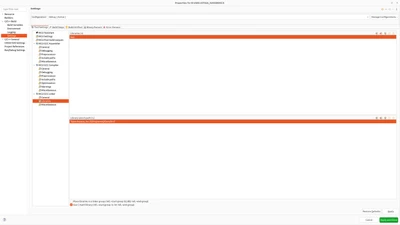
Once you have that, you can add the code in your main.c to use the NanoEdge Library:
Add the includes:
#include "NanoEdgeAI.h"
#include <knowledge.h>
Add the variable in comments at the end of the NanoEdgeAI.h file:
uint16_t id_class = 0; // Point to id class (see argument of neai_classification fct)
float input_user_buffer[DATA_INPUT_USER * AXIS_NUMBER]; // Buffer of input values
float output_class_buffer[CLASS_NUMBER]; // Buffer of class probabilities
const char *id2class[CLASS_NUMBER + 1] = { // Buffer for mapping class id to class name
	"unknown",
 "class1",
 "class2",
 ....
};
Initialize the model:
neai_state = neai_classification_init(knowledge);
printf("Initialize NEAI library. NEAI init return: %d.\n", neai_state);();
NEAI_OK: the library is working as expectedNEAI_INIT_FCT_NOT_CALLED: the learn or detect function has been called without running the init function before. Initialize your library.NEAI_BOARD_ERROR: the board detected is not authorized. For instance, it may happen if you are trying to use a library (for instance obtained from the free version of NanoEdge AI Studio) with a non-supported board.NEAI_KNOWLEDGE_BUFFER_ERROR: the knowledge loaded is not compatible with this library. Make sure that the knowledge being used is the one obtained with this exact library.NEAI_NOT_ENOUGH_CALL_TO_LEARNING: this is a fail-safe to prevent users from running an insufficient (only one or a few) number of iterations of the learning function. Run more learning iterations.NEAI_UNKNOWN_ERROR: there is an unknown error with the library.
It should return NEAI_OK.
Then to use the model and do the classification and print the detected class, here is what you need to do:
neai_state = neai_classification(input_user_buffer, output_class_buffer, &id_class);
// you can print id2class[id_class] to get the predicted class
// you can also look at the output_class_buffer to get the probability of your signal to be of each class
You can find the AI Libraries documentation here:
I hope it is clear, do not hesitate to ask any other question you may have!
Have a good day,
Julian
